

CarCast: Cast M3U TV Player
Aman Singhal Utilities iPhoneiPadiPod touch
CarCast: Cast M3U TV Player is a free Utilities app for iPhone and iPad by Aman Singhal. Rated 4.3/5 from 17 ratings. Requires iOS 18.0.
- Rating
- 4.3
- 17 ratings
- Price
- Free
- on the App Store
- Size
- 138 MB
- Age 4+
- Updated
- Oct 19
- 2026 · v1.1
Screenshots

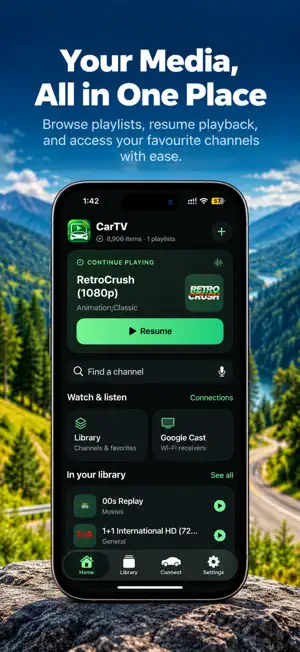

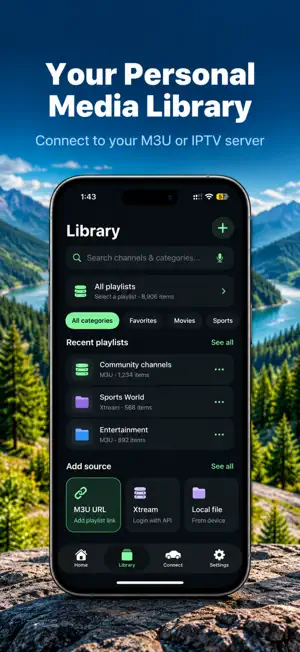
About CarCast: Cast M3U TV Player
**CarCast – M3U & M3U8 Player for CarCast** Turn your iPhone and CarCast display into a convenient media player for your own playlists and media servers. CarCast supports M3U and M3U8 playlists, HLS streams, local video files, and popular personal media servers. **CARCAST & SCREEN MIRRORING** Use your Car display to access supported CarCast features from your iPhone & Car. • View your playlists and media on the car display • Switch between channels and entries with large, easy-to-use controls • Designed for landscape viewing and dashboard use • Simple controls made for use when the vehicle is parked • Screen mirroring lets you display your iPhone screen on the car display where supported **M3U & M3U8 PLAYLIST PLAYER** Add your own M3U or M3U8 playlist URL and CarCast handles the rest. • M3U and M3U8 playlist support • HLS and standard HTTP streams • Automatically organizes entries using playlist groups • Reads group-title and tvg-logo information • Mark channels and videos as favourites • Continue playback from where you stopped No account or sign-in is required. **YOUR OWN MEDIA SERVER** Connect CarCast to your personal Jellyfin or Emby server and access your own media library. • Browse libraries, seasons, and episodes • Automatically organize episodes • Resume playback from where you stopped • Access your personal collection from your iPhone • Server addresses and credentials stay on your device **VIDEO PLAYBACK** CarCast supports a range of video formats and playback options. • Hardware-accelerated video decoding • Software decoding fallback • MKV and HEVC support • DTS audio support • Embedded and external subtitles • Subtitle tracks extracted from supported MKV files **CAR MODE** CarCast includes a landscape interface designed for use with a phone mounted in your dashboard. Large text, oversized controls, and simple navigation make it easier to browse your media and switch between entries. CarCast is intended for **passengers and use while the vehicle is parked. Never watch videos or interact with the app while driving.** **USE YOUR OWN MEDIA** CarCast does not provide or host media. Add your own playlists, connect your own media server, or import your own video files. Perfect for a parked break, charging stop, campsite, road trip rest stop, or simply relaxing in your car. **MANAGE YOUR PLAYLISTS** Keep all your playlists in one place. • Add multiple playlist URLs • Add playlists by scanning a QR code • Refresh playlists whenever you want • Rename or remove playlists • Filter content by playlist groups • Save favourites for quick access • Import video files from your iPhone • Play imported videos offline **MINI PLAYER** Keep your current video playing while browsing your playlist. Open other entries without leaving playback and easily return to what you were watching. **PRIVACY FIRST** Your playlists, server information, and imported media stay on your iPhone. No account or sign-in is required. **IMPORTANT** CarCast is a media player only. It does not provide, host, distribute, bundle, or recommend any movies, TV shows, channels, or other content. You are responsible for supplying your own playlists and media servers and for ensuring that you have the necessary rights to access and play the content. Terms of Use: https://apptivityglobal.com/terms-of-conditions/ Privacy Policy: https://apptivityglobal.com/privacy-policy/
Ratings & reviews
4.3
17 ratings
What’s new
Version 1.1 · Updated October 19, 2026
- Given Video Support - Bug Fix - UI Improved
App privacy
The developer, Aman Singhal, reported these privacy practices to Apple.
Data Used to Track You
The following data may be used to track you across apps and websites owned by other companies:
- Usage Data: Advertising Data
- Diagnostics: Crash Data
Data Not Linked to You
The following data, which may be collected but is not linked to your identity, may be used for the following purposes:
- Usage Data: Advertising Data
- Diagnostics: Crash Data
Used for: Analytics
Alternatives to CarCast: Cast M3U TV Player
Looking for apps like CarCast: Cast M3U TV Player? Here are 6 similar apps on the App Store. The highest rated is AutoCinema: Car IPTV Player (5.0/5), and all 6 are free to download.
-
 AutoCinema: Car IPTV Player
5.0
-
 Car Cinema: TV, IPTV & Cast
5.0
-
 CarTVPro: Playlist Player
-
 Car TV: Smart M3U IPTV Player
3.9
-
 rPlay TV
5.0
-
 Screencast • mirroring for car
3.4
| App | Rating | Price | Last updated | Compare |
|---|---|---|---|---|
| CarCast: Cast M3U TV Player | 4.3 / 5 (17 ratings) | Free | October 19, 2026 | |
| AutoCinema: Car IPTV Player | 5.0 / 5 (1) | Free | Oct 20, 2026 | Compare |
| Car Cinema: TV, IPTV & Cast | 5.0 / 5 (2) | Free | Oct 25, 2026 | Compare |
| CarTVPro: Playlist Player | – | Free | Oct 23, 2026 | Compare |
| Car TV: Smart M3U IPTV Player | 3.9 / 5 (43) | Free | Oct 23, 2026 | Compare |
| rPlay TV | 5.0 / 5 (9) | Free | Aug 12, 2026 | Compare |
| Screencast • mirroring for car | 3.4 / 5 (8) | Free | Dec 18, 2025 | Compare |