

Hamster PhotoBackup to Mac/PC
Shanghai Xiangsu Hangji Technology Co., Ltd. Photo & Video iPhoneiPadiPod touch
Hamster PhotoBackup to Mac/PC is a free Photo & Video app for iPhone and iPad by Shanghai Xiangsu Hangji Technology Co., Ltd. Requires iOS 15.0.
- Price
- Free
- on the App Store
- Size
- 29 MB
- Age 4+
- Updated
- Nov 11
- 2026 · v1.1.0
Screenshots


About Hamster PhotoBackup to Mac/PC
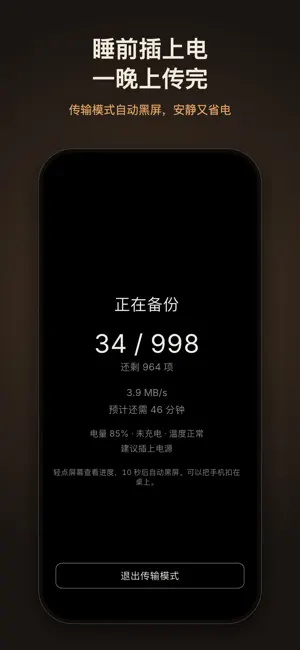
Turn the computer you already own into your private photo library. Back up your iPhone photos to your own Mac or Windows PC in full original quality, then browse everything on it from your phone over home Wi-Fi. No iCloud subscription, no NAS to set up. ORIGINALS, UNTOUCHED - Original files are transferred as-is: HEIC, RAW and video, never re-encoded or compressed - Capture dates, locations and EXIF are preserved, including dates you edited in Photos - Live Photos are backed up as a pair; edited photos keep both the original and the edit - Originals stored only in iCloud are downloaded first, with your permission, never replaced by thumbnails - Every file is verified on the computer before it counts as backed up, and interrupted transfers resume YOUR WHOLE LIBRARY ON YOUR PHONE - Browse by day, month or year, with your phone and your computer library on one timeline - Photos that live only on the computer are marked with a cloud and open in full size, including videos and Live Photos - Save any original back to your phone, with Live Photos restored as a pair - Browse by album, matching the albums in Photos - Photos picked on the computer can be pushed to your phone and saved to Photos when you open the app FREE UP SPACE SAFELY - Only photos whose originals are all verified on the computer can be deleted - You always choose what to delete, and iOS asks you to confirm; deleted items go to Recently Deleted - Deleting in the Photos app never deletes files on your computer TIDY UP - Quick review: swipe left to mark for deletion, right to keep, with undo - Similar photos: find bursts and near-duplicates and choose which to remove OVERNIGHT TRANSFERS - For the first big backup, plug in and turn on Transfer Mode. The screen goes black after 10 seconds to save power while it keeps sending. STAYS AT HOME - Transfers stay on your local network. No cloud servers, no account - Pair by scanning a QR code and matching a number on both devices; your phone only trusts the computer it paired with FREE, WITH A ONE-TIME PRO UPGRADE - Free to use: transfer up to 1 GB of originals a day (backups and saves back to the phone together); the rest continues the next day - Pro is a one-time purchase, yours for good, not a subscription: unlimited transfers, swipe up in Sort to put a photo in a phone album, and live progress on the Lock Screen and Dynamic Island - Browsing, tidying up and deleting are never limited Your library is plain folders with readable file names, so you can open it ten years from now without this app. Requires the Hamster PhotoBackup computer app on your Mac or Windows PC. The Mac version is on the Mac App Store; the Windows version is on our website. Privacy Policy: https://csphoto.pixeltrail.top/en/privacy/ Terms of Use: https://csphoto.pixeltrail.top/en/terms/ Apple Standard End User License Agreement (EULA): https://www.apple.com/legal/internet-services/itunes/dev/stdeula/
What’s new
Version 1.1.0 · Updated November 11, 2026
- Ready for iPhone Duo - Now in Traditional Chinese, Japanese, Korean, Vietnamese and Thai - Back up only the albums you choose under What to back up in Settings; the camera roll stays included by default, so new photos aren't missed - Organize albums in the app: Add to Album puts photos in a phone album or a library album, and in an album you can remove photos, move them to another album or delete the album, without deleting any photos - New library albums: made on your phone and shown on every device - In Sort, photos that are only on the computer join in while you're connected; swipe left to move them to the computer's Recently Deleted - Faster backups: photos already confirmed are no longer checked one by one - The paid upgrade is now called Pro: unlimited transfers, swipe up in Sort to put a photo in a phone album, and live progress on the Lock Screen and Dynamic Island Computer app 1.1.0 (update it too for library albums and more): - Password Lock when the app opens and after it sits idle - Album folders follow the phone, without losing photos - Imported photos go straight into the phone's folder
App privacy
The developer, Shanghai Xiangsu Hangji Technology Co., Ltd., reported these privacy practices to Apple.
Data Not Collected
The developer does not collect any data from this app.
Alternatives to Hamster PhotoBackup to Mac/PC
Looking for apps like Hamster PhotoBackup to Mac/PC? Here are 6 similar apps on the App Store. The highest rated is 轻相册 · Lighten (5.0/5), and all 6 are free to download.
-
 轻相册 · Lighten
5.0
-
 屿时光 - 相册整理,原图备份
-
 MediaMate
5.0
-
 MeTok - Swipe Photo Cleaner
-
 轻了相册
-
 SyncDrop - Smart Photo Sync
3.0
| App | Rating | Price | Last updated | Compare |
|---|---|---|---|---|
| Hamster PhotoBackup to Mac/PC | – | Free | November 11, 2026 | |
| 轻相册 · Lighten | 5.0 / 5 (1) | Free | Jun 28, 2026 | Compare |
| 屿时光 - 相册整理,原图备份 | – | Free | Nov 9, 2026 | Compare |
| MediaMate | 5.0 / 5 (6) | Free | Oct 8, 2026 | Compare |
| MeTok - Swipe Photo Cleaner | – | Free | Nov 13, 2026 | Compare |
| 轻了相册 | – | Free | Oct 17, 2026 | Compare |
| SyncDrop - Smart Photo Sync | 3.0 / 5 (2) | Free | Nov 14, 2026 | Compare |