

SyncDrop - Smart Photo Sync
子昂 陈 Photo & Video iPhoneiPadiPod touch
SyncDrop - Smart Photo Sync is a free Photo & Video app for iPhone and iPad by 子昂 陈. Rated 1.0/5 from 1 ratings. Requires iOS 18.0. Updated October 16, 2026.
- Rating
- 1.0
- 1 ratings
- Price
- Free
- on the App Store
- Size
- 50 MB
- Age 4+
- Updated
- Oct 16
- 2026 · v1.2.7
Screenshots

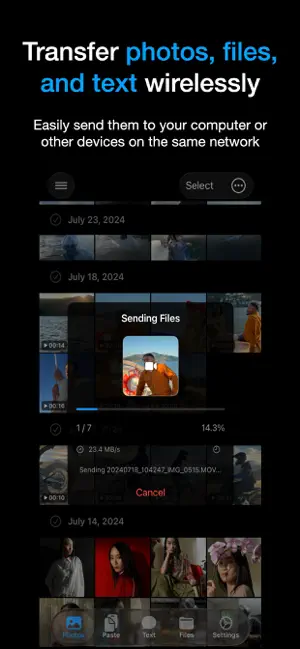


About SyncDrop - Smart Photo Sync
SyncDrop is an all-in-one productivity tool designed to break the boundaries between your devices. Whether you’re syncing clipboards, transferring files, or backing up photos to your private cloud, SyncDrop provides a fast, secure, and seamless experience. Main Features: Universal Sync & Transfer * Any File, Any Size: Move files fast between mobile, PC, and NAS with zero compression. * Cross-Platform Clipboard: Copy on one device, paste on another. Sync links and text instantly. * Instant Messaging: Send text messages and notes directly between your own devices without relying on chat apps. The Pro Choice for Photographers * Studio Mode: Capture on mobile, preview on your Mac/PC in full screen instantly. * Deep Metadata: Professional EXIF viewer with full support for focal length (and 35mm equivalent). Automated Backup & Private Cloud * Cloud & NAS Support: Seamless sync with Google Drive, Google Photos, WebDAV, and private NAS. * Smart Rules: Backup only when charging or on trusted Wi-Fi. It’s automation that respects your battery. Speed & Security * Ultra-Fast P2P: Direct connection technology. High-speed transfer even without an internet connection. * TLS 1.3 Encryption: Secure peer-to-peer transfers. Your data never touches a central server. * No Account Required: Quick pairing via QR code. Protect your privacy from day one. Common Scenarios: * Productivity: Copy a link on your phone and paste it directly into your PC browser. * Traveling: No signal? No problem. Use Hotspot Mode to share high-res travel videos with peers. * Storage Saving: Run out of space? Automatically move memories to your PC or NAS. Install SyncDrop today and simplify your multi-device life. Terms of Use: https://www.apple.com/legal/internet-services/itunes/dev/stdeula/
What’s new
Version 1.2.7 · Updated October 16, 2026
Fixed known issues and enhanced overall system stability.
App privacy
The developer, 子昂 陈, reported these privacy practices to Apple.
Data Not Linked to You
The following data, which may be collected but is not linked to your identity, may be used for the following purposes:
- Purchases: Purchase History
- Identifiers: Device ID
- Usage Data: Product Interaction
- Diagnostics: Crash Data
Used for: Analytics, App Functionality
Alternatives to SyncDrop - Smart Photo Sync
Looking for apps like SyncDrop - Smart Photo Sync? Here are 6 similar apps on the App Store. The highest rated is IntranetPhotoSync (5.0/5), and all 6 are free to download.
-
 Phonas
-
 IntranetPhotoSync
5.0
IntranetPhotoSync
5.0
-
 PicBucket : Photo Storage
-
 PhotoTransfer: Sync with Drive
-
 Arhivphoto
5.0
Arhivphoto
5.0
-
 PhotoNest Backup
| App | Rating | Price | Last updated | Compare |
|---|---|---|---|---|
| SyncDrop - Smart Photo Sync | 1.0 / 5 (1 rating) | Free | October 16, 2026 | |
| Phonas | – | Free | Aug 11, 2026 | Compare |
| IntranetPhotoSync | 5.0 / 5 (1) | Free | Mar 26, 2026 | Compare |
| PicBucket : Photo Storage | – | Free | Aug 20, 2026 | Compare |
| PhotoTransfer: Sync with Drive | – | Free | Oct 20, 2026 | Compare |
| Arhivphoto | 5.0 / 5 (1) | Free | Oct 15, 2026 | Compare |
| PhotoNest Backup | – | Free | Jul 22, 2026 | Compare |