

Duoboard: Foldable Keyboard
Patrick Gatewood Utilities iPhoneiPadiPod touch
Duoboard: Foldable Keyboard is a free Utilities app for iPhone and iPad by Patrick Gatewood. Rated 4.6/5 from 7 ratings. Requires iOS 26.0.
- Rating
- 4.6
- 7 ratings
- Price
- Free
- on the App Store
- Size
- 54 MB
- Age 4+
- Updated
- Nov 15
- 2026 · v1.3
Screenshots
Save to Pinterest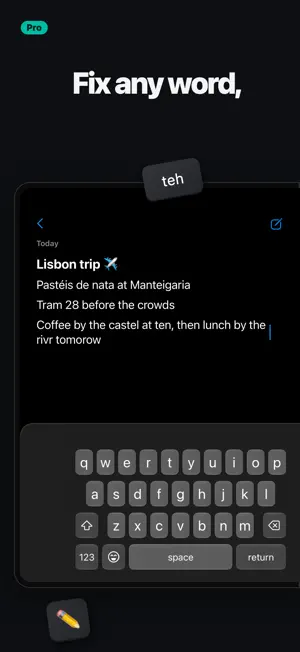


About Duoboard: Foldable Keyboard
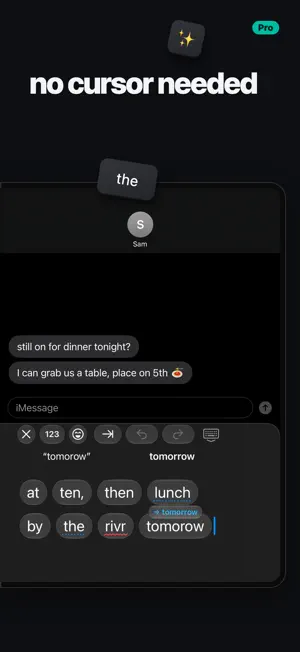
Duoboard puts your keyboard on one half of the open iPhone Duo and a productivity sidekick on the other. Or split the keys across both. LIVE EDIT No more cursor dance. Everything you've typed shows up right beside the keys, word by word, big enough to hit. Tap any word to swap it, fix it or retype it, without wrestling with the text in your app. Pinch two words to join them, or spread one to split it. In Half and in Split. HALF The keys on the screen you're holding, and your sidekick on the other: Live Edit, emoji with search, a number pad and symbols, your snippets and your clipboard. SPLIT One keyboard, a half under each thumb, like on iPad. Spread two fingers on the keys to split them, pinch to bring them back together, and drag the halves wider or narrower to fit your hands. Choose which keys show on which side. DUAL A whole keyboard under each thumb, split across the fold. FULL Or keep it classic, one keyboard across the whole screen. ONE-HANDED, WITHOUT THE FUSS • Sweep two fingers or flick the space bar toward a thumb, and the keyboard drops into Half under it. Sweep again to tuck the keys in for one hand. No holding the globe key, no menu. • On the closed Duo, flick the space bar toward your thumb for one-handed keys, and back for full width. • Drag the keyboard to any height and set its width, remembered for closed, open upright and open sideways. TYPES THE WAY YOU DO • Swipe typing, with suggestions as you swipe • Autocorrect that learns your words and your contacts' names, and reads the words before it • Next-word suggestions after a space • Missed spaces come apart: "itsjust" becomes "it's just" • Hold the space bar for a trackpad: the higher your thumb, the faster the cursor • Hold 123 for snake_case, kebab-case, camelCase or file paths • An optional number row, and a touch and hold on a letter for its accents • Emoji search that forgives typos • What you just copied waits in the suggestion bar, one tap to paste • Undo and redo in the suggestion bar • Set how fast the delete key repeats SNIPPETS AND CLIPBOARD Save the things you type all the time, your address, your email, a go-to reply, and send them with a tap. Duoboard can also keep what you copy, so it's there when you need it again. ON IPAD TOO Duoboard works on iPad too, Split and Live Edit included. PRIVATE Nothing you type leaves your device. No account, no ads, no tracking. DUOBOARD PRO The Full keyboard is free, with autocorrect, emoji, snippets and your clipboard. Duoboard Pro unlocks Half, Split, Dual, Live Edit and swipe typing: try it free for 7 days, then keep it with a one-time purchase. No subscription.
Ratings & reviews
4.6
7 ratings
What’s new
Version 1.3 · Updated November 15, 2026
Make Duoboard exactly your size. In Half or one-handed, slowly drag the space bar to make the keys exactly as wide as you like. Full, Half, Split and Dual each remember the size you set for them. Also in this update: • Slide for capitals and numbers: slide from shift onto a letter, or from 123 onto a number, and let go • Customizable Split View: choose which keys show on each half, in Settings • Smoother gestures: switching layouts now follows your fingers, so you can let go to keep it or slide back to cancel. Spread two fingers to split from any layout • Better swipe typing: swiping picks the word you meant more often • Smarter autocorrect: it fixes a word only when it's fairly sure, catches more missed letters, and learns fewer typos • A better demo to share: the try-before-installing demo is shorter and more fun • Suggestions stay in the top row, and the keys keep their full height • Plenty of small fixes under the hood
App privacy
The developer, Patrick Gatewood, reported these privacy practices to Apple.
Data Not Linked to You
The following data, which may be collected but is not linked to your identity, may be used for the following purposes:
- Purchases: Purchase History
- Identifiers: User ID
Used for: App Functionality
Alternatives to Duoboard: Foldable Keyboard
Looking for apps like Duoboard: Foldable Keyboard? Here are 6 similar apps on the App Store. The highest rated is ReachType (5.0/5), and 5 of the 6 are free to download.
-
 Foldboard
2.6
-
 MeBoard: Glide & Haptics
4.2
-
 ReachType
5.0
-
 DuoCorder+
5.0
-
 Brim Browser
4.5
-
 Brutal Time: Typographic Clock
5.0
| App | Rating | Price | Last updated | Compare |
|---|---|---|---|---|
| Duoboard: Foldable Keyboard | 4.6 / 5 (7 ratings) | Free | November 15, 2026 | |
| Foldboard | 2.6 / 5 (5) | Free | Nov 24, 2026 | Compare |
| MeBoard: Glide & Haptics | 4.2 / 5 (5) | Free | Nov 11, 2026 | Compare |
| ReachType | 5.0 / 5 (1) | Free | Nov 22, 2026 | Compare |
| DuoCorder+ | 5.0 / 5 (1) | 2.99 USD | Oct 14, 2026 | Compare |
| Brim Browser | 4.6 / 5 (20) | Free | Nov 24, 2026 | Compare |
| Brutal Time: Typographic Clock | 5.0 / 5 (1) | Free | Nov 9, 2026 | Compare |