

Lenscript: Voice Teleprompter
DJLsb LLC Photo & Video iPhoneiPadiPod touch
Lenscript: Voice Teleprompter is a free Photo & Video app for iPhone and iPad by DJLsb LLC. Requires iOS 26.0. Updated November 7, 2026.
- Price
- Free
- on the App Store
- Size
- 2 MB
- Age 4+
- Updated
- Nov 7
- 2026 · v1.0.2
Screenshots
Save to Pinterest


About Lenscript: Voice Teleprompter
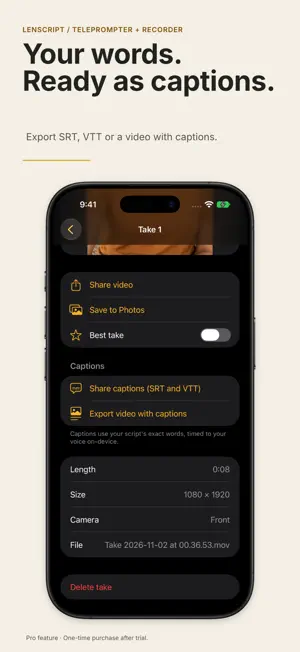
Teleprompter for iPhone Duo: read your script while recording with its main cameras. Record yourself with the main rear cameras while seeing your script and camera preview on the smaller outer screen beside them. Lenscript turns the unfolded iPhone Duo into a self-recording teleprompter, with your words and framing together in one view. MADE FOR MAIN-CAMERA SELF-RECORDING Open Duo and turn the outer screen toward you. Lenscript selects the main rear cameras for this setup, so you can read, check your framing and record without looking away at a separate display. Compact controls leave more room for the script. An optional hinge-case clearance setting moves text and controls away from a case that overlaps the outer screen when Duo is open. When Duo is closed, you can switch between front and rear cameras. Prefer more room to read? The larger inner display also puts your script near its camera, with a centered preview. LET YOUR VOICE SET THE PACE Voice Follow listens on your iPhone and moves through your script as you speak. Pause to breathe, slow down for an important point, or repeat a line. The prompter follows your place in the script instead of making you chase a timer. Prefer a steady rhythm? Set a scrolling speed from 60 to 260 words per minute. MAKE IT YOUR PROMPTER • Write scripts or import text, Markdown and RTF files. • Adjust text size, line spacing, margins and reading position. • Add section headings and stage cues such as [pause] or [smile]. • Dim words already read and mirror text for a beam-splitter rig. • Rehearse in prompter-only mode or record your video in the same app. RECORD WITH CONFIDENCE Choose 1080p or 4K, 30 or 60 fps, and HDR (HLG), where the selected camera supports them. Use available lens presets, pinch to zoom and tap to focus. The Duo inner camera uses HD at 30 or 60 fps, without zoom or HDR. Start and stop with supported volume-button or Camera Control input, and use a countdown to settle into your take. CAPTIONS FROM YOUR SCRIPT Use your written words for captions, with on-device speech recognition to help time them to your take. Keep your chosen spelling for names and specialist terms. Export SRT or VTT subtitle files, or share a video with captions burned in. You can also add video filmed elsewhere to a script. Review caption timing before sharing. KEEP YOUR BEST TAKES Keep recordings with their scripts, star favorites, share videos, and save to Photos. Your take files are also available in Files. LANGUAGES The interface is available in English, Spanish, Brazilian Portuguese, German and French. Spoken navigation commands work in English, Spanish, Portuguese, German and French: go back, jump between sections or restart without touching the screen. Voice Follow and speech-timed captions use the recognition languages available on your iPhone. See the complete list for your device in Settings > Voice Follow and captions > Language. Availability varies with your device and iOS version; the first use may download a language model. Select the language you will speak. PRIVATE BY DESIGN No account, no ads and no tracking. Speech processing happens on your iPhone. Lenscript does not upload your scripts or recordings; you choose what to export or share. START FREE. MAKE IT PRO. The free app includes up to three scripts and steady-speed prompting. Your first three recorded or imported takes include Pro features. Lenscript Pro is a one-time purchase that unlocks Voice Follow, captions, 4K/60 fps/HDR where supported, unlimited scripts and prompter colors. No subscription. Requires iOS 26 or later. Duo display features require iPhone Duo and compatible iOS. Camera and speech capabilities vary by device.
What’s new
Version 1.0.2 · Updated November 7, 2026
Updated App Store information to make Lenscript’s teleprompter features easier to find.
App privacy
The developer, DJLsb LLC, reported these privacy practices to Apple.
Data Not Collected
The developer does not collect any data from this app.
Alternatives to Lenscript: Voice Teleprompter
Looking for apps like Lenscript: Voice Teleprompter? Here are 6 similar apps on the App Store. The highest rated is Field Monitor for Camera (5.0/5), and all 6 are free to download.
-
 Teleprompter Duo
1.0
-
 PlugView: Camera Field Monitor
-
 Field Monitor for Camera
5.0
-
 Open Prompter
4.4
-
 FaceHider: Blur Video & Face
5.0
-
 Telepromter for Video
4.4
| App | Rating | Price | Last updated | Compare |
|---|---|---|---|---|
| Lenscript: Voice Teleprompter | – | Free | November 7, 2026 | |
| Teleprompter Duo | 1.0 / 5 (1) | Free | Nov 19, 2026 | Compare |
| PlugView: Camera Field Monitor | – | Free | Nov 27, 2026 | Compare |
| Field Monitor for Camera | 5.0 / 5 (1) | Free | Nov 13, 2026 | Compare |
| Open Prompter | 4.4 / 5 (8) | Free | Sep 3, 2026 | Compare |
| FaceHider: Blur Video & Face | 5.0 / 5 (1) | Free | Nov 16, 2026 | Compare |
| Telepromter for Video | 4.4 / 5 (142) | Free | Jul 22, 2026 | Compare |