

Open Prompter
LELAND ANDREW DUTCHER Photo & Video iPhoneiPadiPod touch
Open Prompter is a free Photo & Video app for iPhone and iPad by LELAND ANDREW DUTCHER. Rated 5.0/5 from 6 ratings. Requires iOS 17.0.
- Rating
- 5.0
- 6 ratings
- Price
- Free
- on the App Store
- Size
- 7 MB
- Age 4+
- Updated
- Sep 3
- 2026 · v3.1.2
Screenshots



About Open Prompter
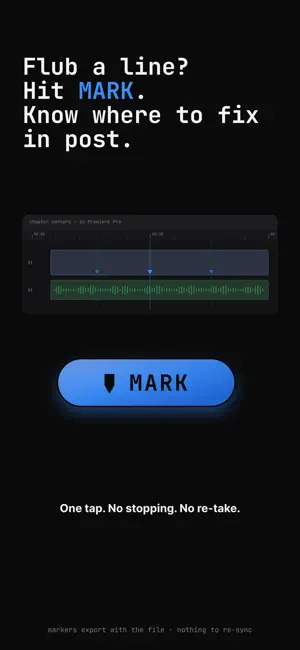
Open Prompter is a teleprompter supporting markdown files and every "Pro" feature you need to record content (plus some extras). It reads universal .md files from iCloud, your Obsidian vault or any source in IOS Files — as-is, with live updates, no paste, no import needed. Read it back at your pace with voice tracking while the selfie camera records you. The file saves to your Photos and back to your script folder for the most seamless workflow. THE READING EXPERIENCE — Voice tracking using on-device speech recognition follows what you actually said, so the page advances when you do. Your data never leaves the phone. — Horizontal AND vertical mirroring for beam-splitter teleprompter rigs. — Six legibility-tuned fonts built in: Atkinson Hyperlegible (default), Lexend, System Sans, Verdana, New York (Serif), and the brand monospace. — Adjustable scroll speed (5–200 px/s) and font size (16–160 pt) so dense scripts and eye-line reads both work. — Focus mode dims the chrome for clean recording — a single eye button brings it back. — Full-bleed prompter with vertical or horizontal rotation. CAMERA AND RECORDING — Front camera native recording inside the app. A picture-in-picture tile floats over the script while you read; tap it to promote to a full-screen camera preview; tap minimize to collapse it back. — Open Gate recording on iPhone 17 with the full 1:1 front sensor at 3840 × 3840. Perform your script once, crop a 9:16 / 1:1 / 16:9 from the same take in your editor. No reshoot for every platform. — Save next to the script: toggle in Settings → Recording. When on, the .mov writes to the same folder as the .md so iCloud delivers the take to your Mac next to the script. No "where did I put that file" hunt. — Standard or High Bitrate HEVC, sized for quality and efficiency. — True 24p frame rate or 30p or 60p (if you're feeling wild). BUILT-IN EDITOR Tap the pencil in the top bar to open the file. Changes save back through the file coordinator — iCloud syncs them to your Mac the same way it syncs any other file. BLUETOOTH REMOTE Pair any Bluetooth keyboard or media remote and bind buttons to play, pause, mirror, restart, and more. Volume-button capture is opt-in (Settings → Remote) so the volume rocker still works as a volume rocker by default. WHAT IT UNDERSTANDS Open Prompter parses real markdown. Headings render as headings, bullets as bullets, numbered lists as numbered lists. Front matter, Callouts (> footnotes, tables, and visual-direction brackets ([B-roll: ...]) are stripped. Aggressive stripping is on by default; turn it off in Settings if you want to see cues on screen. WHAT YOU WON'T FIND HERE No account. No subscription. No analytics. No tracking. No third-party SDKs. No network calls of any kind. Voice tracking and the camera both run entirely on-device. Open Prompter reads the files you pick from the built-in Files app, captures with the camera you already own. OPEN SOURCE Every line of code is on GitHub under the MIT license. REQUIREMENTS — iPhone on iOS 17 or newer — For iCloud live-sync: the same Apple ID on Mac and phone — For Obsidian vaults: Obsidian Sync or any folder the iOS Files app can reach — For Open Gate recording: iPhone 17 family (older iPhones record at the maximum frame their sensor exposes — the square-headroom re-crop trick is iPhone 17-only) — For Bluetooth remote: any keyboard or media remote your iPhone can pair with
Ratings & reviews
5.0
6 ratings
What’s new
Version 3.1.2 · Updated September 3, 2026
- Bug fixes and performance improvements
App privacy
The developer, LELAND ANDREW DUTCHER, reported these privacy practices to Apple.
Data Not Collected
The developer does not collect any data from this app.
Alternatives to Open Prompter
Looking for apps like Open Prompter? Here are 6 similar apps on the App Store. The highest rated is Focalware (5.0/5), and all 6 are free to download.
-
 Shots - Screenshot Beautifier
-
 Framelo: Video to Photos
-
 Focalware
5.0
-
 ShadowCat Album
4.8
-
 Ocean: Video Editor
5.0
-
 PhotoStrip Metadata Remover
5.0
| App | Rating | Price | Last updated | Compare |
|---|---|---|---|---|
| Open Prompter | 5.0 / 5 (6 ratings) | Free | September 3, 2026 | |
| Shots - Screenshot Beautifier | – | Free | Jun 16, 2026 | Compare |
| Framelo: Video to Photos | – | Free | Oct 18, 2026 | Compare |
| Focalware | 5.0 / 5 (6) | Free | Apr 29, 2026 | Compare |
| ShadowCat Album | 4.8 / 5 (4) | Free | May 30, 2026 | Compare |
| Ocean: Video Editor | 5.0 / 5 (1) | Free | Jun 11, 2026 | Compare |
| PhotoStrip Metadata Remover | 5.0 / 5 (2) | Free | Apr 23, 2026 | Compare |
Compare Open Prompter with the top alternatives: ratings, updates, ASO score and keyword gaps →