

SkyTasks: To-Do & Planner
Nitay Shlomai Productivity iPhoneiPadiPod touch
SkyTasks: To-Do & Planner is a free Productivity app for iPhone and iPad by Nitay Shlomai. Requires iOS 15.0. Updated November 20, 2026.
- Price
- Free
- on the App Store
- Size
- 51 MB
- Age 4+
- Updated
- Nov 20
- 2026 · v0.1.4
Screenshots
Save to Pinterest


About SkyTasks: To-Do & Planner
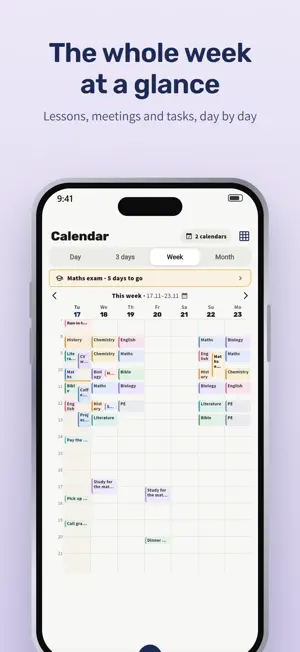
SkyTasks. Manage your tasks and personal schedule with ease, and enjoy building a city of your own along the way. Every area of your life is a neighbourhood: work, home, family, health, study, money and shopping. Every task you finish grows that neighbourhood's building, and every project rises on a lot of its own, from foundations to roof. One look shows what moved forward and what needs attention. A new task in a second Type or say one sentence, like "dentist tomorrow at 10", and the app already knows the day, the time and the neighbourhood. You can even do it from the Lock Screen, without opening the app. For school and uni Fill in your timetable once: lessons repeat every week and skip the holidays by themselves. An exam gets a countdown and study sessions in your free hours, and each session builds a floor of the school in your city. Reminders at the right moment Each morning you get a short summary of what's waiting today, and a reminder comes before every task. If something slips, one more reminder follows, with an easy way to move it to the evening or to tomorrow. Your schedule in one place Your iPhone's calendars (iCloud, Google, Outlook) sit next to your tasks, by day, 3 days, week or month. Drag a task to a free hour, drag over the hours for an event, or mark it all day. One home for two Invite your partner with a link and share one neighbourhood for chores and groceries: tasks for whoever gets to them first, or for each other, with a notification when something is waiting for you. Your day, in order A quick morning plan, an evening wrap-up, repeating tasks, steps within a task, Home Screen and Lock Screen widgets, and neighbourhoods of your own. Focus mode When it's hard to start, focus mode shows one task and a small first step. A 2, 10 or 25 minute timer builds a floor at a time, and the task can be read aloud. When the day is done, the city celebrates with you. At night, every task you finished lights a window. Hebrew and English. No ads.
What’s new
Version 0.1.4 · Updated November 20, 2026
What's new in this version: • A redesigned calendar: clean, calm, and what's next stands out • Faster adding: the + opens into a card over the keyboard • Privacy in the home's calendar: "busy" with no details, or no column • A day that arranges itself around your calendar • A video of your city to share • Seasons, real weather and landmarks in your city • A focus timer that builds a tower, and reminders that won't let go • Garden City: a new look for your city, and a new icon
App privacy
The developer, Nitay Shlomai, reported these privacy practices to Apple.
Data Linked to You
The following data, which may be collected and linked to your identity, may be used for the following purposes:
- Contact Info: Email Address, Name
- User Content: Emails or Text Messages
- Diagnostics: Other Diagnostic Data
Used for: App Functionality
Data Not Linked to You
The following data, which may be collected but is not linked to your identity, may be used for the following purposes:
- Identifiers: Device ID
- Usage Data: Product Interaction
Used for: Analytics
Alternatives to SkyTasks: To-Do & Planner
Looking for apps like SkyTasks: To-Do & Planner? Here are 6 similar apps on the App Store. The highest rated is Osame (5.0/5), and all 6 are free to download.
-
 My Documents: Secure Vault
-
 Group Habit Tracker: Rootmates
4.0
-
 Osame
5.0
-
 Mila Studio: כתיבת תסריטים
-
 Pack & Peek: Box Inventory
-
 Good Day AI - Noa, AI manager
| App | Rating | Price | Last updated | Compare |
|---|---|---|---|---|
| SkyTasks: To-Do & Planner | – | Free | November 20, 2026 | |
| My Documents: Secure Vault | – | Free | Sep 28, 2026 | Compare |
| Group Habit Tracker: Rootmates | 4.0 / 5 (4) | Free | Oct 20, 2026 | Compare |
| Osame | 5.0 / 5 (1) | Free | Nov 6, 2026 | Compare |
| Mila Studio: כתיבת תסריטים | – | Free | Nov 20, 2026 | Compare |
| Pack & Peek: Box Inventory | – | Free | Nov 14, 2026 | Compare |
| Good Day AI - Noa, AI manager | – | Free | Nov 16, 2026 | Compare |