

Good Day AI - Noa, AI manager
Shomri azizi consulting Ltd. Productivity iPhoneiPadiPod touch
Good Day AI - Noa, AI manager is a free Productivity app for iPhone and iPad by Shomri azizi consulting Ltd. Requires iOS 26.1. Updated October 21, 2026.
- Price
- Free
- on the App Store
- Size
- 29 MB
- Age 17+
- Updated
- Oct 21
- 2026 · v1.9.22
Screenshots


About Good Day AI - Noa, AI manager
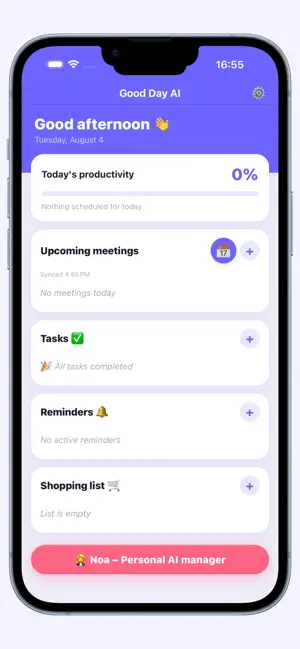
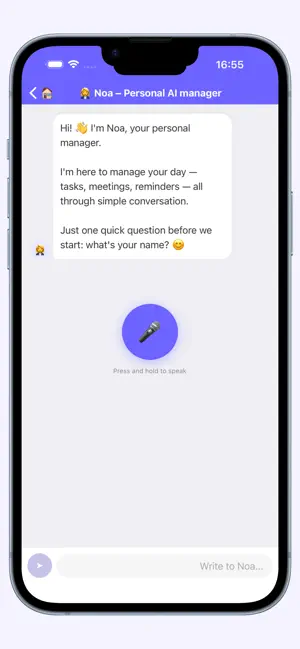
Five minutes of talking in the morning, and your day is set. "Book a meeting with Dan tomorrow at three, remind me to pay the electric bill, and add milk to the list." Noa checks your calendar, books it, drafts a message to Dan, and takes care of the rest. Everything in one place Calendar, reminders, tasks and messages — not in four apps, and not in four corners of your head. No message goes out until you tap Send Noa drafts the message to Dan and shows it to you. It goes out only when you tap Send. Not before. What goes on the calendar comes off in one sentence Noa books it and tells you right away what was added. Not right? "Delete that" — and it's gone. Calendar Book, cancel and find meetings in plain language. Conflicts are checked before anything is booked. Cancelling updates attendees through the calendar itself. Works with iPhone Calendar, Google Calendar and Outlook. Reminders that don't slip One-time and recurring — daily, weekdays, weekends, or the days you pick. Two-way sync with the iPhone Reminders app. On iOS 26, an important reminder can ring like an alarm, even on silent. Tasks without typing "Add: call Dan, buy milk, finish the report" — three tasks in one message. An hour after the due time, Noa asks whether you got to it and offers to move it. A shopping list that sorts itself You say it, she sorts it into categories. One tap sends the list on WhatsApp to whoever is shopping. One morning message, not twenty notifications A single message at the time you choose: how many meetings, which tasks, what's waiting. Plus a heads-up 30 minutes before each meeting. She remembers, so you don't have to "Mom's address is 15 Oak Street." "I prefer morning meetings." "Every Monday at eight I have training." Noa uses this when she suggests a time or spots a conflict. Voice first Tap the mic, speak, and get a spoken answer. Typing works too. A closed system Your calendar and tasks don't pass through Meta and aren't sold to anyone. Data is encrypted on the device. Contacts stay on your phone — only the name you said is sent. Voice recordings are used for transcription only and aren't stored. Conversations aren't used to train models. Four languages English, Hebrew, Arabic and Russian. Who it's for People whose day no longer fits in a day: managers with back-to-back meetings, freelancers juggling clients, working parents running two schedules at once. If you have three tasks a day, your phone's built-in reminders are enough. 7-day trial, then a monthly subscription. Cancel anytime in Settings.
What’s new
Version 1.9.22 · Updated October 21, 2026
New: Home screen widget — your day at a glance without opening the app. Meetings, tasks, reminders and overdue items in a clean layout. New: Daily Brief screen — "Good morning" opens a smart snapshot of your whole day, including back-to-back meetings, carried-over tasks, and a "now" line on the timeline. New: Email drafts — Noa prepares an email draft and opens your mail app. Updating a meeting now preserves the title, location, notes and alerts — iOS and Android. Dialing fix: the number you provide is the number dialed. "Done " is only shown after an action actually succeeds. Improved spoken Arabic support. General stability and reliability fixes.
App privacy
The developer, Shomri azizi consulting Ltd., reported these privacy practices to Apple.
Data Linked to You
The following data, which may be collected and linked to your identity, may be used for the following purposes:
- Contact Info: Email Address
Used for: App Functionality
Data Not Linked to You
The following data, which may be collected but is not linked to your identity, may be used for the following purposes:
- User Content: Audio Data
- Identifiers: User ID
Used for: App Functionality
Alternatives to Good Day AI - Noa, AI manager
Looking for apps like Good Day AI - Noa, AI manager? Here are 6 similar apps on the App Store.
-
 Document Vault - Vault
-
 Minder Personal Assistant
-
 DayVoice: Voice Reminders
-
 MAI - ניהול משימות והרגלים
-
 FollowFollow Alarm
-
 Rafiq AI Assistant
| App | Rating | Price | Last updated | Compare |
|---|---|---|---|---|
| Good Day AI - Noa, AI manager | – | Free | October 21, 2026 | |
| Document Vault - Vault | – | Free | Jun 18, 2026 | Compare |
| Minder Personal Assistant | – | Free | Oct 13, 2026 | Compare |
| DayVoice: Voice Reminders | – | Free | Jul 1, 2026 | Compare |
| MAI - ניהול משימות והרגלים | – | Free | Sep 15, 2026 | Compare |
| FollowFollow Alarm | – | 5.99 USD | Oct 19, 2026 | Compare |
| Rafiq AI Assistant | – | Free | Oct 21, 2026 | Compare |