

RooQi Keyboard
Shenzhen Jinji Digital Technology Co.,Ltd Utilities iPhoneiPadiPod touch
RooQi Keyboard is a free Utilities app for iPhone and iPad by Shenzhen Jinji Digital Technology Co.,Ltd. Rated 5.0/5 from 1 ratings. Requires iOS 18.0.
- Rating
- 5.0
- 1 ratings
- Price
- Free
- on the App Store
- Size
- 88 MB
- Age 4+
- Updated
- Nov 16
- 2026 · v1.1.8
Screenshots
Save to Pinterest

About RooQi Keyboard
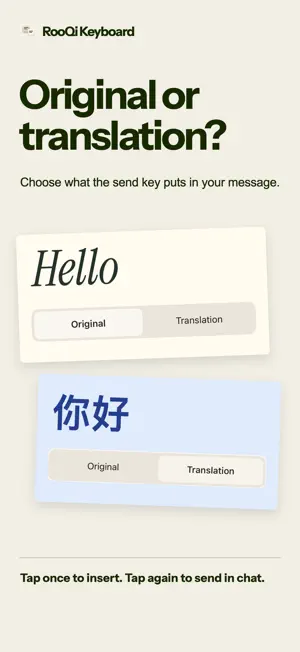
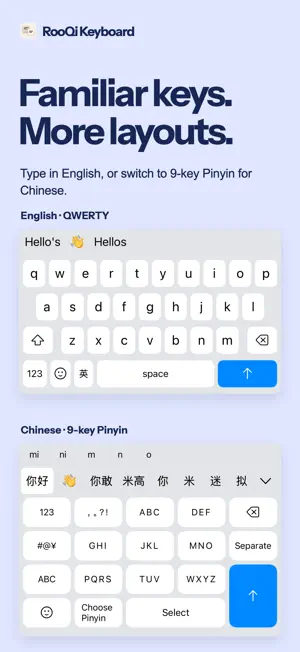
Your words. Your keyboard. Your device. RooQi Keyboard brings 16 languages and on-device translation to your iPhone keyboard. Draft a message, review its translation, then choose what to insert into the current app—without repeatedly copying between apps. PRIVATE BY DESIGN • Typing, translation and read-aloud are processed on your device. RooQi does not collect or upload your input or translations. • No ads, tracking, analytics SDKs, accounts or cloud conversation history. • Translation uses Apple Translation and on-device Apple language resources. Initial or additional language downloads require an internet connection and are handled by Apple. Once resources are ready, supported language pairs can translate offline. You can also download languages in Apple's Translate app. • Once you choose to insert text into another app, that app handles it under its own privacy policy. 16 LANGUAGES, FAMILIAR LAYOUTS Type in Simplified Chinese, Traditional Chinese, English, Japanese, Korean, Spanish, French, German, Hindi, Arabic, Portuguese (Brazil), Indonesian, Russian, Thai, Vietnamese and Italian. Choose full Pinyin or nine-key Pinyin for Chinese; romaji or kana flick for Japanese; two-set or ten-key for Korean; and Telex or VNI for Vietnamese. Hold the language key to change supported layouts. Home-screen hints show how, and RooQi remembers your choice. Long-press supported letters for accented forms in Spanish, French, German, Brazilian Portuguese and Italian. The app interface supports the same 16 languages. Follow your system language or choose an interface language independently of typing and translation. CHOOSE WHAT YOU INSERT • Set the keyboard's action key to insert the original, translation or both together from the home screen. With a draft, the first tap inserts it. With an empty draft, the key follows the current app's Send, Search, Go or Return action. You decide when to press it again. • Optional on-device expression optimization is off by default. Enable it to match selected common Chinese–English expressions locally and provide their translations. • Translate manually or after a pause with optional automatic translation. Review either line and tap it to insert. • Listen to translations using system voices with adjustable voice and speed. • Find emoji through categories, search and related candidates. LOCAL CONTROLS Personal word-choice learning stays on your device and can be disabled. Optional draft recovery is off by default. When enabled, it keeps the unfinished draft and one previous sentence locally for up to 24 hours, excluded from backup, and never automatically resends them. REQUIREMENTS Requires iPhone with iOS 18 or later. Basic typing works without Full Access. Keyboard translation and read-aloud require Full Access on some system versions, including iOS 18; enabling it does not cause RooQi to upload your text. Language-pair and voice availability depend on your device and iOS. This version does not offer recording or dictation. Secure fields and apps that restrict third-party keyboards use the system keyboard. Translations may be inaccurate; check important details before use. Support: [email protected] Privacy policy: https://rooqi.ai/keyboard/privacy/
What’s new
Version 1.1.8 · Updated November 16, 2026
• Insert original text and translation together with the new bilingual insertion option. • Optional on-device expression optimization for selected Chinese–English expressions. • Expanded Chinese dictionary with more names, brands and everyday words. • Improved Chinese suggestions for everyday and business conversations. • Repeatedly tap the 9-key Pinyin punctuation key within one second to cycle through ,。?!. • Fixed an issue where learned words could be lost after reopening the keyboard.
App privacy
The developer, Shenzhen Jinji Digital Technology Co.,Ltd, reported these privacy practices to Apple.
Data Not Collected
The developer does not collect any data from this app.
Alternatives to RooQi Keyboard
Looking for apps like RooQi Keyboard? Here are 6 similar apps on the App Store. The highest rated is Keylish: Pinyin & Languages (5.0/5), and all 6 are free to download.
-
 SafeInput: Chinese Keyboard
-
 Keylish: Pinyin & Languages
5.0
-
 Langboard
5.0
-
 智花输入法
-
 GearBoard
-
 Universe Keyboard
| App | Rating | Price | Last updated | Compare |
|---|---|---|---|---|
| RooQi Keyboard | 5.0 / 5 (1 rating) | Free | November 16, 2026 | |
| SafeInput: Chinese Keyboard | – | Free | Nov 17, 2026 | Compare |
| Keylish: Pinyin & Languages | 5.0 / 5 (2) | Free | Nov 18, 2026 | Compare |
| Langboard | 5.0 / 5 (1) | Free | Nov 18, 2026 | Compare |
| 智花输入法 | – | Free | Nov 13, 2026 | Compare |
| GearBoard | – | Free | Oct 30, 2026 | Compare |
| Universe Keyboard | – | Free | Nov 18, 2026 | Compare |
Compare RooQi Keyboard with the top alternatives: ratings, updates, ASO score and keyword gaps →