

Keylish: Pinyin & Languages
北京博雅观止科技有限公司 Utilities iPhoneiPadiPod touch
Keylish: Pinyin & Languages is a free Utilities app for iPhone and iPad by 北京博雅观止科技有限公司. Rated 5.0/5 from 2 ratings. Requires iOS 18.0.
- Rating
- 5.0
- 2 ratings
- Price
- Free
- on the App Store
- Size
- 29 MB
- Age 4+
- Updated
- Oct 19
- 2026 · v1.12
Screenshots


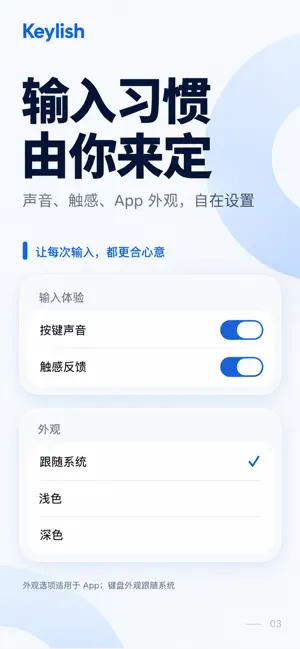
About Keylish: Pinyin & Languages
Keylish is a Chinese pinyin keyboard with optional translation comparison in multiple languages. Type Chinese or English normally and see translations beneath candidates to pick up expressions as you go. Chinese input • 26-key full pinyin and optional nine-key pinyin on iPhone, with a local Rime dictionary • Tap a Chinese candidate, or press Space during pinyin composition to select the first candidate, to enter Chinese • Exact-match English word candidates enter that English word when selected • Tappable pinyin correction candidates, which can be disabled in Settings • Press Return during pinyin composition to enter the raw pinyin letters • Numbers, symbols, emoji, and capitalization English ABC • Word completions as you type; tap a completion to enter the word with a trailing space • Tappable spelling suggestions, with no automatic spelling changes • Selected words are remembered on this device to help rank future suggestions • No next-word prediction Translation comparison in multiple languages • Chinese pinyin and English ABC each have their own comparison switch and target language • See translations or meanings in your selected language beneath Chinese candidates and English completions • Available languages depend on the translation pairs supported by your device and system; check the list in the app • Long-press a candidate with a meaning to read the full text; listen, stop, and replay when a system voice is available • Turn automatic speech off or choose an installed voice for each comparison language • Uses Apple's on-device translation; prepare the language resources for offline use • Translations are display-only and never replace your input Chinese-English phrasebook • Everyday expressions with Chinese, pinyin, and English together • Add, edit, and delete your own entries Permissions and privacy • Chinese, English ABC, numbers, symbols, and emoji input work without Full Access • Apple Translation requires Full Access enabled in system Settings and the appropriate language resources • Input, dictionaries, custom phrases, and translation caches stay on device; keystrokes are not uploaded to our servers • No ads or third-party analytics SDKs Optional translation access • The base keyboard is free • Try translation comparison free for 30 days, once per Apple Account, with no automatic charge when it ends • A separate one-time purchase unlocks lifetime translation access; no subscription • Redeem offer codes or restore purchases on the unlock page Privacy policy: https://dawnfz-lenfeng.github.io/keylish-legal/privacy.html
What’s new
Version 1.12 · Updated October 19, 2026
• In Chinese, entering Chinese punctuation — including ,。?!、, quotes and brackets — from the number or symbol page now returns to your pinyin layout • The Chinese @ key now enters a plain ASCII “@” so @mentions work as expected • Keyboard symbol rows and input behavior adapt to address, email, and URL fields • Fixed marked text being replayed after the host app had already ended the composition • Fixed the number and symbol page keys so switching between pages responds correctly • Removed the system scroll-edge effect behind the candidate bar and expanded panel for a flat, consistent look
App privacy
The developer, 北京博雅观止科技有限公司, reported these privacy practices to Apple.
Data Not Collected
The developer does not collect any data from this app.
Alternatives to Keylish: Pinyin & Languages
Looking for apps like Keylish: Pinyin & Languages? Here are 6 similar apps on the App Store. The highest rated is Clash Mi (4.6/5), and 5 of the 6 are free to download.
-
 Chinese English Keyboard
4.0
Chinese English Keyboard
4.0
-
 微信输入法
4.0
微信输入法
4.0
-
 Nextin
3.7
Nextin
3.7
-
 Shadowrocket
4.5
Shadowrocket
4.5
-
 PikPak - Cloud Storage & Saver
3.0
PikPak - Cloud Storage & Saver
3.0
-
 Clash Mi
4.6
Clash Mi
4.6
| App | Rating | Price | Last updated | Compare |
|---|---|---|---|---|
| Keylish: Pinyin & Languages | 5.0 / 5 (2 ratings) | Free | October 19, 2026 | |
| Chinese English Keyboard | 4.0 / 5 (5) | Free | Oct 20, 2026 | Compare |
| 微信输入法 | 4.0 / 5 (782) | Free | Oct 1, 2026 | Compare |
| Nextin | 3.7 / 5 (853) | Free | Sep 10, 2026 | Compare |
| Shadowrocket | 4.5 / 5 (12,180) | 2.99 USD | Sep 7, 2026 | Compare |
| PikPak - Cloud Storage & Saver | 3.0 / 5 (224) | Free | Sep 10, 2026 | Compare |
| Clash Mi | 4.6 / 5 (459) | Free | Oct 17, 2026 | Compare |