

KKUK - Mechanical Keyboard
seung beom ko Utilities iPhoneiPadiPod touch
KKUK - Mechanical Keyboard is a free Utilities app for iPhone and iPad by seung beom ko. Requires iOS 17.0. Updated November 23, 2026.
- Price
- Free
- on the App Store
- Size
- 67 MB
- Age 4+
- Updated
- Nov 23
- 2026 · v1.1.5
Screenshots
Save to Pinterest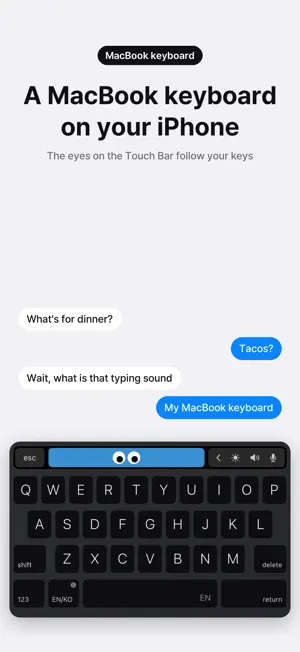

About KKUK - Mechanical Keyboard
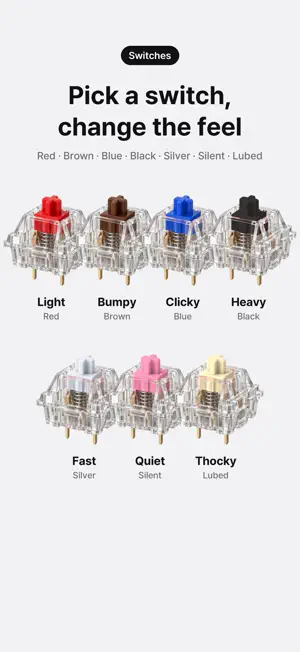
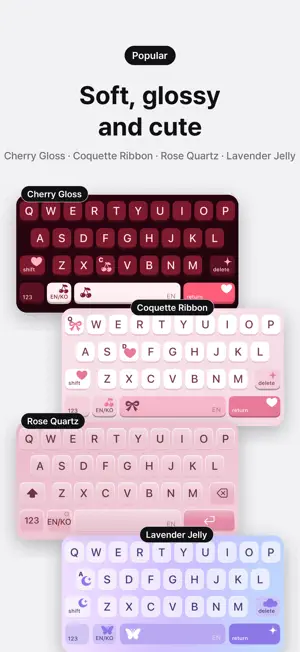
KKUK turns your iPhone keyboard into a mechanical keyboard. • 36 keyboard themes: MacBook, glass, crystal, light, dark, gradient, retro • Keycap art: keys printed with ribbons, hearts, cherries, flames and lightning • Switch feel: pick red, brown, blue, black, silver, silent or lubed switches to change the haptics and typing sound • MacBook keyboard: the eyes on the Touch Bar follow the keys you press, look surprised when you type fast and doze off when you stop • Animated themes: koi swimming under glass keys, a cat walking across the keyboard, an otter and a sea otter floating in a pond • Layouts: QWERTY, AZERTY, QWERTZ, Colemak, Dvorak, plus Korean layouts • Adjust key height, font and font size • Move the cursor by holding the space bar or swiping across letter keys; autocorrect • Emoji: tap the language key to switch between Korean, English and emoji • Your own themes: build one from colors or a photo Free: Classic Dark, Cherry Gloss and Rose Quartz themes, all layouts and settings, red switches, one custom theme KKUK Pro (monthly or yearly, 7-day free trial): every theme, all 7 switch feels, MacBook keyboard, unlimited custom themes Want just one keyboard? Buy it once and keep it forever. What you type never leaves your device. Full Access is only used so the keyboard can read the theme and settings you chose in the app. Terms of Use: https://gstudio.it.kr/kkuk/terms Privacy Policy: https://gstudio.it.kr/kkuk/privacy
What’s new
Version 1.1.5 · Updated November 23, 2026
• Try the yearly plan free for 7 days • After you turn on the keyboard, KKUK shows what's included in Pro once • Polished the subscription screen
App privacy
The developer, seung beom ko, reported these privacy practices to Apple.
Data Not Linked to You
The following data, which may be collected but is not linked to your identity, may be used for the following purposes:
- Usage Data: Product Interaction
Used for: Analytics
Alternatives to KKUK - Mechanical Keyboard
Looking for apps like KKUK - Mechanical Keyboard? Here are 6 similar apps on the App Store.
-
 Knowch Keyboard: Themes, Mates
-
 Tingle: Custom Keyboard Themes
-
 Keypop: Keycap Keyboard Themes
-
 찌키 - 폰꾸 키보드 · 내 사진 테마 & 폰트
-
 EHangOS
-
 TTobak – AI Keyboard
| App | Rating | Price | Last updated | Compare |
|---|---|---|---|---|
| KKUK - Mechanical Keyboard | – | Free | November 23, 2026 | |
| Knowch Keyboard: Themes, Mates | – | Free | Nov 24, 2026 | Compare |
| Tingle: Custom Keyboard Themes | – | Free | Nov 26, 2026 | Compare |
| Keypop: Keycap Keyboard Themes | – | Free | Nov 21, 2026 | Compare |
| 찌키 - 폰꾸 키보드 · 내 사진 테마 & 폰트 | – | Free | Nov 23, 2026 | Compare |
| EHangOS | – | Free | Oct 22, 2026 | Compare |
| TTobak – AI Keyboard | – | Free | Nov 26, 2026 | Compare |