

TTobak – AI Keyboard
minyong oh Utilities iPhoneiPadiPod touch
TTobak – AI Keyboard is a free Utilities app for iPhone and iPad by minyong oh. Requires iOS 16.0. Updated November 24, 2026.
- Price
- Free
- on the App Store
- Size
- 102 MB
- Age 4+
- Updated
- Nov 24
- 2026 · v1.0.14
Screenshots
Save to Pinterest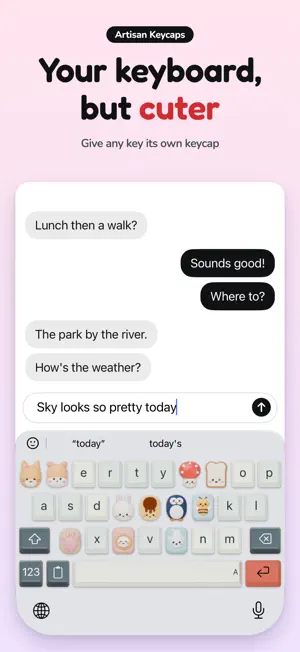

About TTobak – AI Keyboard
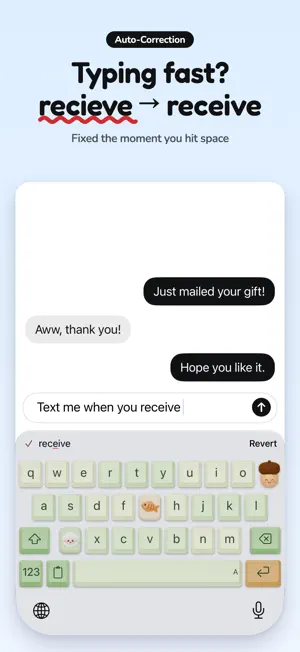
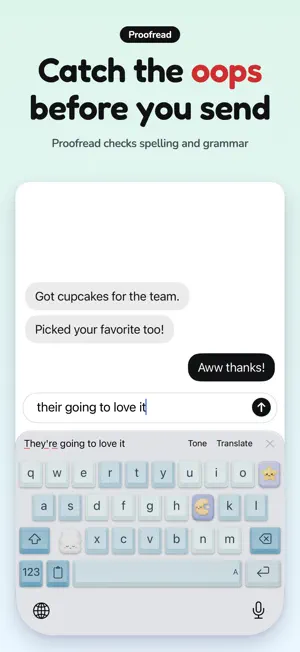
TTobak is an iPhone keyboard you can dress up. Pick 3D keycaps, set a mechanical switch sound, and type in English with autocorrect that runs on your phone. Korean layouts are built in and can be turned on in the app. KEYCAPS AND SOUNDS • 3D keycap sets, plus artisan keycaps you place on single keys. • 29 mechanical switch sounds. • Key color, font, and a background photo. • Some keycaps and sounds need a paid plan or the Lifetime Pass. TYPING • English autocorrect and word suggestions work on the device. • Tap Revert in the toolbar to restore what you typed. • Slide on the space bar to move the cursor. • Korean layouts (2-Set, 10-Key, Naratgeul, Single Vowel) with Korean typo correction: turn on Korean Keyboard in the app. PROOFREAD, TONE, TRANSLATE • Buttons sit in the toolbar above the keys. The result is inserted only when you tap it. • Proofread fixes spelling and grammar. Tone rewrites in 8 styles or one you define. Translate covers 30 languages. • TTobak AI runs on the Light and Pro plans. • Or connect your own Claude or GPT API key with the API Connection plan or the Lifetime Pass. The AI provider bills you for usage separately. • iPhone AI works without a plan on iPhones with Apple Intelligence turned on. CLIPBOARD AND SAVED TEXT • Paste from clipboard history, or insert saved phrases and links. FEEDBACK BOARD • Post requests and problems on the Global Board inside the app and read replies from the TTobak Team. PLANS The keyboard, autocorrect, and word suggestions work without a subscription. After you agree to AI use, TTobak AI gives 300 starter credits once. When those credits run out, TTobak AI needs the Light or Pro plan. Prices are shown in the app in your currency. Credits are deducted based on the amount of text processed. Longer text uses more, as do requests on weekdays from 10 a.m. to 1 p.m. and 3 p.m. to 7 p.m. Korea time. Live Check also uses credits and has a daily limit on each plan. Daily credits reset at midnight Korea time. Subscriptions are charged to your Apple Account and renew monthly unless canceled at least 24 hours before the period ends. Manage or cancel in Settings > [your name] > Subscriptions. PRIVACY Autocorrect works without Full Access. TTobak AI sends text only after you agree in the app, and the TTobak server doesn't keep the text. With Live Check on TTobak AI, the sentence before the cursor is sent each time you pause. Text in password and verification code fields is never sent. Terms of Use (EULA): https://www.apple.com/legal/internet-services/itunes/dev/stdeula/ Terms: https://ttobak.in-bak.com/en/terms Privacy Policy: https://ttobak.in-bak.com/en/privacy Contact: [email protected]
What’s new
Version 1.0.14 · Updated November 24, 2026
• Simpler settings: Settings now have clearer names, with the ones you change most often shown first. • Key Size & Layout: Change key sizes and spacing, move keys, or add and remove them on one screen. • Save & Load My Settings: Save your keyboard settings to one file and bring them back exactly as they were. • Multiple Phrases: Paste text into Multiple Phrases in Saved so each line becomes one phrase. • Number keyboards: A new option lets you touch and hold 123 to open a different number keyboard, and you can touch and hold a number on the 10-key keyboard to enter its symbol. • Dictation fix: Dictated sentences are less likely to be entered twice.
App privacy
The developer, minyong oh, reported these privacy practices to Apple.
Data Linked to You
The following data, which may be collected and linked to your identity, may be used for the following purposes:
- Purchases: Purchase History
- User Content: Photos or Videos
- Identifiers: User ID, Device ID
- Usage Data: Product Interaction
Used for: App Functionality
Data Not Linked to You
The following data, which may be collected but is not linked to your identity, may be used for the following purposes:
- User Content: Other User Content
- Diagnostics: Other Diagnostic Data
- Other Data: Other Data Types
Used for: App Functionality
Alternatives to TTobak – AI Keyboard
Looking for apps like TTobak – AI Keyboard? Here are 6 similar apps on the App Store.
-
 TransWindow: Screen Translator
-
 말하는시계-음성모닝콜
-
 편한키보드 - 맞춤법, 클립보드, 상용구, 번역
-
 Dodak Dodak - Clicky Keyboard
-
 Knowch Keyboard: Themes, Mates
-
 또각또각 - 한글 키보드
| App | Rating | Price | Last updated | Compare |
|---|---|---|---|---|
| TTobak – AI Keyboard | – | Free | November 24, 2026 | |
| TransWindow: Screen Translator | – | Free | Nov 18, 2026 | Compare |
| 말하는시계-음성모닝콜 | – | Free | Nov 23, 2026 | Compare |
| 편한키보드 - 맞춤법, 클립보드, 상용구, 번역 | – | Free | Nov 24, 2026 | Compare |
| Dodak Dodak - Clicky Keyboard | – | Free | Nov 15, 2026 | Compare |
| Knowch Keyboard: Themes, Mates | – | Free | Nov 24, 2026 | Compare |
| 또각또각 - 한글 키보드 | – | Free | Oct 19, 2026 | Compare |