

Iridia: Game Emulator
ANDREA,MARGARET ZAPATKA Entertainment iPhoneiPadiPod touch
Iridia: Game Emulator is a free Entertainment app for iPhone and iPad by ANDREA,MARGARET ZAPATKA. Rated 5.0/5 from 2 ratings. Requires iOS 26.0.
- Rating
- 5.0
- 2 ratings
- Price
- Free
- on the App Store
- Size
- 188 MB
- Age 4+
- Updated
- Nov 20
- 2026 · v1.2.0
Screenshots
Save to Pinterest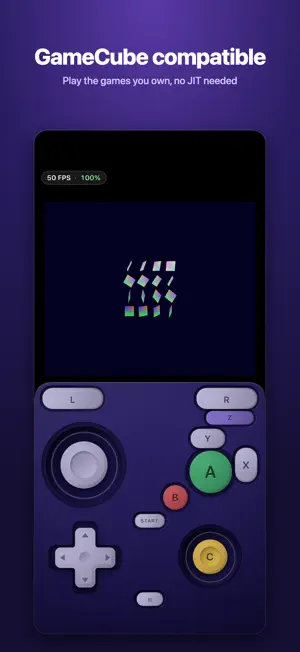

About Iridia: Game Emulator
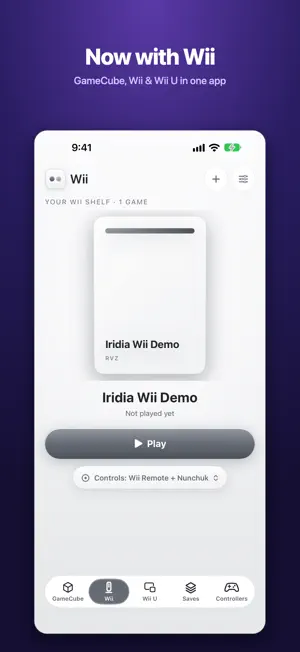
Iridia plays your own GameCube, Wii and Wii U games on iPhone and iPad. ONE SHELF FOR THREE CONSOLES Your games sit on a glass shelf, one for each system. Give a game your own cover picture or keep the built-in case design. Switch between GameCube, Wii and Wii U with a tap or a swipe along the tab bar. Pick up right where you left off, or start from the title screen. WII (NEW) • Touch controls for the Wii Remote, Nunchuk, sideways Wii Remote and Classic Controller • Aim the pointer by touch, or by tilting your device • Shake, recenter, and controls and layouts saved for each game • Plays RVZ, WIA, ISO, WBFS, GCZ and CISO, plus homebrew • Real Wii Remotes can't connect, because iOS doesn't allow it. Use the touch controls or a game controller. • Wii games need more power than GameCube games. Wii games run best on recent iPhones and iPads. GAMECUBE • Upscaling up to 8x on newer devices, with a live panel for frame rate and resolution • Save states, memory cards and settings for each game • Touch controls you can move and resize, or a game controller • Plays best on newer phones WII U (EXPERIMENTAL) • Several screen layouts, including both screens at once • Draw on the GamePad screen with your finger or Apple Pencil • Motion controls • Plays WUA files, title folders and homebrew (RPX) • Needs 8 GB of memory: iPhone 15 Pro or later, iPad with M1 or later, or iPad mini with A17 Pro. Games may run slowly or show glitches. CONTROLLERS MFi, Xbox, PlayStation and Switch controllers are supported, with remapping. FREE TO TRY Every time you start a game you get a free play session: 10 minutes for GameCube and Wii, 20 minutes for Wii U. Time in the pause menu doesn't count, and you can start as many sessions as you like. One purchase unlocks unlimited play on all three, and on any consoles added in the future. No subscription, no ads. YOUR FILES Iridia includes no games, keys, BIOS or firmware. Add your own legally obtained game files through the Files app, or choose a folder such as Downloads and Iridia checks it for new games. ZIP and 7Z files are unpacked for you. OPEN SOURCE Iridia is open source, based on the Dolphin and Cemu emulators. Source: github.com/IridiaEmu/iridia Iridia is not affiliated with or endorsed by Nintendo. Some games contain flashing lights.
What’s new
Version 1.2.0 · Updated November 20, 2026
Wii support is here. • A new Wii shelf next to GameCube and Wii U, with the same layout and smooth Liquid Glass switching between them • Touch controls for the Wii Remote, Nunchuk, sideways Wii Remote and Classic Controller, with pointer aiming by touch or tilt, plus game controller support • Plays RVZ, WIA, ISO, WBFS, GCZ and CISO Wii discs, plus homebrew • Per-game control layouts for GameCube and Wii • Faster importing for ZIP and 7Z files, with a progress bar and Cancel • One purchase now unlocks GameCube, Wii and Wii U, and any consoles added in the future • Many fixes and improvements
App privacy
The developer, ANDREA,MARGARET ZAPATKA, reported these privacy practices to Apple.
Data Not Collected
The developer does not collect any data from this app.
Alternatives to Iridia: Game Emulator
Looking for apps like Iridia: Game Emulator? Here are 6 similar apps on the App Store. The highest rated is Snapemu - Retro Emulator (5.0/5), and all 6 are free to download.
-
 Combo: Dual-Screen Emulator
-
 Fold Retro: Game Emulator
-
 Snapemu - Retro Emulator
5.0
-
 RetroKit: Game Emulator
5.0
-
 Retro Console Player
5.0
-
 TwinPlay: Dual-Screen Emulator
5.0
| App | Rating | Price | Last updated | Compare |
|---|---|---|---|---|
| Iridia: Game Emulator | 5.0 / 5 (2 ratings) | Free | November 20, 2026 | |
| Combo: Dual-Screen Emulator | – | Free | Nov 12, 2026 | Compare |
| Fold Retro: Game Emulator | – | Free | Oct 22, 2026 | Compare |
| Snapemu - Retro Emulator | 5.0 / 5 (1) | Free | Oct 15, 2026 | Compare |
| RetroKit: Game Emulator | 5.0 / 5 (2) | Free | Nov 11, 2026 | Compare |
| Retro Console Player | 5.0 / 5 (1) | Free | Nov 17, 2026 | Compare |
| TwinPlay: Dual-Screen Emulator | 5.0 / 5 (4) | Free | Nov 17, 2026 | Compare |