

TwinPlay: Dual-Screen Emulator
Charlie Rodriguez Garcia Entertainment iPhoneiPadiPod touch
TwinPlay: Dual-Screen Emulator is a free Entertainment app for iPhone and iPad by Charlie Rodriguez Garcia. Rated 5.0/5 from 4 ratings. Requires iOS 16.0.
- Rating
- 5.0
- 4 ratings
- Price
- Free
- on the App Store
- Size
- 69 MB
- Age 4+
- Updated
- Nov 17
- 2026 · v1.4.2
Screenshots
Save to Pinterest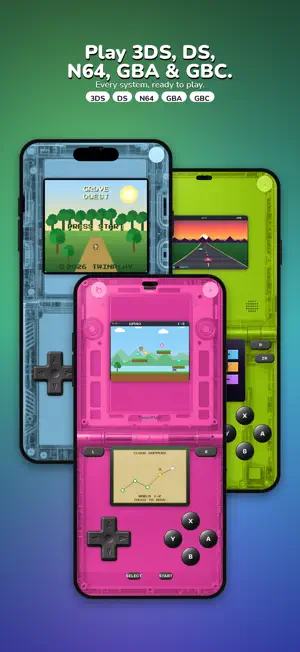

About TwinPlay: Dual-Screen Emulator
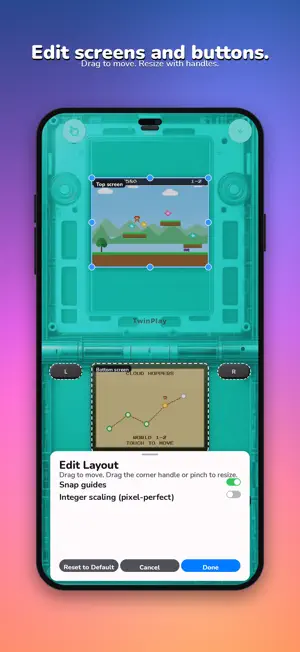
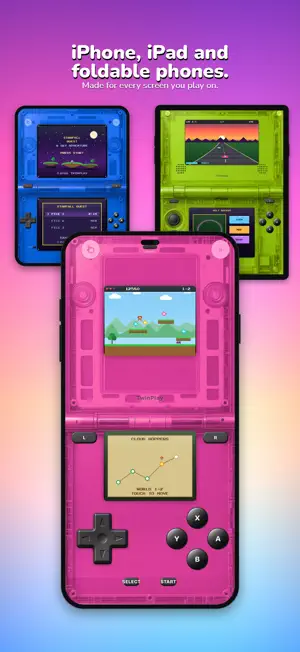
TwinPlay turns your iPhone into a dual-screen handheld: the game on the top screen and the touch screen on the bottom. On a foldable iPhone, the two screens sit on either side of the fold. It also plays Game Boy Advance, Game Boy and Game Boy Color games, and it works great on every iPhone. MADE FOR TWO SCREENS • Cheat codes you enter yourself: Action Replay DS, GameShark, CodeBreaker and Game Genie • Screenshots and gameplay videos with game sound, saved to Photos • Free one-tap cover finder for your library • Top screen and touch screen, in portrait or landscape • On a foldable iPhone, unfold it and the screens split right at the fold • The free Pearl White skin, a white Lite-style shell, puts the hinge right on the fold • Tap and drag on the bottom screen like a stylus • iPad is not supported CLOSED FOLDABLE: A CLASSIC HANDHELD • Fold the iPhone shut and Game Boy, Game Boy Color and Game Boy Advance games keep playing on the outer screen, in landscape, inside a full-screen classic handheld shell • Classic skin pack: Classic Gray, Slim Silver, Grape, Atomic Purple (translucent), Teal, Kiwi, Dandelion, Berry, Indigo, Glacier (translucent), Platinum and Spice Orange • Every layout and skin is just the default: move and resize every control, and pick any skin you like NO GAMES INCLUDED TwinPlay does not include any games or system files, and it does not download games. Add game files that you own, such as backups of your own cartridges, or free homebrew made by independent developers. EASY TO START 1. Put your game files in the Files app (for example, in Downloads or iCloud Drive). 2. In TwinPlay, tap + and choose Import Game Files… or Import a Folder…. 3. Tap a game to play. TwinPlay only looks for new games when you tap "Find New Games Now". It never scans your phone by itself. FEATURES • DS, GBA, Game Boy and Game Boy Color in one app • No BIOS files needed: a built-in BIOS is included • Dual-screen layouts for portrait, landscape and foldable iPhones • Touch controls made for phones: slide between buttons, press A+B together, diagonals on the D-pad, size and opacity options, and vibration • Touch-only mode for DS games played with the stylus • Works with MFi, Xbox and PlayStation controllers • Realistic skins inspired by classic handhelds • Game library with Cover Flow, cartridge view and title-screen view • Save states plus normal in-game saves • Custom layouts, free: move and resize the screens and every on-screen button, with snap guides and integer scaling, saved per console and orientation • Home Screen widget: open your recent, favorite or most played games with one tap (iOS 17 or later) • Sharp, high-resolution 3D on newer iPhones • A clean glass design that fits right in with iOS BEST ON Works on iPhone with iOS 16 or later. Best on iPhone 13 or newer. GOOD TO KNOW DS emulation is still improving, and some games may not run, or may not run perfectly yet. You can report a game that does not work right from inside the app, and we use these reports to improve TwinPlay. TWINPLAY PLUS AND PRO (one-time purchases, no subscription) • Plus: all skins, library scenes, app icons and single-screen mode • Pro: everything in Plus, plus Cover Flow, custom BIOS, FPS meter, stick calibration, custom backgrounds, and no ads Restore your purchases on any of your iPhones with Restore Purchases. LEGAL TwinPlay is an independent app. It is not affiliated with, endorsed by, or sponsored by Nintendo or Apple. Product names are used only to describe compatibility and belong to their owners. TwinPlay does not include, download, or link to copyrighted games or BIOS files. Questions or problems? Email [email protected].
What’s new
Version 1.4.2 · Updated November 17, 2026
New features and bug fixes.
App privacy
The developer, Charlie Rodriguez Garcia, reported these privacy practices to Apple.
Data Used to Track You
The following data may be used to track you across apps and websites owned by other companies:
- Location: Coarse Location
- Identifiers: Device ID
- Usage Data: Product Interaction, Advertising Data
Data Not Linked to You
The following data, which may be collected but is not linked to your identity, may be used for the following purposes:
- Location: Coarse Location
- Identifiers: Device ID
- Usage Data: Product Interaction, Advertising Data
- Diagnostics: Crash Data, Performance Data, Other Diagnostic Data
Used for: Third-Party Advertising, Analytics
Alternatives to TwinPlay: Dual-Screen Emulator
Looking for apps like TwinPlay: Dual-Screen Emulator? Here are 6 similar apps on the App Store. The highest rated is Omega EMU: Retro Emulator (5.0/5), and all 6 are free to download.
-
 Omega EMU: Retro Emulator
5.0
-
 Zenulator
5.0
-
 RetroKit: Game Emulator
5.0
-
 Fold Retro: Game Emulator
-
 eNDS Retro
5.0
-
 Retro Console Player
5.0
| App | Rating | Price | Last updated | Compare |
|---|---|---|---|---|
| TwinPlay: Dual-Screen Emulator | 5.0 / 5 (4 ratings) | Free | November 17, 2026 | |
| Omega EMU: Retro Emulator | 5.0 / 5 (1) | Free | Sep 25, 2026 | Compare |
| Zenulator | 5.0 / 5 (1) | Free | Oct 1, 2026 | Compare |
| RetroKit: Game Emulator | 5.0 / 5 (2) | Free | Nov 11, 2026 | Compare |
| Fold Retro: Game Emulator | – | Free | Oct 22, 2026 | Compare |
| eNDS Retro | 5.0 / 5 (1) | Free | Oct 28, 2026 | Compare |
| Retro Console Player | 5.0 / 5 (1) | Free | Nov 17, 2026 | Compare |