

Book Pad: EPUB & PDF Reader
yongho choi Book iPad
Book Pad: EPUB & PDF Reader is a free Book app for iPad by yongho choi. Requires iOS 18.0. Updated November 21, 2026.
- Price
- Free
- on the App Store
- Size
- 55 MB
- Age 4+
- Updated
- Nov 21
- 2026 · v1.4
Screenshots
Save to Pinterest
About Book Pad: EPUB & PDF Reader
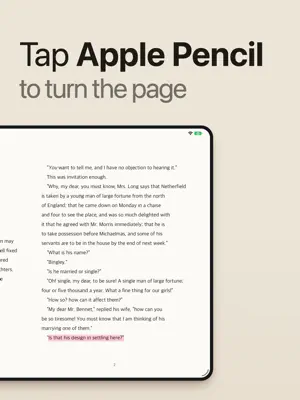
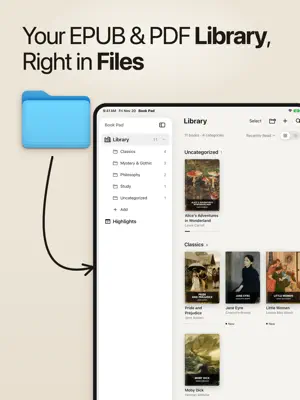
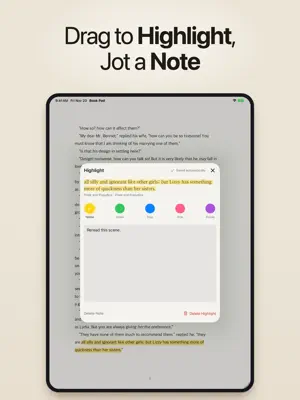
Read hands-free: double-tap your Apple Pencil, or press a Bluetooth remote or foot pedal, and Book Pad turns the page without you touching your iPad. Book Pad opens the EPUB and PDF files you already own. Highlight as you read, and every highlight from every book ends up in one place. Book Pad needs no account. TURN PAGES WITH APPLE PENCIL • Double-tap Apple Pencil (2nd generation) or Apple Pencil Pro to go to the next page. You can set it to go back instead. • On Apple Pencil Pro, you can also set squeeze to turn pages. • Book Pad follows the gestures you set in the app, even when the system double-tap setting is Ignore. • Pick how pages turn: slide, fade, or no animation. OTHER WAYS TO TURN THE PAGE • Use the arrow keys, Page Up and Page Down, or Space. Bluetooth page-turners that send key presses work too. • Tap the left or right side of the screen. • In Settings > Page Turning > Remotes & Gestures, choose which input goes forward or back. YOUR FILES ARE YOUR LIBRARY • Book Pad's folder in the Files app is your library, and each subfolder becomes a category. • Make your own categories too. Drag a book onto one, or add several at once. The files don't move. • Import many books at once from Files, or send them from another app with the share sheet. • Move or rename a book and your reading position and highlights stay with it. • If a file goes missing, Book Pad keeps its highlights. If you clear them, Recently Deleted holds them for 30 days. HIGHLIGHT WITHOUT A MENU • Press on a word, drag across the passage, and lift. The highlight appears right away. • Choose from five colors and add a note to any highlight. • Highlighting works in EPUBs and in PDFs with selectable text, including PDFs that block copying. EVERY HIGHLIGHT IN ONE PLACE • Search the text of all your highlights and notes at once. • Filter by book or color, or show only highlights with notes. • Group highlights by book or color, and sort them by newest, oldest, or position in the book. • Tap a highlight to jump back to that spot in the book. • While you read, open this book's highlights and notes in a side panel. EXPORT AND TAKE THEM WITH YOU • Export one book or your whole collection as Markdown, then save it to Files or share it. • Save a copy of a PDF with your highlights and notes in it. • Next to each book, Book Pad keeps a small .notes.json file. Copy it along with the book to another iPad running Book Pad and your highlights come too. LISTEN • Book Pad reads EPUBs and PDFs aloud from the page you're on and marks each sentence. Try the optional high-quality voice free on one book. Book Pad Pro includes it. READ YOUR WAY • Light, sepia, and dark themes, or your own background and text colors. • Set the font, text size, bold text, margins, justification, and line, paragraph, letter, and word spacing. • Add your own .ttf or .otf fonts in Settings > My Fonts. • Read EPUBs page by page or as one continuous scroll. • In landscape, read two pages side by side, or switch to one page at a time. • Table of contents, search inside the book, and footnotes that open right on the page. • Opens fixed-layout EPUBs and vertical-text books, which turn right to left. • PDFs get an outline, text search, page jumps, and zoom. PRIVACY AND ADS • No sign-up. Book Pad has no server. Your books stay on your iPad, and so do highlights and notes unless you turn on iCloud Sync. • The free version shows a small ad at the bottom of the Library and, now and then after you import or export, a full-screen ad. There are no ads while you read. Book Pad Pro, a one-time in-app purchase, removes them. • Ads come from Google AdMob. You choose whether to allow tracking, and declining gives non-personalized ads. GOOD TO KNOW • Book Pad opens your own files. It doesn't sell books. • DRM-protected books and password-protected PDFs can't be opened. • Deleting the app also deletes the Book Pad folder on your iPad, so keep a copy of your books somewhere else.
What’s new
Version 1.4 · Updated November 21, 2026
New in 1.4 • Sidebar: move between your library, categories, highlights and settings from a sidebar that slides in from the left. • Categories: create a category, select several books and add them at once, or drag a book onto a category. • Read aloud now starts from the page you are on, and reads numbers, units, money and abbreviations more naturally. • Choose the read-aloud voice and how the spoken sentence is marked in Settings. • Fonts you import can now be the reading font. • My Notes shows the page of each highlight. • A smaller progress bar while reading, and smoother animations throughout.
App privacy
The developer, yongho choi, reported these privacy practices to Apple.
Data Used to Track You
The following data may be used to track you across apps and websites owned by other companies:
- Identifiers: Device ID
Data Linked to You
The following data, which may be collected and linked to your identity, may be used for the following purposes:
- Location: Coarse Location
- Identifiers: Device ID
- Usage Data: Product Interaction, Advertising Data
Used for: Third-Party Advertising, Developer’s Advertising or Marketing, Analytics, App Functionality
Data Not Linked to You
The following data, which may be collected but is not linked to your identity, may be used for the following purposes:
- Diagnostics: Performance Data, Other Diagnostic Data, Crash Data
Used for: Third-Party Advertising, Developer’s Advertising or Marketing, Analytics, App Functionality
Alternatives to Book Pad: EPUB & PDF Reader
Looking for apps like Book Pad: EPUB & PDF Reader? Here are 6 similar apps on the App Store. The highest rated is Librune: EPUB & PDF Reader (4.0/5), and all 6 are free to download.
-
 FinnBook: EPUB & eBook Reader
-
 Mekuru: Japanese Manga Reader
-
 Koofy Reader - EPUB, TXT & TTS
-
 Librune: EPUB & PDF Reader
4.0
-
 Versa: Comic & Manga Reader
-
 PlotReader
| App | Rating | Price | Last updated | Compare |
|---|---|---|---|---|
| Book Pad: EPUB & PDF Reader | – | Free | November 21, 2026 | |
| FinnBook: EPUB & eBook Reader | – | Free | Nov 6, 2026 | Compare |
| Mekuru: Japanese Manga Reader | – | Free | Nov 24, 2026 | Compare |
| Koofy Reader - EPUB, TXT & TTS | – | Free | Nov 16, 2026 | Compare |
| Librune: EPUB & PDF Reader | 4.0 / 5 (3) | Free | Nov 11, 2026 | Compare |
| Versa: Comic & Manga Reader | – | Free | Oct 31, 2026 | Compare |
| PlotReader | – | Free | Aug 10, 2026 | Compare |