

Brizemi: Brain Dump Planner
Ertan GURKAN Productivity iPhoneiPadiPod touchApple Watch
Brizemi: Brain Dump Planner is a free Productivity app for iPhone and iPad by Ertan GURKAN. Requires iOS 26.0. Updated November 2, 2026.
- Price
- Free
- on the App Store
- Size
- 45 MB
- Age 4+
- Updated
- Nov 2
- 2026 · v1.2.13
Screenshots


About Brizemi: Brain Dump Planner
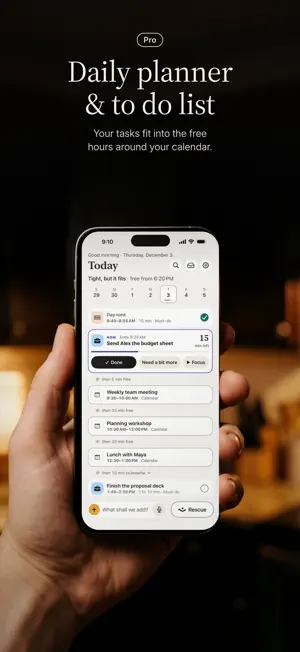
Brizemi is a calm day planner app for iPhone, iPad and Mac: you say or type what's on your mind, it fits those tasks into the free hours around your calendar, and when the day slips, Rescue re-plans the rest in one tap. No account. Plans break: a meeting ran over, school called. Tap Rescue and Brizemi rebuilds the rest of your day around what can't move. You see the new day first; one tap undoes it. No red, no guilt pile. RESCUE, YOUR WAY • Keep the essentials: important things stay put, the rest shifts. • Lighter day: fewer things today, the rest waits in Parked. • Move it to tomorrow: today keeps only meetings and essentials. Rescue is always free and works offline, also from the Today widget, the Lock Screen, Control Center or Siri: "Rescue my day in Brizemi". HOW YOUR DAY GETS MADE 1. Dump: talk or type whatever is on your mind, or add a photo. Brizemi turns it into cards. 2. Shape: sort the cards into Must, Could and Park. 3. Plan: get a realistic day around your calendar, with breathing room between things. 4. Today: one line tells you how the day looks: "Tight, but it fits · free from 6:45 PM". The Now card shows the minutes left; tap "Need a bit more" to see what each choice does first. FROM A PHOTO (PRO) • Scan a paper list or choose a screenshot: each line becomes a card you can check and fix. • An invitation or a poster with one date becomes one task with its day and time, and the widget counts down to it. EVERYTHING IN ONE DAY PLAN • Focus: Pomodoro-style 25+5 or 50+10 minute rounds, with or without a task, sized to fit before your next meeting. • A Matrix in Parked: tasks in four boxes by importance and due date. • Routines: your repeating tasks' week on one screen. No streaks, no points. • Notes: notes that never go into the plan. Make one a task whenever you like. YOUR CALENDAR, YOUR REMINDERS, YOUR DAYS • Reads your calendar only, and helps you add Google or Outlook calendars. • Bring from Reminders (Pro): turn what's waiting there into cards in one tap. • Share a WhatsApp voice note; Brizemi turns it into text and cards. • Simple repeats (free: every day, weekdays, weekly), and Shop mode with your opening hours. IT LEARNS HOW LONG THINGS REALLY TAKE (PRO) After a few days, Brizemi sets aside time based on how your days actually go. A plan you accepted never changes on its own. COUNTDOWN WIDGET: COMING UP Days left until your dated things and calendar days, on your Home and Lock Screen, now in a large size too. Free. Choose "Show in widget" in a dated task's menu to put it first. PRIVATE BY DESIGN • No account, no sign-up. Your plans stay on your devices, and in your own iCloud when you sync, backed up daily. We never see them. • Your voice and photos are read on your device, where cards are made too. Audio and photos are never stored. • Calendar and Reminders access are optional, and Brizemi never moves your events. FREE AND PRO Today is free; tomorrow and after is Pro. Free, always: Rescue, Today, Park, adding things one at a time and free gaps, moves from notifications, your day and Coming up in widgets, simple repeats, Focus rounds, the Matrix, Routines, Notes, and What you got done. Your first planned day is free too. Pro: plans from talking or a photo any day, Plan tomorrow, learned lengths, the week, Reminders, midday and morning reminders, Live Activity, Done in the widget, Siri and the Apple Watch app. Pro comes as a yearly plan, a monthly plan, or a one-time lifetime purchase. There is no free trial: payment is charged to your Apple Account when you buy, and you see the exact price before you pay. A subscription renews automatically unless it is canceled at least 24 hours before the end of the current period. Manage or cancel it in Settings > your name > Subscriptions. Terms of Use: https://www.apple.com/legal/internet-services/itunes/dev/stdeula/ Privacy Policy: https://brizemi.com/privacy-en Brizemi is a planning tool, not a medical device or treatment.
What’s new
Version 1.2.13 · Updated November 2, 2026
What's new: • Your 2026: from 1 December, look back at your year. Hours planned, things done, your busiest month, all worked out on this device. • Day chips while you type: tap Tomorrow and it goes to that day. • Easier adding: four big ways in the + window. Search now finds settings and features too, and opens when you pull Today down. • Next only: if you like, Today shows just what's on now and what comes next. • Add by typing from the Lock Screen and from a notification. Reminders in the same minute arrive as one.
App privacy
The developer, Ertan GURKAN, reported these privacy practices to Apple.
Data Not Collected
The developer does not collect any data from this app.
Alternatives to Brizemi: Brain Dump Planner
Looking for apps like Brizemi: Brain Dump Planner? Here are 6 similar apps on the App Store. The highest rated is Due Something: Pokes to Remind (5.0/5), and all 6 are free to download.
-
 NotesMD
-
 Unfog: Brain Dump & To-Do List
-
 Hobba: To-Do List & Kanban
-
 Due Something: Pokes to Remind
5.0
-
 Aethyr: ADHD Brain Dump
-
 Nombox: Cooking Assistant
5.0
| App | Rating | Price | Last updated | Compare |
|---|---|---|---|---|
| Brizemi: Brain Dump Planner | – | Free | November 2, 2026 | |
| NotesMD | – | Free | Nov 4, 2026 | Compare |
| Unfog: Brain Dump & To-Do List | – | Free | Aug 27, 2026 | Compare |
| Hobba: To-Do List & Kanban | – | Free | Nov 3, 2026 | Compare |
| Due Something: Pokes to Remind | 5.0 / 5 (2) | Free | Oct 27, 2026 | Compare |
| Aethyr: ADHD Brain Dump | – | Free | Nov 2, 2026 | Compare |
| Nombox: Cooking Assistant | 5.0 / 5 (7) | Free | Nov 2, 2026 | Compare |