

Hobba: To-Do List & Kanban
Sebastian Rinn Productivity iPhoneiPadiPod touchMacApple Watch
Hobba: To-Do List & Kanban is a free Productivity app for iPhone and iPad by Sebastian Rinn. Requires iOS 17.0. Updated September 27, 2026.
- Price
- Free
- on the App Store
- Size
- 43 MB
- Age 4+
- Updated
- Sep 27
- 2026 · v1.5
Screenshots


About Hobba: To-Do List & Kanban
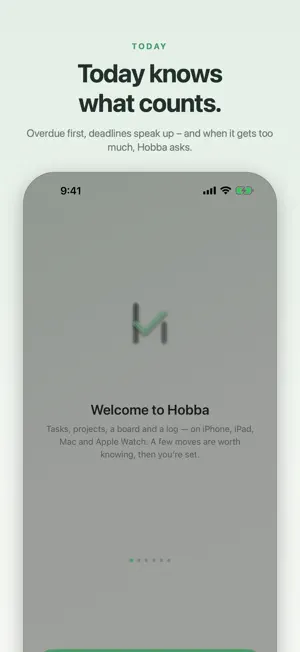
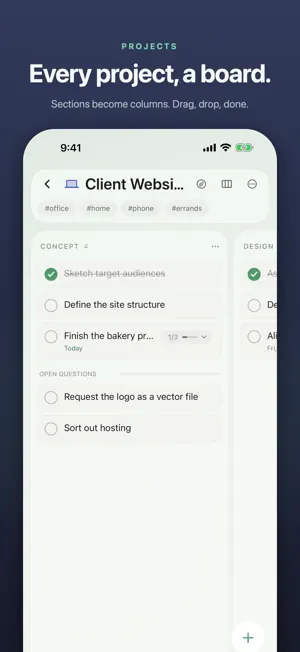
Hobba clears your head instead of filling it. Four lists that sort themselves — Inbox, Today, Upcoming, Someday — and a log that shows what you got done. What slips doesn’t vanish into nothing: anything overdue sits at the top of Today the next morning. PROJECTS THE WAY YOU NEED THEM • Projects with sections, favourite tiles and colours of their own • Three views, switchable per list: a list, a kanban board, or a grid of tiles • On the board: drag columns, move cards, set dividers • Tags that tasks inherit from their project — and hand back when they move; every tag gets its own list in the overview • Your own smart lists from tag, project and time range — selectable in widgets too • Templates: set up a recurring project once, create it again and again • Trash: anything deleted can be brought back for 30 days TOGETHER • Share a project: an invitation by message, and both of you see and edit the same thing — the groceries at home, the board at work • Attachments come along • Pick “read only” when inviting: then the other side really cannot change a thing • It runs through your own private iCloud — no account with us EVERYTHING IN ITS TIME • Pick a task up and drop it: a bar opens along the edge — date, project, focus, tags, delete; behind Upcoming, a calendar across five weeks • “One thing at a time”: 5, 15 or 25 minutes on a single task, with a timer on the Lock Screen • Repeats: “every week”, “every two weeks”, “every second Tuesday of the month” or “three days after you tick it off” • Reminders with a time that move along when the task changes day • Reminders at a place, on arriving or on leaving — and every place appears in the overview with what is waiting there • Calendar events right inside Today and Upcoming, as a band with the gaps between them • Upcoming as a week grid if you prefer • “Evening” as a pane of its own — and from a time you choose, Today asks once what is left • What you finish stays, struck through, and moves into the log when the day turns ON EVERY DEVICE • iPhone, iPad (sidebar, multitasking), Mac (every project in its own window) and Apple Watch • Complications for the watch face: how much is still open today • Widgets in every size — Today, projects, progress, tick off right in the widget • Appearance, accent colour and background are yours to choose — right into the widgets and onto the watch face • Sync through iCloud: optional, and off by default QUICK WAYS IN • Just write it down: “dentist tomorrow at 10” — the day and the reminder set themselves (can be switched off) • Dictation: the microphone in the entry sheet turns speech into text on your device; with Apple Intelligence one sentence becomes several tasks (iOS 26 and later) • Tasks from photos, PDFs and text — read on your device, and only what you tap is kept • Let the Inbox be sorted: a suggestion for every task about which project it belongs to • Paste a list, get several tasks — each line with a date of its own • Import from Apple Reminders — pick a list, pick a project, done • Share sheet: turn anything, from any app, into a task • Siri and Shortcuts • Dictation on your wrist PAY ONCE, DONE Hobba is free to download and free to use at its core — with up to three projects. The bigger things (unlimited projects, board and tiles, repeats, Watch, all widgets, attachments, Apple Intelligence) are unlocked for good by a single purchase. No subscription. PRIVATE No account, no ads, no tracking, no analytics services. Your data lives on your device — and, if you switch sync on, in your own private iCloud. Nowhere else. Whatever Hobba recognises — spoken, photographed, suggested — it recognises on your device. Hobba is fully available in German, English, French and Japanese.
What’s new
Version 1.5 · Updated September 27, 2026
You can now drag and drop tasks — a bar opens the moment you pick one up. On top of that, a rebuilt Appearance with more colours, widgets that fill a whole Home Screen page, and Hobba speaks Japanese. DRAG INSTEAD OF TAP Pick up a task and a bar appears along the bottom: Date, Project, Focus, Tags and Delete. Move onto one of the fields and what lies behind it grows upwards — under Date that is Today, Evening, Tomorrow, Someday and Upcoming. Behind Upcoming you now get five weeks at once: a dot under the figure tells you where something already sits, and past days accept nothing. Letting go is enough, and a tap takes it back. It works with several selected tasks at once as well. On iPad the bar sits along the right edge in landscape, on Mac vertically beside the window — and with a mouse or trackpad on iPad the drag now starts with no wait at all. What you pick up follows your finger without lagging behind. MORE COLOURS, FEWER MENUS Settings › Appearance has been rebuilt: appearance, style and widgets are switches instead of menus. On top of that, six new backgrounds, ten accent colours and a picker for one of your own, separate pages for the icon and the background, and a preview that shows every choice at once. Your accent colour no longer stops at the app either: the widgets, the Lock Screen and the watch all carry the same shade. And “Minimal” now keeps your background instead of clearing it away. PROJECTS WITH ONE SWIPE Swipe a project row in the overview to the left: the glass draws back and frees a “•••” — favourite, appearance, share and delete. ONE THING AT A TIME On the Mac, focus no longer lies over everything; it opens a small window of its own, so you carry on working beside it. And the fifteen minutes are back: 5, 15 or 25 are there to choose everywhere. IT KEEPS MOVING Push the same task away from today for the fourth time and a line appears in the opened card: “Postponed 4 times already. Break it up or set it aside?” Two handles beside it. No sound, no sheet. WIDGETS THAT FILL A WHOLE PAGE From iOS 27 on, Today (large), Upcoming, Tasks and the new project board also come in a size that fills an entire Home Screen page: every event of the day instead of two, twice as many task rows — and you can tick things off without opening the app. On iPad the same four also come in the wide format, in two columns. And you can now change the size right on the Home Screen: nine of the ten widgets take it. The new project board shows every list with its progress. JAPANESE The whole interface is now available in Japanese as well, and titles are read the same way there. That makes the app fully available in German, English, French and Japanese. ALSO The “Add task” shortcut now takes your text the way the entry field would: “buy milk tomorrow at 6pm” gets a day and a reminder. On Apple Watch Ultra, the Action button can open a new task. Empty lists now tell you how they fill up. And when iOS rebuilds its search index, Hobba fills it again straight away. FIXED A task with “Saturday” in its title quietly got a reminder at twelve noon. A German title containing “hier” was given yesterday’s date. In French, times like “10h” and “14 heures” were read over. Ticking something off the overdue block in Today made the remaining overdue tasks count as due today. On iPhone the search field sat behind the Dynamic Island. In the overview a dropped task could land in the wrong list after scrolling, and a project could not be picked up in the top third. On iPad the dragged “+” created nothing in the week grid. An open sheet now ends a running drag. And leaving a board or the week grid for the overview no longer costs a pause.
App privacy
The developer, Sebastian Rinn, reported these privacy practices to Apple.
Data Not Collected
The developer does not collect any data from this app.
Alternatives to Hobba: To-Do List & Kanban
Looking for apps like Hobba: To-Do List & Kanban? Here are 6 similar apps on the App Store. The highest rated is Pop - Paste, Organize, Perform (5.0/5), and all 6 are free to download.
-
 Finito - Task Manager
-
 TidyCards - Awesome Kanban
-
 Tasks: To-Do List & Reminders
-
 Hense: Kanban Task Board
-
 Just Todo: Simple To Do List
-
 Pop - Paste, Organize, Perform
5.0
Pop - Paste, Organize, Perform
5.0
| App | Rating | Price | Last updated | Compare |
|---|---|---|---|---|
| Hobba: To-Do List & Kanban | – | Free | September 27, 2026 | |
| Finito - Task Manager | – | Free | Jun 11, 2026 | Compare |
| TidyCards - Awesome Kanban | – | Free | Sep 3, 2026 | Compare |
| Tasks: To-Do List & Reminders | – | Free | Aug 10, 2026 | Compare |
| Hense: Kanban Task Board | – | Free | Aug 25, 2026 | Compare |
| Just Todo: Simple To Do List | – | Free | Sep 15, 2024 | Compare |
| Pop - Paste, Organize, Perform | 5.0 / 5 (6) | Free | May 24, 2026 | Compare |