

MyReader: PDF Reader & Notes
MEHMET ALI ISSEVER Productivity iPhoneiPadiPod touch
MyReader: PDF Reader & Notes is a free Productivity app for iPhone and iPad by MEHMET ALI ISSEVER. Requires iOS 17.4. Updated November 26, 2026.
- Price
- Free
- on the App Store
- Size
- 13 MB
- Age 4+
- Updated
- Nov 26
- 2026 · v1.0.3
Screenshots
Save to Pinterest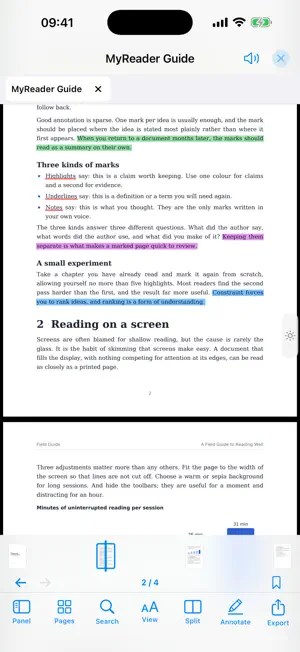

About MyReader: PDF Reader & Notes
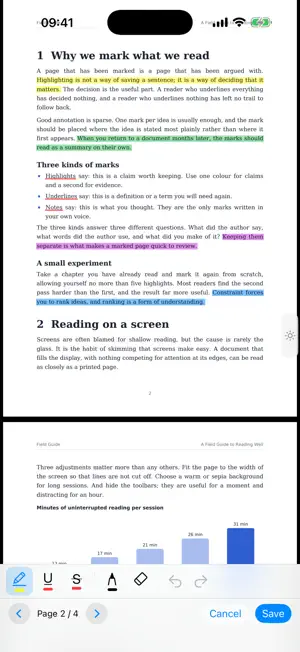
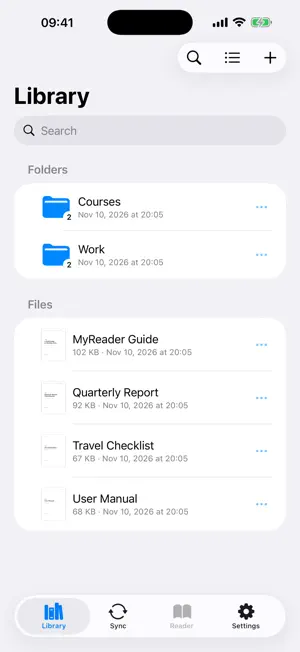
MyReader is a fast, private PDF reader for iPhone and iPad, built for people who read long documents and want to find things again. READ COMFORTABLY • Continuous, page-by-page, horizontal, and two-page book layouts • Fit to width or fit to page; White, Sepia, Gray, and Night themes • Brightness and warm-tone panel that slides in from the edge • Tabs for several open PDFs, and a split view to read two side by side • Page thumbnails, bookmarks, table of contents, and go-to-page • Full-screen reading with one tap ANNOTATE • Highlight in four colors, underline, strike through, and add notes • Draw with Apple Pencil or your finger; undo and redo • See all annotations in one panel and export them as a summary • Save annotations into the PDF so they open in other apps • Highlights made in other apps are imported automatically FIND ANYTHING • Search inside every PDF in your library at once • Exact phrase, all words, or any word; file name or content • Text recognition (OCR) makes scanned pages searchable, on your device BRING IN YOUR FILES • Scan documents with the camera and turn them into PDFs • Make a single PDF from your photos • Upload and download files from a computer's browser on the same Wi-Fi network, protected by a PIN • Open ZIP, 7z, TAR, GZ, BZ2, and XZ archives ORGANIZE • Library with folders, list, grid, and compact views • Rename, move, copy, pin, multi-select, drag and drop • Unread indicator and filter; share a folder as a ZIP file • Opens videos, audio, images, text, and Office documents too EDIT PAGES • Rotate, delete, duplicate, reorder, crop, and split pages • Merge PDFs; open password-protected PDFs; print LISTEN AND TRANSLATE • Read aloud with system voices, skipping headers and page numbers • Translate selected text; on iOS 18 and later, listen in another language SYNC AND VERSIONS • Download from your own WebDAV server or a folder you pick in Files • When a new version of a document arrives, see which pages changed and carry your annotations forward PRIVATE BY DESIGN • No account, no ads, no analytics, no tracking • Your files and annotations stay on your device Works on iPhone and iPad, with multiple windows and keyboard shortcuts on iPad. Available in English and Turkish.
What’s new
Version 1.0.3 · Updated November 26, 2026
Improved version comparison and fixed some bugs.
App privacy
The developer, MEHMET ALI ISSEVER, reported these privacy practices to Apple.
Data Not Collected
The developer does not collect any data from this app.
Alternatives to MyReader: PDF Reader & Notes
Looking for apps like MyReader: PDF Reader & Notes? Here are 6 similar apps on the App Store. The highest rated is Latch: App Blocker & Focus (5.0/5), and all 6 are free to download.
-
 PDF Reader & Tools: PDFKit
-
 Latch: App Blocker & Focus
5.0
-
 SoloPDF
-
 FolikPDF
-
 LocalRAG! - AI Document Chat
1.0
-
 Secure Reader for BlackBerry
4.5
| App | Rating | Price | Last updated | Compare |
|---|---|---|---|---|
| MyReader: PDF Reader & Notes | – | Free | November 26, 2026 | |
| PDF Reader & Tools: PDFKit | – | Free | Nov 7, 2026 | Compare |
| Latch: App Blocker & Focus | 5.0 / 5 (7) | Free | Aug 17, 2026 | Compare |
| SoloPDF | – | Free | Nov 23, 2026 | Compare |
| FolikPDF | – | Free | Nov 23, 2026 | Compare |
| LocalRAG! - AI Document Chat | 1.0 / 5 (2) | Free | Oct 15, 2026 | Compare |
| Secure Reader for BlackBerry | 4.5 / 5 (2) | Free | Oct 1, 2026 | Compare |