

FlickMe: One-Hand Keyboard
Bitta, Inc. Utilities iPhoneiPadiPod touch
FlickMe: One-Hand Keyboard is a paid Utilities app for iPhone and iPad by Bitta, Inc. Requires iOS 17.0. Updated November 20, 2026.
- Price
- 2.99 USD
- on the App Store
- Size
- 154 MB
- Age 4+
- Updated
- Nov 20
- 2026 · v1.2.2
Screenshots
Save to Pinterest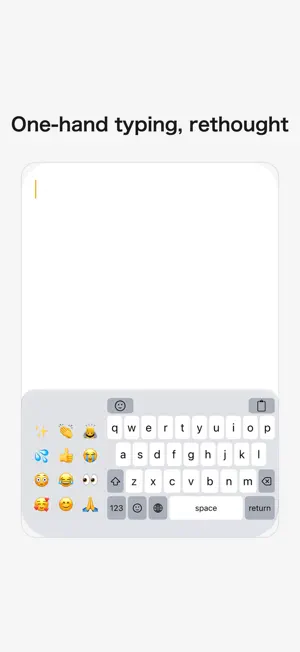
About FlickMe: One-Hand Keyboard
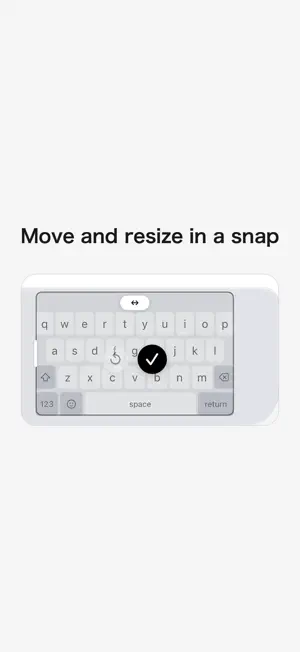
FlickMe is a Japanese flick keyboard for typing with one thumb. KEYS - Keys appear in the bottom-right corner at a fixed size. - On iPhone Duo, they stay in the same place whether the device is folded or unfolded. - Swipe outside the keys to move them left or right. - Auto left/right (beta, iPhone Duo folded): the keyboard moves to the side of the hand holding it. - Customize key size, position, colors, lettering, key sounds, haptic strength, and the emoji shown beside the keys. INPUT - Kana-kanji conversion and predictions run entirely on the device. - Split the reading to convert only part of it. - Halfwidth katakana, circled numbers, and other symbols appear as candidates. - Words from your iPhone user dictionary appear as candidates. - Long-press the space key and slide to move the cursor. - Switch to numbers, letters, or flick-only input. - Voice input in Japanese and English. PASTE AND SAVED PHRASES - Paste with one tap. - Long-press paste to pick from your saved phrases. Add phrases and images in the app. UNFOLDED (iPhone Duo) - Optional two-hand layout with keys on both sides. PRIVACY - The keyboard makes no network connections. It does not send or store what you type or copy. - Full Access is used for paste, haptics, saved phrases, voice input, and key sounds. Typing works without it. - The app sends data only when you choose to: a hold recording for Auto left/right, or a conversion report you write. Neither identifies you. OPEN SOURCE AzooKeyKanaKanjiConverter (MIT) with its dictionary (Apache-2.0), and zenz-v3.2-xsmall (CC BY-SA 4.0). See Licenses in the app. Terms of use: https://app.notion.com/p/jetdaizu/3fe45a5c600c807b8666da99f84b5ad9
What’s new
Version 1.2.2 · Updated November 20, 2026
- Conversion is more accurate. Words that follow the previous sentence, and words with a missed small tsu or dakuten, now convert correctly. - When a word doesn't convert the way you expected, you can now report it from the app or the candidate bar. - You can now choose the emoji shown beside the keys. - You can now split the text you want to convert. - Symbols such as circled numbers and curly quotes now appear as candidates. - "n" and "?" can now also be typed by flicking down. - The customize screen is easier to read. - Halfwidth katakana now appears as a candidate.
App privacy
The developer, Bitta, Inc., reported these privacy practices to Apple.
Data Not Linked to You
The following data, which may be collected but is not linked to your identity, may be used for the following purposes:
- Other Data: Other Data Types
Used for: Analytics
Alternatives to FlickMe: One-Hand Keyboard
Looking for apps like FlickMe: One-Hand Keyboard? Here are 6 similar apps on the App Store. The highest rated is KumiKey: 自由に配置できるフリックキーボード (5.0/5), and all 6 are free to download.
-
 Parail: Split Screen Browser
-
 KumiKey: 自由に配置できるフリックキーボード
5.0
-
 パタログ
-
 Deflector ◇
4.0
-
 Farroom: Remote Desktop
5.0
-
 MozcCo - サイズ調整できる日本語キーボード
| App | Rating | Price | Last updated | Compare |
|---|---|---|---|---|
| FlickMe: One-Hand Keyboard | – | 2.99 USD | November 20, 2026 | |
| Parail: Split Screen Browser | – | Free | Nov 26, 2026 | Compare |
| KumiKey: 自由に配置できるフリックキーボード | 5.0 / 5 (1) | Free | Nov 24, 2026 | Compare |
| パタログ | – | Free | Nov 27, 2026 | Compare |
| Deflector ◇ | 4.0 / 5 (4) | Free | Nov 18, 2026 | Compare |
| Farroom: Remote Desktop | 5.0 / 5 (2) | Free | Nov 10, 2026 | Compare |
| MozcCo - サイズ調整できる日本語キーボード | – | Free | Nov 24, 2026 | Compare |