

Everydo: Recurring Tasks
Yury Paulouski Productivity iPhoneiPadiPod touch
Everydo: Recurring Tasks is a free Productivity app for iPhone and iPad by Yury Paulouski. Requires iOS 16.4. Updated November 24, 2026.
- Price
- Free
- on the App Store
- Size
- 11 MB
- Age 4+
- Updated
- Nov 24
- 2026 · v1.1.0
Screenshots
Save to Pinterest


About Everydo: Recurring Tasks
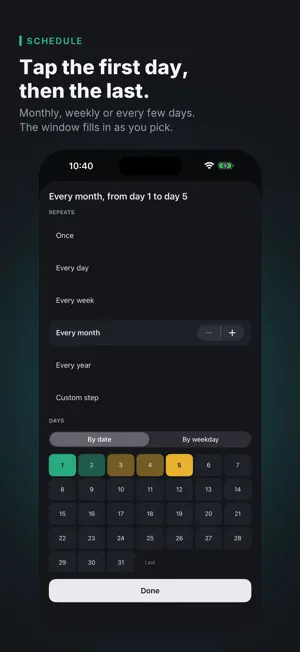
Rent is due between the 1st and the 5th. The bins go out Tuesday or Wednesday. The car needs an oil change sometime this month. Most reminder apps make you pick one date anyway, so the task either nags you early or shows up late. In Everydo a task is due over a window: the span of days when it is meant to be done. It appears when the window opens and stays on the list until you tick it off. A task that really does belong to one day gets a one-day window and behaves like an ordinary reminder. HOW MUCH TIME IS LEFT The day chip counts down to the start before the window opens, then to the end once it is open. You can see at a glance what has to happen today, what can wait until Friday, and what is already late. SCHEDULES THAT MATCH REAL LIFE Daily. Weekly, from one weekday to another. A set of weekdays, like Mon/Wed/Fri. Monthly, from day X to day Y, including "last day of month". Every N days as a rolling window. Yearly. Or the nth weekday of a month, for the first Monday of every month. Add a start date for a gym plan that begins next month, and an end date for a lease that runs to next June or a course of ten instalments. NOTHING GETS QUIETLY DROPPED A missed task does not disappear. It stays red on the list until you close it yourself, as Done late or Skipped, and both outcomes go into the task's timeline. Later you can see how a task has actually been going, not just that it is ticked today. THE WHOLE MONTH AT A GLANCE The calendar shades days by how many windows are open, turns a day red once something on it is overdue, and keeps the names out of the cells. Tap a day to see everything covering it, most urgent first. SPOT THE PATTERN The Rhythm tab gives every task a row and runs time left to right, over two weeks, two months or six months. This is where you notice that a task fires twice as often as you remembered, or that three of them keep landing in the same week. REMINDERS TIED TO THE WINDOW Get a reminder on the first day, the day before the start, on the last day, the day before the end, or every day the window is open, each at a time you choose. The notification has a Mark done action, so a task can be closed without opening the app. Once a day, a morning summary lists what is open, grouped by urgency; on a free day it says so instead of staying quiet. ON THE HOME SCREEN Two widgets: today's list, with a + that starts a new task, and a small counter of what is open today. IMPORT FROM YOUR CALENDAR Everydo reads the calendars already on your iPhone, iCloud, Google, Outlook or local, and offers their events. You tick the ones worth tracking; nothing is ticked for you, because a work calendar full of meetings does not belong in a task list. Nothing is written back to your calendar. SUBTASKS A task can hold a checklist, and the tile shows the progress. Every new window starts the list fresh. YOUR DATA STAYS ON YOUR PHONE No account, no sign-in, no cloud sync. Your tasks are never sent anywhere. Export a full backup to a file whenever you want, and restore it on another phone. The free version shows one banner above the tab bar. A one-time purchase removes it; nothing else changes.
What’s new
Version 1.1.0 · Updated November 24, 2026
• Long titles now wrap in the task editor, up to four lines, instead of scrolling sideways. • One-day tasks can have a time, such as the dentist at 14:30. The list, the calendar and the widget show it, and on the day itself the hour replaces the days counter. • Tapping a task opens a card with its dates, description, subtasks and reminders. Press and hold a task in the list to go straight to the editor.
App privacy
The developer, Yury Paulouski, reported these privacy practices to Apple.
Data Used to Track You
The following data may be used to track you across apps and websites owned by other companies:
- Identifiers: Device ID
Data Linked to You
The following data, which may be collected and linked to your identity, may be used for the following purposes:
- Location: Coarse Location
- Identifiers: Device ID
- Usage Data: Product Interaction, Advertising Data
Used for: Third-Party Advertising, Developer’s Advertising or Marketing, Analytics, App Functionality
Data Not Linked to You
The following data, which may be collected but is not linked to your identity, may be used for the following purposes:
- Diagnostics: Performance Data, Other Diagnostic Data, Crash Data
Used for: Third-Party Advertising, Developer’s Advertising or Marketing, Analytics, App Functionality
Alternatives to Everydo: Recurring Tasks
Looking for apps like Everydo: Recurring Tasks? Here are 6 similar apps on the App Store. The highest rated is FlowStack: Focus & Routine (4.9/5), and all 6 are free to download.
-
 Today Todo: Tasks & Habits
-
 Hey Kio - Reminders Until Done
-
 Nag: To Do List & Reminders
3.0
-
 Overdue: minimal to-do
-
 PracticePlan
-
 FlowStack: Focus & Routine
4.9
| App | Rating | Price | Last updated | Compare |
|---|---|---|---|---|
| Everydo: Recurring Tasks | – | Free | November 24, 2026 | |
| Today Todo: Tasks & Habits | – | Free | Nov 22, 2026 | Compare |
| Hey Kio - Reminders Until Done | – | Free | Nov 17, 2026 | Compare |
| Nag: To Do List & Reminders | 3.0 / 5 (1) | Free | Nov 19, 2026 | Compare |
| Overdue: minimal to-do | – | Free | Sep 14, 2026 | Compare |
| PracticePlan | – | Free | Oct 27, 2026 | Compare |
| FlowStack: Focus & Routine | 4.9 / 5 (8) | Free | Nov 16, 2026 | Compare |