

ShotRadar: Photo Pose Guide
Guanghui Wang Photo & Video iPhoneiPadiPod touch
ShotRadar: Photo Pose Guide is a free Photo & Video app for iPhone and iPad by Guanghui Wang. Requires iOS 17.0. Updated October 28, 2026.
- Price
- Free
- on the App Store
- Size
- 5 MB
- Age 4+
- Updated
- Oct 28
- 2026 · v1.1.1
Screenshots
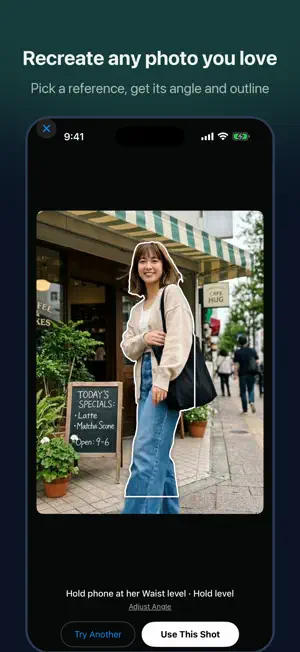


About ShotRadar: Photo Pose Guide
Love a photo you saw online and want the exact same shot? ShotRadar makes it effortless for whoever holds the phone to nail the picture for you. It works just like car parking sensors: guides show where to stand, while arrows and audio cues tell the person holding the camera where to step, how low to crouch, and how to tilt the phone. Once everything aligns, it snaps automatically. [ Recreate Any Reference Photo ] Pick a reference shot from your album or paste a web link. ShotRadar reconstructs the camera angle and pose outline to get the shot in three simple steps: 1. Match the Background: Clear prompts show whether to step forward, back, left, or right so your background matches the reference. 2. Frame the Pose: Silhouette outlines show the subject exactly where to stand and how much space to fill in the frame. 3. Perfect the Details: AI compares the live scene with your reference and gives concise instructions—like "raise right arm slightly" or "turn head left"—with optional voice cues. After the shot, it automatically crops to match the reference composition, keeping the uncropped original in your camera roll too. If a step feels close enough, simply tap "Next Step" anytime. [ No Reference? Scout the Location ] Snap the spot you're at. AI evaluates the setting, suggests framing ideas, and generates a preview to show you how the finished photo could look. Once you love the concept, follow the outline to shoot. Not quite right? Redraw previews with your first 3 redraws free. You can also search Instagram or Pinterest for location inspiration with one tap. [ Pay As You Go ] Real-time camera guidance runs directly on your device and is completely free. Cloud AI features use flexible credits: 2 credits per new scene, 1 credit per pose (burst shots in the same pose cost nothing extra), and 15 credits per AI preview. New users get 20 free credits, and your first AI preview is free. Whenever your balance dips below 6 credits, it tops back up to 6 daily. Credit packs are one-time purchases and never expire—ideal for occasional vacation shoots. [ Privacy First ] No account required and zero ads. Your photos stay strictly in your personal camera roll. Only when you give permission and actively use AI features are the relevant images sent for AI analysis, and our servers do not store them.
What’s new
Version 1.1.1 · Updated October 28, 2026
Minor bug fixes and stability improvements.
App privacy
The developer, Guanghui Wang, reported these privacy practices to Apple.
Data Linked to You
The following data, which may be collected and linked to your identity, may be used for the following purposes:
- Usage Data: Product Interaction
- Purchases: Purchase History
- Identifiers: User ID
Used for: Analytics, App Functionality
Data Not Linked to You
The following data, which may be collected but is not linked to your identity, may be used for the following purposes:
- User Content: Photos or Videos
Used for: App Functionality
Alternatives to ShotRadar: Photo Pose Guide
Looking for apps like ShotRadar: Photo Pose Guide? Here are 6 similar apps on the App Store. The highest rated is Pose Camera - PhotoGen (3.0/5), and all 6 are free to download.
-
 Mochi: AI Pose Coach Camera
-
 OK Photo: AI Pose Coach
-
 LumiAR by 4DScanLab
-
 Copycat Cam: Pose Guide Camera
-
 Frame Coach: Pose Camera
-
 Pose Camera - PhotoGen
3.0
Pose Camera - PhotoGen
3.0
| App | Rating | Price | Last updated | Compare |
|---|---|---|---|---|
| ShotRadar: Photo Pose Guide | – | Free | October 28, 2026 | |
| Mochi: AI Pose Coach Camera | – | Free | Oct 30, 2026 | Compare |
| OK Photo: AI Pose Coach | – | Free | Oct 1, 2026 | Compare |
| LumiAR by 4DScanLab | – | Free | Jul 10, 2026 | Compare |
| Copycat Cam: Pose Guide Camera | – | Free | Sep 21, 2026 | Compare |
| Frame Coach: Pose Camera | – | Free | Oct 26, 2026 | Compare |
| Pose Camera - PhotoGen | 3.0 / 5 (1) | Free | Aug 3, 2026 | Compare |