

OK Photo: AI Pose Coach
杰 赵 Photo & Video iPhoneiPadiPod touch
OK Photo: AI Pose Coach is a free Photo & Video app for iPhone and iPad by 杰 赵. Requires iOS 17.0. Updated October 1, 2026.
- Price
- Free
- on the App Store
- Size
- 29 MB
- Age 9+
- Updated
- Oct 1
- 2026 · v1.3.0
Screenshots
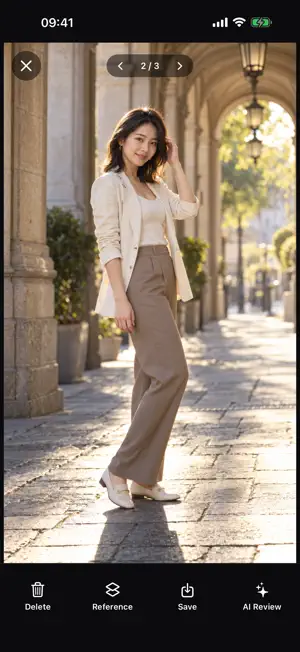
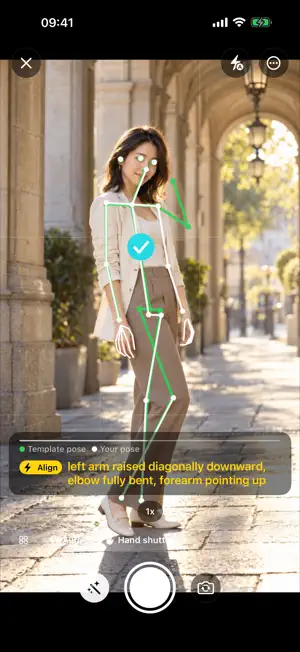


About OK Photo: AI Pose Coach
OK Photo: AI Pose Coach helps you decide what to do before pressing the shutter. Find a reference for your scene, place it over the viewfinder, and follow cues for your pose and framing. It is designed for people who feel awkward in front of a camera and friends who need a clearer way to direct a shoot. START WITH A PLAN The introduction explains the main controls and the shooting flow, with a Next button to move through it. Point the phone at a scene and generate references based on the light, background and subject. Choose a reference, adjust its overlay opacity, or pick an existing image from the library. FOLLOW THE POSE For portraits, green lines show the target pose and white lines show your current pose. On-screen and spoken cues help the model and the person holding the phone adjust their position, arms, head and framing. Live pose alignment runs on your phone and does not use generation credits. You can shoot manually or use the alignment-based automatic shutter. USE YOUR OWN MODEL'S FACE Turn on the model option to use the face visible in the camera frame as the basis for a reference. With it off, AI creates a demonstration model. Keep the face clearly visible before generating. Resemblance can vary: this is a pose reference, not identity replication or automatic photo restoration. References made with your own subject are not added to the shared library. MORE THAN PORTRAITS Choose portraits, food, flowers, figurines, pets, objects or scenery. Analysis and references adapt to the subject. After shooting, an optional AI review offers suggestions, and you can overlay the reference to compare the composition. Automatic post-shot AI review can be disabled in Settings. WHEN TO USE IT Try travel photos, café portraits, street photography, selfies, photos with friends, or everyday food and pet pictures. Beginners can explore poses; photographers can show a model what they mean. Lighting, surroundings, equipment and your choices still determine the result—matching a reference does not guarantee an identical photograph. LANGUAGES AND CREDITS The interface supports Simplified and Traditional Chinese, English, Japanese, Korean, Russian, Vietnamese, German, French and Spanish. No login is needed for the core shooting flow. Generating new references uses credits, which can refill under the in-app rules or be purchased. Live alignment, shooting with existing references and post-shot review do not spend generation credits. An optional account lets you recover credits and history across devices. DATA AND AI REFERENCES Scene analysis, generation and post-shot review use online services as described in the privacy policy. With your permission, anonymous activity, time spent and error records are sent to our server to improve guidance. You can turn this off in Settings. No advertising tracking. AI references are examples to learn from, not evidence that the app automatically turns every shot into a finished professional image.
What’s new
Version 1.3.0 · Updated October 1, 2026
What's new in 1.3 • A clearer introduction explains the shooting flow and uses explicit Next buttons. • The model option now explains how your own model's face is used to create a reference; resemblance can vary. • Clearer viewfinder labels and multilingual guidance connect references, pose alignment and photo review. • Less waiting when repeating analysis of the same scene, with retry controls kept available after generation failures.
App privacy
The developer, 杰 赵, reported these privacy practices to Apple.
Data Linked to You
The following data, which may be collected and linked to your identity, may be used for the following purposes:
- Purchases: Purchase History
- User Content: Photos or Videos, Audio Data, Other User Content
- Identifiers: User ID
Used for: App Functionality
Alternatives to OK Photo: AI Pose Coach
Looking for apps like OK Photo: AI Pose Coach? Here are 6 similar apps on the App Store. The highest rated is Pose Camera - PhotoGen (3.0/5), and all 6 are free to download.
-
 MOSJIE Camera
-
 Lensmera: Learn Pro Camera
-
 Posee: Photo Pose Camera
-
 Pose Camera - PhotoGen
3.0
Pose Camera - PhotoGen
3.0
-
 Pose Camera: Posing Guide
-
 Pose AI: Photo Guide Camera
| App | Rating | Price | Last updated | Compare |
|---|---|---|---|---|
| OK Photo: AI Pose Coach | – | Free | October 1, 2026 | |
| MOSJIE Camera | – | Free | Oct 26, 2026 | Compare |
| Lensmera: Learn Pro Camera | – | Free | Oct 24, 2026 | Compare |
| Posee: Photo Pose Camera | – | Free | Jun 15, 2026 | Compare |
| Pose Camera - PhotoGen | 3.0 / 5 (1) | Free | Aug 3, 2026 | Compare |
| Pose Camera: Posing Guide | – | Free | Sep 24, 2026 | Compare |
| Pose AI: Photo Guide Camera | – | Free | Sep 8, 2026 | Compare |