

Mindscend Notes
Mindscend Inc. Productivity iPhoneiPadiPod touch
Mindscend Notes is a free Productivity app for iPhone and iPad by Mindscend Inc. Requires iOS 26.0. Updated November 10, 2026.
- Price
- Free
- on the App Store
- Size
- 321 MB
- Age 4+
- Updated
- Nov 10
- 2026 · v1.1.1
Screenshots
Save to Pinterest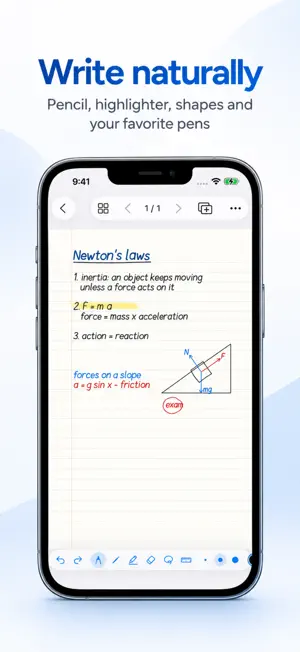


About Mindscend Notes
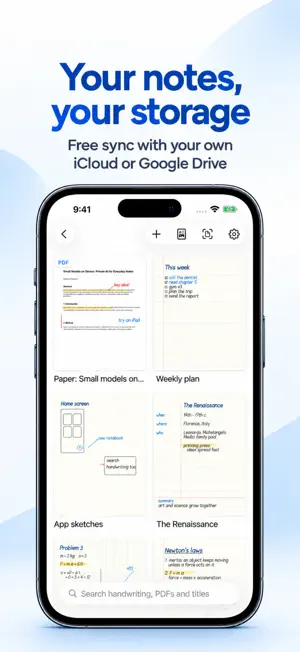
Mindscend Notes (formerly MindPage) is a calm, fast notebook for handwriting, PDFs and books, with private AI that runs on your device. Your notes stay yours. WRITE NATURALLY • Apple Pencil with pressure and tilt, palm rejection and low latency • Pen, pencil, highlighter, eraser, lasso and ruler in a compact bar, with your favorite pens one tap away • Hold the pen at the end of a stroke to snap it into a clean line, rectangle, triangle or circle • Lined, grid, dot, blank, Cornell, to-do, planner, music and isometric paper • Text boxes, sticky notes, photos, stickers and a laser pointer for presenting • Select ink with the lasso to move, resize, recolor, move it to another page or turn it into typed text PDFS AND BOOKS • Import PDFs and EPUB books, then write, highlight and add stickers right on the pages • Insert note pages anywhere inside a book or lecture slides • Scan paper documents with the camera • Bookmarks, page thumbnails, duplicate and reorder pages, swipe between pages • Books reopen at the page where you stopped • Export any notebook as a PDF PRIVATE AI, ON YOUR DEVICE • Search your handwriting, PDFs and typed text • Ask my notes: questions answered from your own notes, on the device • Record lectures and meetings while you write; tap your notes to hear that moment again • On-device transcription and summaries where your device supports it • Flashcards made from your notes, without sending them anywhere YOUR NOTES, YOUR STORAGE • Sync between iPhone, iPad, Mac and the web through your own iCloud Drive or Google Drive, free • Notes are never stored on Mindscend servers • Works fully offline; changes merge automatically, without conflicts • Folders inside folders, an open and documented file format FREE, NO ACCOUNT NEEDED • Every essential feature and unlimited folders and notebooks, free • Use your own picture or PDF as paper, free • Sign in with Apple or Google only if you want it; Mindscend Notes works fully without an account MINDSCEND NOTES PLUS (OPTIONAL) • Premium notebook templates and covers • Folder icons and notebook covers: emoji or your own pictures • Paper colours, including dark paper • $1.99/month or $14.99/year. Anything you made with Plus stays yours if you stop Subscriptions renew automatically unless cancelled at least 24 hours before the end of the current period. Manage or cancel in your Apple Account settings. Terms: https://mindscendinc.com/mindpage/terms Privacy: https://mindscendinc.com/mindpage/privacy
What’s new
Version 1.1.1 · Updated November 10, 2026
MindPage is now Mindscend Notes. • Every essential feature stays free, with no limit on folders or notebooks • A cleaner editor on iPhone and iPad: grouped top bar, Ask my notes beside the page, and a pages sidebar that stays open on iPad • Scroll pages: pages one under the other, tap one to write • Lists in text boxes: bullets, numbers and checklists • Library: Continue where you left off, bigger cards, drag a notebook onto a folder • Choose the on-device model that answers Ask my notes • New, optional Mindscend Notes Plus: premium templates and covers, folder icons and notebook covers with emoji or your own pictures, and paper colours • Fixes: cooler iPad with large PDFs, more reliable Google Drive sync
App privacy
The developer, Mindscend Inc., reported these privacy practices to Apple.
Data Linked to You
The following data, which may be collected and linked to your identity, may be used for the following purposes:
- Purchases: Purchase History
- Contact Info: Email Address
- User Content: Other User Content
- Identifiers: User ID
Used for: App Functionality
Alternatives to Mindscend Notes
Looking for apps like Mindscend Notes? Here are 6 similar apps on the App Store. The highest rated is ScribblePad: Notes & PDF (5.0/5), and all 6 are free to download.
-
 Penna: AI Notes, PDF Markup
-
 ScribblePad: Notes & PDF
5.0
-
 AlphaTouch Video Intercom
4.6
-
 BBnotes: AI Notes & PDF Tutor
4.4
-
 CodeBrew - IDE for Java
3.7
-
 Focused Work - Pomodoro Timer
4.7
| App | Rating | Price | Last updated | Compare |
|---|---|---|---|---|
| Mindscend Notes | – | Free | November 10, 2026 | |
| Penna: AI Notes, PDF Markup | – | Free | Nov 24, 2026 | Compare |
| ScribblePad: Notes & PDF | 5.0 / 5 (3) | Free | Sep 7, 2026 | Compare |
| AlphaTouch Video Intercom | 4.6 / 5 (4,253) | Free | Dec 21, 2024 | Compare |
| BBnotes: AI Notes & PDF Tutor | 4.4 / 5 (9) | Free | Nov 25, 2026 | Compare |
| CodeBrew - IDE for Java | 3.7 / 5 (10) | Free | Feb 16, 2026 | Compare |
| Focused Work - Pomodoro Timer | 4.7 / 5 (609) | Free | Jul 9, 2026 | Compare |
Compare Mindscend Notes with the top alternatives: ratings, updates, ASO score and keyword gaps →