

BBnotes: AI Notes & PDF Tutor
甡朋 刘 Productivity iPhoneiPadiPod touchMac
BBnotes: AI Notes & PDF Tutor is a free Productivity app for iPhone and iPad by 甡朋 刘. Rated 4.4/5 from 9 ratings. Requires iOS 17.0.
- Rating
- 4.4
- 9 ratings
- Price
- Free
- on the App Store
- Size
- 36 MB
- Age 4+
- Updated
- Oct 24
- 2026 · v1.78
Screenshots

About BBnotes: AI Notes & PDF Tutor
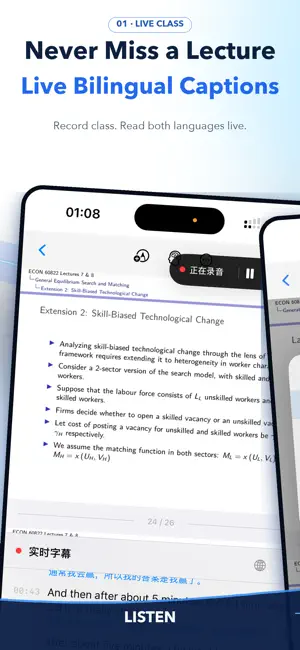
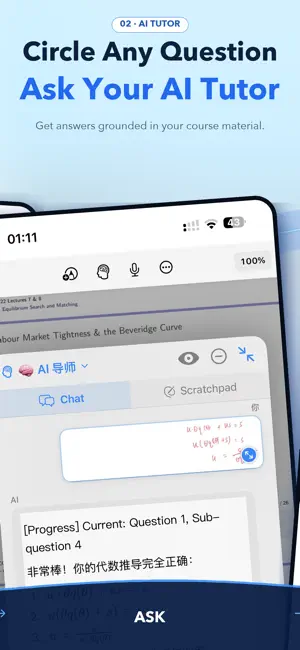
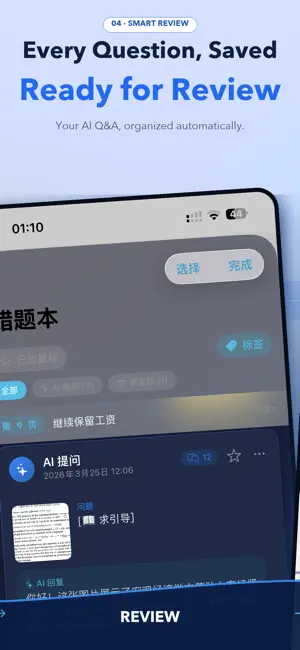
BBnotes is an AI notebook for international students studying in a second language. Translate PDFs side by side, follow lectures with bilingual captions, handwrite with Apple Pencil and ask an AI tutor about the exact passage, formula or note on the page—all in one study workspace. READ AND TRANSLATE PDFs • View the original text and its translation side by side. • Scroll both versions together to keep the same passage aligned. • Keep the source visible while you highlight, annotate and handwrite. FOLLOW LECTURES IN TWO LANGUAGES • Record a lecture and see bilingual captions on supported devices. • Review a timestamped bilingual transcript after class. • Jump back to the relevant moment instead of searching the entire recording. ASK AI IN CONTEXT • Circle a passage, formula or handwriting and ask directly from the page. • Keep each question and explanation connected to the source material. • Get guided explanations and next-step prompts when working through a problem. WRITE, ORGANISE AND REVIEW • Take handwritten notes with Apple Pencil on iPad. • Generate an outline to navigate long documents. • Keep important explanations beside the material they refer to. • Bring reading, writing, translation, lecture audio and AI support into one notebook. BUILT AROUND THE STUDY DAY Use BBnotes before class to prepare, during class to follow along, and after class to return to what was said and where it appeared in your notes. Download BBnotes for free. New users get a 14-day Pro trial. Optional Pro plans and AI point packs are available as in-app purchases. Pricing is determined by your local App Store. Available on iPhone, iPad and Mac. Some features require compatible devices and system versions, and feature availability may vary by platform. Terms of Use: https://bbnotes-legal.liushenpeng1.workers.dev/terms.html Privacy Policy: https://bbnotes-legal.liushenpeng1.workers.dev/privacy.html Apple Standard EULA: https://www.apple.com/legal/internet-services/itunes/dev/stdeula/
Ratings & reviews
4.4
9 ratings
What’s new
Version 1.78 · Updated October 24, 2026
• New floating captions: when you switch to another app while recording, live captions keep showing in Picture in Picture (iPhone/iPad) or an always-on-top window (Mac) • If a call or another app interrupts your recording, BBNotes now tells you why and lets you continue with one tap • Fixed an issue where a recording could be cut down to about 1 second after the system interrupted it • On iPhone, cloud sync status now shows in the top-left corner of the home screen • On iPhone, swiping with your finger after putting the pen away now scrolls the slides instead of drawing • Fixed garbled characters appearing when translating some slides • Fixed sticky notes written in Dark Mode being unreadable in Light Mode • More reliable reconnection for Precise Translation on unstable networks • PowerPoint/Word conversion now supports files up to 100 MB • Other stability improvements
App privacy
The developer, 甡朋 刘, reported these privacy practices to Apple.
Data Linked to You
The following data, which may be collected and linked to your identity, may be used for the following purposes:
- Purchases: Purchase History
- Location: Coarse Location
- Contact Info: Email Address, Name
- Identifiers: User ID, Device ID
- Usage Data: Product Interaction, Other Usage Data
- Diagnostics: Performance Data, Other Diagnostic Data
- User Content: Photos or Videos, Audio Data, Other User Content
Used for: Analytics, App Functionality
Alternatives to BBnotes: AI Notes & PDF Tutor
Looking for apps like BBnotes: AI Notes & PDF Tutor? Here are 6 similar apps on the App Store. The highest rated is Record Lectures - Clearly (5.0/5), and all 6 are free to download.
-
 LecSync
4.4
LecSync
4.4
-
 LectMate: 有道留学听课宝
4.8
LectMate: 有道留学听课宝
4.8
-
 BeginClass
4.8
BeginClass
4.8
-
 Record Lectures - Clearly
5.0
Record Lectures - Clearly
5.0
-
 Translate Live: AI Interpreter
5.0
Translate Live: AI Interpreter
5.0
-
 秒转翻译官:SecsTrans Translator
4.9
秒转翻译官:SecsTrans Translator
4.9
| App | Rating | Price | Last updated | Compare |
|---|---|---|---|---|
| BBnotes: AI Notes & PDF Tutor | 4.4 / 5 (9 ratings) | Free | October 24, 2026 | |
| LecSync | 4.4 / 5 (13) | Free | Oct 23, 2026 | Compare |
| LectMate: 有道留学听课宝 | 4.8 / 5 (694) | Free | Oct 17, 2026 | Compare |
| BeginClass | 4.8 / 5 (33) | Free | Oct 25, 2026 | Compare |
| Record Lectures - Clearly | 5.0 / 5 (1) | Free | Oct 30, 2026 | Compare |
| Translate Live: AI Interpreter | 5.0 / 5 (11) | Free | Oct 29, 2026 | Compare |
| 秒转翻译官:SecsTrans Translator | 4.9 / 5 (140) | Free | Oct 22, 2026 | Compare |