

Hedwiq: Bookmark & Reading Log
Takuro Koyanagi Book iPhoneiPadiPod touch
Hedwiq: Bookmark & Reading Log is a free Book app for iPhone and iPad by Takuro Koyanagi. Requires iOS 18.0. Updated November 16, 2026.
- Price
- Free
- on the App Store
- Size
- 7 MB
- Age 4+
- Updated
- Nov 16
- 2026 · v1.6.1
Screenshots



About Hedwiq: Bookmark & Reading Log
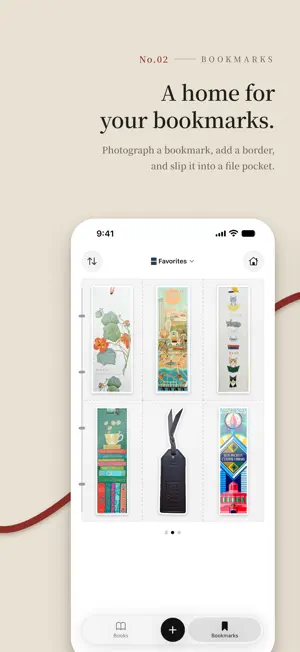
Hedwiq is a reading log that keeps your books on a bookshelf of spines and a calendar, and collects photos of your bookmarks in a binder. Record when you started and finished each book and which bookmark you used, and your shelf and calendar slowly fill up with your reading. ■ Your current read, always close. The app’s home view shows the book you are reading, propped on a shelf with its bookmark. If you are reading more than one, swipe sideways to switch. Swipe down to see this month’s calendar and the spines of the books you finished this month. ■ A home for your bookmarks. Take or choose a photo of a bookmark, and Hedwiq cuts it out along its shape and adds a white border. If the cutout is not quite right, fix it by tracing with your finger. Your bookmarks sit in clear pockets like a binder, and you turn the pages to look through them. Sort them into files, such as bookmarks from trips or from bookstores. ■ Every book you’ve read, spine out. See your books as a grid of covers, or as a bookshelf of spines. Spine height follows the book’s format, and thickness follows its page count. You can also photograph a book’s spine and place it on the shelf. Tap a spine to take the book off the shelf; turn it with your finger to see its spine and back. ■ When, and with which bookmark. The calendar shows a cover on the day you finished a book and a band across the days you were reading it, with the bookmark you used in the corner of the cover. Tap a date to see what you were reading that day. If you read a book again, each reading is recorded separately. ■ Stars and thoughts, for every reading. Rate a book with five stars, in half-star steps, and write down your thoughts — while you’re reading or after you finish. If you read a book again, each reading keeps its own. Sort by Highest Rated to see ratings on the covers. ■ Look back on your reading year. Open Reading Stats from the calendar to see how many books you finished each month, January through December — plus pages read, average days per book, your ratings, and your most-used bookmarks. Switch years to compare. ■ Share your reading as a card. Turn a year or month of reading, your reading calendar, or your shelf into a tall image to save or share. Create one from the button at the top right of Stats or the calendar. ■ Every bookmark keeps its books. Open a bookmark to see the books you read with it, and look back on the books you spent with a favorite bookmark. ■ Easy to add Search by title or author, or scan the barcode on the back cover. Find books in English, Japanese, and Korean. If a book is not found, enter it by hand. Filter, sort, and search to find any book quickly. ■ One purchase. Yours to keep. (Hedwiq Pro) Hedwiq Pro is a one-time in-app purchase. Buy it once and keep it, with no extra charge, including Pro features added in the future. ・Create unlimited files (up to 3 for free) ・Bookmark border color and width, or no border ・File cover trims, textures, and photos, and corner shapes ・A matte finish for the spines on your shelf ・Home Screen widgets (This Month, Shelf) ・Gradient backgrounds for share cards, and hiding the Hedwiq mark Adding books, search, the bookshelf, the calendar, the Reading widget, and every other recording feature work without Pro. ■ Your records stay on your iPhone No account needed. Your books, bookmarks, photos, and reading records are stored only on your iPhone, and are included in your iPhone backups (iCloud or computer). Book search, and covers of books added from search, use external book data services (an internet connection is required). ■ Good to know ・Requires an iPhone with iOS 18 or later. ・Available in English, Japanese, and Korean. ・Terms of use: Apple’s standard Licensed Application End User License Agreement (https://www.apple.com/legal/internet-services/itunes/dev/stdeula/) ・Privacy Policy: https://takurokoyanagi.com/hedwiq/en/privacy/
What’s new
Version 1.6.1 · Updated November 16, 2026
• Fixed an issue where a bookmark’s existing photo could be lost after canceling the manual cutout screen. • Hedwiq now lets you know if something couldn’t be saved. • In the book edit screen, date fields now match the reading status (Date Finished appears only for Finished). • Other small improvements.
App privacy
The developer, Takuro Koyanagi, reported these privacy practices to Apple.
Data Not Collected
The developer does not collect any data from this app.
Alternatives to Hedwiq: Bookmark & Reading Log
Looking for apps like Hedwiq: Bookmark & Reading Log? Here are 6 similar apps on the App Store.
-
 コミコレ - マンガ初版・価格管理
-
 ReadWrap: Reading Journal
-
 5books: Your Top Five Books
-
 Kamigokochi: 3D Book Tracker
-
 Shelfieline
-
 Yondoru
| App | Rating | Price | Last updated | Compare |
|---|---|---|---|---|
| Hedwiq: Bookmark & Reading Log | – | Free | November 16, 2026 | |
| コミコレ - マンガ初版・価格管理 | – | Free | Jul 19, 2026 | Compare |
| ReadWrap: Reading Journal | – | Free | Oct 24, 2026 | Compare |
| 5books: Your Top Five Books | – | Free | Sep 17, 2026 | Compare |
| Kamigokochi: 3D Book Tracker | – | Free | Nov 6, 2026 | Compare |
| Shelfieline | – | Free | Oct 5, 2026 | Compare |
| Yondoru | – | Free | Jul 5, 2026 | Compare |