

MemoryViewer: RAM, CPU Monitor
Isac Shin Utilities iPhoneiPadiPod touch
MemoryViewer: RAM, CPU Monitor is a free Utilities app for iPhone and iPad by Isac Shin. Requires iOS 17.0. Updated October 19, 2026.
- Price
- Free
- on the App Store
- Size
- 7 MB
- Age 4+
- Updated
- Oct 19
- 2026 · v1.0.1
Screenshots

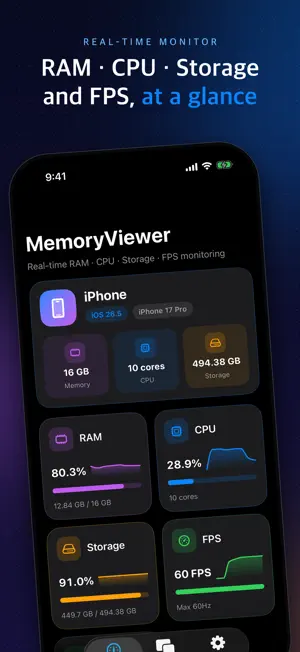


About MemoryViewer: RAM, CPU Monitor
Ever wonder how busy your iPhone is right now, or how much memory and storage you have left? MemoryViewer is a system monitor that shows RAM, CPU, storage, thermal state, and FPS in live graphs. LIVE METRICS AT A GLANCE • RAM: used and total memory, plus a donut chart that breaks memory into Active, Inactive, Wired, Compressed, and Available • CPU: device-wide CPU usage with a graph of the last 60 seconds • Storage: how much space you have used and how much is left • Thermal state: a 4-level heat status (Normal, Slightly high, High, Very high) that changes color as your device warms up • FPS: this app's frame rate and your screen's maximum refresh rate • Each metric has its own color, so everything is easy to read HOME SCREEN WIDGET • Small and medium widgets show your metrics right on the Home Screen • Tap the refresh button on the widget to load the latest values • Choose which items the widget shows PICTURE IN PICTURE (PiP) • Float a small window over other apps and the Home Screen to watch your metrics live • Choose which items PiP shows THERMAL ALERT SOUND • When your device heat level rises to "High" or above, an alert sound plays and repeats like an alarm • Pick how long it repeats: 5, 10, 30, or 60 seconds • Stop it any time from the Stop button in the app or from the notification, even on the Lock Screen • Turn the alert off in Settings if you don't want it MAKE IT YOURS • In Settings, choose the items for the widget and PiP separately • At least one item is always shown • Supports Light and Dark mode and larger text sizes • English and Korean GOOD TO KNOW • MemoryViewer shows device-wide RAM, CPU, and storage. iOS does not allow apps to see how much memory other apps use. • FPS is the refresh rate of this app's own screen. The FPS of other apps or games can't be measured, and FPS shows 0 while this app is in the background. • iOS manages memory automatically, so MemoryViewer does not clean memory or close other apps. • iOS does not provide an exact temperature, so the thermal state is a 4-level status reported by the system. • An interstitial ad may appear when you start PiP. • Picture in Picture works on a real iPhone. It isn't available in the Simulator.
What’s new
Version 1.0.1 · Updated October 19, 2026
- Improved app performance.
App privacy
The developer, Isac Shin, reported these privacy practices to Apple.
Data Not Linked to You
The following data, which may be collected but is not linked to your identity, may be used for the following purposes:
- Identifiers: Device ID
- Usage Data: Advertising Data
Used for: Third-Party Advertising, Analytics
Alternatives to MemoryViewer: RAM, CPU Monitor
Looking for apps like MemoryViewer: RAM, CPU Monitor? Here are 6 similar apps on the App Store. The highest rated is Airothy - Remote for Mac (5.0/5), and all 6 are free to download.
-
 메모리야 - 저장공간 정리
-
 SpamGuard: SMS Filter
-
 Airothy - Remote for Mac
5.0
Airothy - Remote for Mac
5.0
-
 스르륵 - 제스처 키보드
4.0
스르륵 - 제스처 키보드
4.0
-
 DateTimeAtIsland
-
 MyTodo: Habits & Reminders
3.0
MyTodo: Habits & Reminders
3.0
| App | Rating | Price | Last updated | Compare |
|---|---|---|---|---|
| MemoryViewer: RAM, CPU Monitor | – | Free | October 19, 2026 | |
| 메모리야 - 저장공간 정리 | – | Free | Sep 27, 2026 | Compare |
| SpamGuard: SMS Filter | – | Free | Sep 7, 2026 | Compare |
| Airothy - Remote for Mac | 5.0 / 5 (1) | Free | Oct 9, 2026 | Compare |
| 스르륵 - 제스처 키보드 | 4.0 / 5 (1) | Free | Oct 21, 2026 | Compare |
| DateTimeAtIsland | – | Free | May 21, 2026 | Compare |
| MyTodo: Habits & Reminders | 3.0 / 5 (2) | Free | Oct 26, 2026 | Compare |