

Feedbye: Reels Blocker
Bohdan Bernatek Productivity iPhoneiPadiPod touch
Feedbye: Reels Blocker is a free Productivity app for iPhone and iPad by Bohdan Bernatek. Requires iOS 17.0. Updated November 23, 2026.
- Price
- Free
- on the App Store
- Size
- 31 MB
- Age 4+
- Updated
- Nov 23
- 2026 · v1.0.11
Screenshots
Save to Pinterest
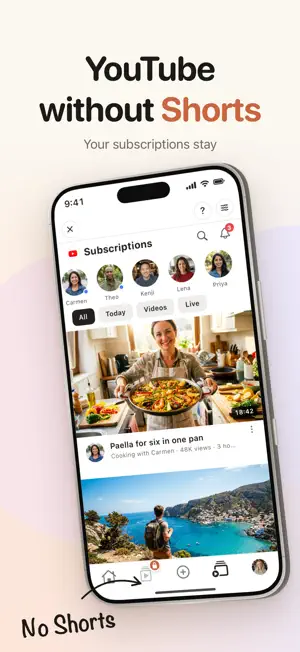


About Feedbye: Reels Blocker
Social media without the endless scroll, and without deleting a single app. Feedbye hides the endless video feeds and gives your feed a daily limit. Friends, messages and stories stay. HOW IT WORKS • Video feeds off: endless video and recommendation feeds no longer open. Posts from people you follow, stories, messages and profiles stay. • Daily limit: for example 10 posts per app. Then the feed rests until tomorrow. • 3 exceptions a day: if you really need a few more posts after your limit, use an exception. Finish all of the day's habits and you get one back. • A home screen widget shows what's left for today. LOCK THE ORIGINAL APPS Lock the original apps with Apple's Screen Time, all of them with one tap. Opening one shows a calm screen that brings you to Feedbye instead. Take a single app out whenever you like and put it back with a tap. Apple keeps your app selection private: we never see which apps you picked. Need to post? "Open to post" opens the original app for 5, 10 or 15 minutes, up to 3 times a day, then locks it again by itself. No exception needed. Only a quick look uses one. SMALL HELPERS • Focus timer: while you work or study, your feeds and the locked apps stay closed. • Bedtime: from the time you pick until you get up, your feeds stay closed. • Habits instead of scrolling: tick off small things, like a walk or reading 10 pages. Your hamster shows how you're doing, from scroll zombie to zen. Habits give it energy, exceptions take some away. A playful motivator, not a health or medical tool. WORKS WITH THE OFFICIAL WEBSITES OF Instagram, YouTube, TikTok, Threads, X and Facebook. You sign in on those sites yourself, inside Feedbye. On your iPhone, Feedbye only hides what you closed, like the Reels tab, and doesn't block ads. If a platform changes its website, hiding may stop working. Your daily limit stays. WHAT'S FREE AND WHAT PRO ADDS Free for everyone: locking the original apps with Screen Time, Open to post, the focus timer, bedtime and habits. With Feedbye Pro: the six social media apps inside Feedbye, without endless video feeds and with a daily limit, plus your own limit per app and free days without a limit, for example on weekends. Without a subscription, they stay closed inside Feedbye. Family: Pro for up to 6 people through Apple Family Sharing. SUBSCRIPTION TERMS Feedbye Pro comes as a weekly or yearly subscription, Feedbye Family as monthly or yearly; the app shows the price for your country before you buy. If you're new to Feedbye, the yearly plans start with a 3-day free trial. Payment is charged to your Apple Account when you confirm the purchase. The subscription renews automatically unless you cancel at least 24 hours before the end of the current period. Manage or cancel anytime in Settings › Apple Account › Subscriptions. Offer codes can be redeemed in the app. PRIVACY • No ads from us. What you look at and your numbers stay on your iPhone. • We never see your passwords. None of our code runs on login pages. • What you browse and your feed counts stay on your iPhone. • Sign in with Apple or an email code. Your account stores your habits and streak on servers in the EU. Delete it anytime in Profile › Delete account. QUESTIONS Is this an official app of these services? No. Feedbye is independent and not affiliated with or endorsed by Meta, Google/YouTube, TikTok or X. I want to delete Feedbye. What should I do first? Press and hold the Feedbye icon and tap "Delete safely" (or Profile › Deleting Feedbye?). One tap there lifts every block. Otherwise apps you locked with Screen Time can stay locked until you change it in iOS Settings › Screen Time. Terms of Use: https://feedbye.app/terms Privacy Policy: https://feedbye.app/privacy
What’s new
Version 1.0.11 · Updated November 23, 2026
• New Home: each social media app is its own block, with one big button to open it without Reels or Shorts. • Locks are on Home now: drag an app into the circle to lock it. "Open anyway" always ends by itself after a few minutes. • New: Friends. Add friends with your link and see your week next to theirs. • When Apple's app list opens, a short hint shows what to tap. • Smaller fixes and improvements.
App privacy
The developer, Bohdan Bernatek, reported these privacy practices to Apple.
Data Used to Track You
The following data may be used to track you across apps and websites owned by other companies:
- Purchases: Purchase History
- Contact Info: Email Address
- Identifiers: Device ID
- Usage Data: Product Interaction
Data Linked to You
The following data, which may be collected and linked to your identity, may be used for the following purposes:
- Purchases: Purchase History
- Identifiers: Device ID, User ID
- Usage Data: Product Interaction, Other Usage Data
- Other Data: Other Data Types
- Contact Info: Email Address
- User Content: Customer Support, Other User Content
Used for: Developer’s Advertising or Marketing, Analytics, App Functionality
Data Not Linked to You
The following data, which may be collected but is not linked to your identity, may be used for the following purposes:
- Contact Info: Email Address
Used for: Developer’s Advertising or Marketing
Alternatives to Feedbye: Reels Blocker
Looking for apps like Feedbye: Reels Blocker? Here are 6 similar apps on the App Store. The highest rated is Focusly: Screen Time Control (5.0/5), and all 6 are free to download.
-
 Second Brain: Voice Planner
-
 Formatic: Form & Survey Maker
-
 Focusly: Screen Time Control
5.0
-
 Toggle: Block Reels
4.5
-
 Reels Off: Reels Blocker
-
 Stillfeed: Block Reels&Shorts
4.0
| App | Rating | Price | Last updated | Compare |
|---|---|---|---|---|
| Feedbye: Reels Blocker | – | Free | November 23, 2026 | |
| Second Brain: Voice Planner | – | Free | Nov 18, 2026 | Compare |
| Formatic: Form & Survey Maker | – | Free | Nov 13, 2026 | Compare |
| Focusly: Screen Time Control | 5.0 / 5 (4) | Free | Sep 7, 2026 | Compare |
| Toggle: Block Reels | 4.5 / 5 (22) | Free | Nov 16, 2026 | Compare |
| Reels Off: Reels Blocker | – | Free | Nov 22, 2026 | Compare |
| Stillfeed: Block Reels&Shorts | 4.0 / 5 (2) | Free | Nov 19, 2026 | Compare |