
Focusly: Screen Time Control
APTE Ltd Productivity iPhoneiPadiPod touch
Focusly: Screen Time Control is a free Productivity app for iPhone and iPad by APTE Ltd. Rated 5.0/5 from 3 ratings. Requires iOS 16.0.
- Rating
- 5.0
- 3 ratings
- Price
- Free
- on the App Store
- Size
- 6 MB
- Age 4+
- Updated
- Sep 7
- 2026 · v1.1.0
Screenshots

About Focusly: Screen Time Control
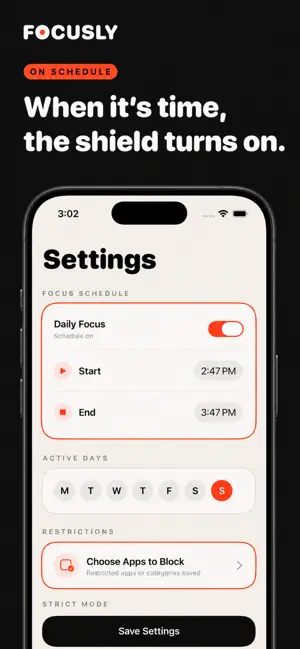
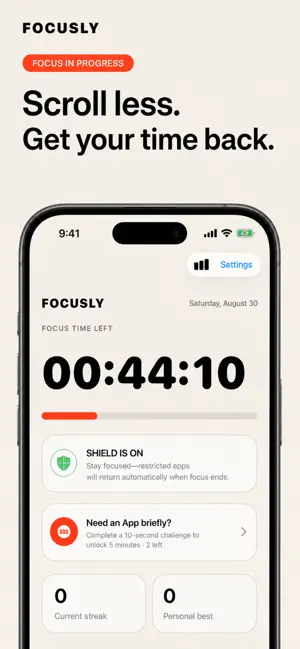
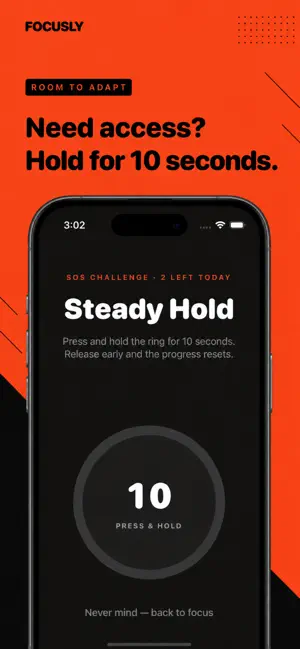
"Take back control over your phone usage. The average person spends hours mindlessly scrolling every day. Stop distractions and reclaim your time for work, study, rest and sleep. Block distracting apps and in‑app web content, set focus timers, and build auto‑running routines to stay productive. Our focus score tracks your wellbeing, helping you reduce screen time effortlessly. Key Benefits • Cut daily screen‑time and stop mindless scrolling • Reduce distractions for work, study & deep work • Improve focus, stress relief and better sleep quality • Friendly for users needing focus support including ADHD • Build custom daily routines for work hours, sleep & family time Powerful Features App & In‑App Web Content Blocker Block distracting apps and in‑app web content on custom schedules. Build blocklist & allowlist for work, bedtime or leisure. Focus Timer & Deep Focus Mode One‑tap focus sessions. Deep‑Focus mode prevents you from bypassing blocks for undisturbed deep work. Auto‑Running Rules & Routines Schedule automatic blocking rules. Pre‑built templates for deep work, sleep‑time, lunch break and family moments. Focus Reports & Focus Score Track screen‑time, distracted time and wellness metrics. Compare your progress against your own history. Resist Temptation Add friction to unblock apps. Challenge yourself before disabling blocks to avoid mindless opening. Smart Distraction Alerts Get gentle reminders when you spend too much time on distracting applications. System Integration Support system shortcuts & focus‑mode linkage. Home‑screen widget available. Private & Secure All processing runs locally on your device. Your personal usage data never leaves your phone. Regain your focus and take charge of your digital life today!"
What’s new
Version 1.1.0 · Updated September 7, 2026
fixed bugs.
App privacy
The developer, APTE Ltd, reported these privacy practices to Apple.
Data Not Linked to You
The following data, which may be collected but is not linked to your identity, may be used for the following purposes:
- Usage Data: Product Interaction
- Diagnostics: Crash Data, Performance Data
Used for: Analytics, Product Personalization, App Functionality
Alternatives to Focusly: Screen Time Control
Looking for apps like Focusly: Screen Time Control? Here are 6 similar apps on the App Store. The highest rated is Kappi: Screen Time Blocker (5.0/5), and all 6 are free to download.
-
 Kappi: Screen Time Blocker
5.0
Kappi: Screen Time Blocker
5.0
-
 lockwork: study screen time
-
 Focus Timer Pomodoro Study App
-
 Pilot EFB: Flight Planner
5.0
Pilot EFB: Flight Planner
5.0
-
 App Blocker & Focus: Quell
-
 Strict App Blocker:Block Apps
| App | Rating | Price | Last updated | Compare |
|---|---|---|---|---|
| Focusly: Screen Time Control | 5.0 / 5 (3 ratings) | Free | September 7, 2026 | |
| Kappi: Screen Time Blocker | 5.0 / 5 (2) | Free | Aug 29, 2026 | Compare |
| lockwork: study screen time | – | Free | May 11, 2026 | Compare |
| Focus Timer Pomodoro Study App | – | Free | Apr 8, 2026 | Compare |
| Pilot EFB: Flight Planner | 5.0 / 5 (3) | Free | Jun 27, 2026 | Compare |
| App Blocker & Focus: Quell | – | Free | Sep 24, 2026 | Compare |
| Strict App Blocker:Block Apps | – | Free | Sep 24, 2026 | Compare |