

RetroPlay Emulator
Daniel Nadeem Games iPhoneiPadiPod touch
RetroPlay Emulator is a free Games app for iPhone and iPad by Daniel Nadeem. Requires iOS 26.0. Updated November 19, 2026.
- Price
- Free
- on the App Store
- Size
- 54 MB
- Age 4+
- Updated
- Nov 19
- 2026 · v1.4
Screenshots


About RetroPlay Emulator
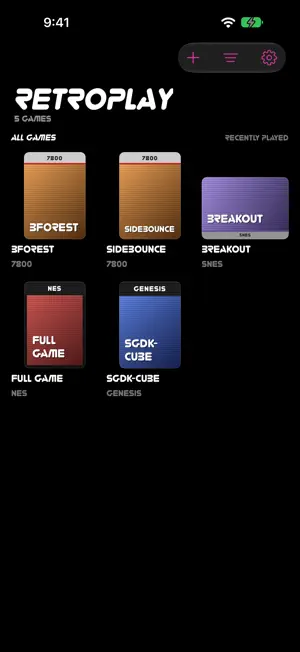
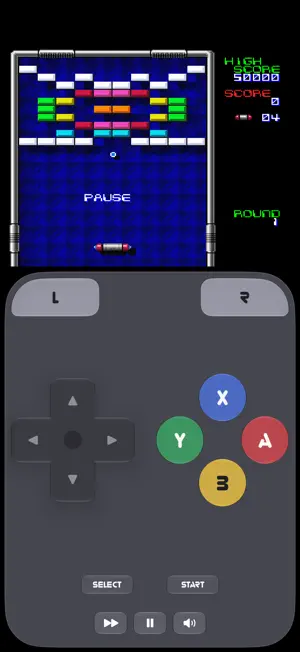
RetroPlay plays the classic games you own on your iPhone. Import your game files from Files and start playing: RetroPlay picks the right system for each one and keeps your library organised with box art. PLAYS • NES and SNES • Game Boy Advance • Nintendo 64 • Nintendo DS, with the touch screen • Genesis / Mega Drive • Atari 7800 • PlayStation and PlayStation Portable BUILT FOR PLAYING • Touch controls laid out like each system's own, in portrait and landscape, in Liquid Glass or a flat style • Game controllers: Xbox, PlayStation, Switch Pro and MFi, including menu navigation. Touch controls step aside while a controller is connected • Save states, automatic in-game saves, and resume where you left off • Fast forward • PSP games rendered on the GPU, sharp at your screen's resolution • AirPlay to a TV BRING YOUR SAVES • Import saves from Files, iCloud Drive or a network share: pick a folder and RetroPlay searches it, and every folder inside, for battery saves, memory cards, Nintendo 64 saves and PSP save folders • Each save is matched to its game, and RetroPlay asks before replacing a save you already have • Saves for games you haven't added yet are kept and attach when you add the game • Works with the save files of every system RetroPlay plays YOUR LIBRARY • Cover Flow: your games as boxes and cases you flick through, or a grid • Box art for your games, your own cover pictures, or a box drawn in each system's style • Filter by system, sort and search • Everything stays on your iPhone, in RetroPlay's folder in the Files app PRIVATE No account, no ads, no tracking, no data collected. BRING YOUR OWN GAMES RetroPlay doesn't include, sell or link to any games, BIOS or firmware. Import only software you have the right to use. RetroPlay is open source under the GPL. Game Boy Advance, Nintendo 64, Nintendo DS, NES, SNES, PlayStation, PlayStation Portable, Genesis, Mega Drive and Atari 7800 are trademarks of their respective owners, used here only to describe compatibility. RetroPlay is not affiliated with or endorsed by Nintendo, Sony, Sega or Atari.
What’s new
Version 1.4 · Updated November 19, 2026
• Pull down to search: in the grid or Cover Flow, pull the library down to reveal the search field. The top bar is simpler, with just Import, Filter and Settings. • Bigger titles, still with their glitch. • A refreshed app icon, closer in on the controller. • Smoother Cover Flow when the search field opens and closes. • PSP: fixed terrain and textures flickering between light and dark in some games, such as ATV Offroad Fury Pro.
Play today's Queens puzzle
One queen in every row, column and color. A free daily puzzle from Fiplay, same board for everyone. It plays right here, no download.
App privacy
The developer, Daniel Nadeem, reported these privacy practices to Apple.
Data Not Collected
The developer does not collect any data from this app.
Alternatives to RetroPlay Emulator
Looking for apps like RetroPlay Emulator? Here are 6 similar apps on the App Store. The highest rated is KotRetro8 (5.0/5), and all 6 are free to download.
-
 KotRetro8
5.0
-
 threeds
5.0
-
 vireo player
5.0
-
 Super Emu
5.0
-
 pkhemu: Emulator & Save Editor
5.0
-
 Rebit Play
5.0
| App | Rating | Price | Last updated | Compare |
|---|---|---|---|---|
| RetroPlay Emulator | – | Free | November 19, 2026 | |
| KotRetro8 | 5.0 / 5 (1) | Free | Nov 4, 2026 | Compare |
| threeds | 5.0 / 5 (1) | Free | Oct 31, 2026 | Compare |
| vireo player | 5.0 / 5 (1) | Free | Sep 18, 2026 | Compare |
| Super Emu | 5.0 / 5 (1) | Free | Oct 16, 2026 | Compare |
| pkhemu: Emulator & Save Editor | 5.0 / 5 (2) | Free | Nov 4, 2026 | Compare |
| Rebit Play | 5.0 / 5 (2) | Free | Nov 4, 2026 | Compare |
Compare RetroPlay Emulator with the top alternatives: ratings, updates, ASO score and keyword gaps →