

pkhemu: Emulator & Save Editor
Arley Silva de Padu Games iPhoneiPadiPod touch
pkhemu: Emulator & Save Editor is a free Games app for iPhone and iPad by Arley Silva de Padu. Rated 5.0/5 from 2 ratings. Requires iOS 18.0.
- Rating
- 5.0
- 2 ratings
- Price
- Free
- on the App Store
- Size
- 87 MB
- Age 4+
- Updated
- Nov 4
- 2026 · v0.15.1
Screenshots

About pkhemu: Emulator & Save Editor
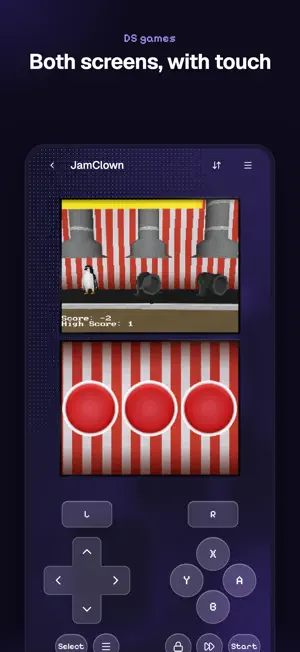
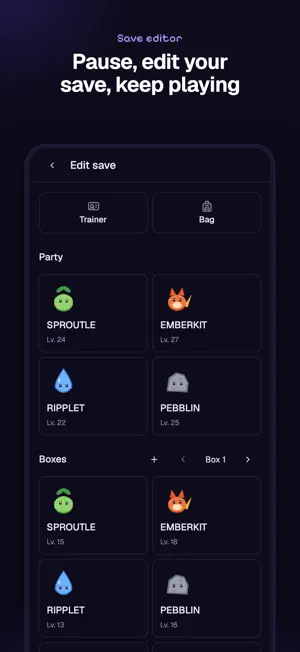
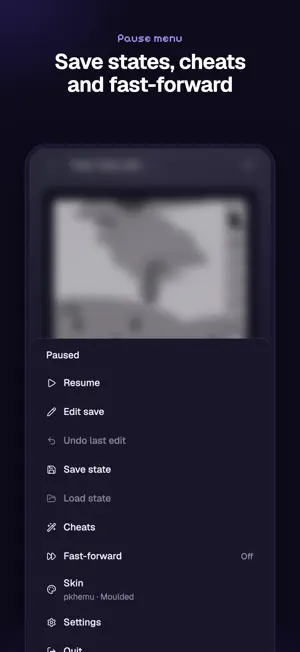
pkhemu plays Game Boy, Game Boy Color, Game Boy Advance, Nintendo DS, Nintendo 3DS and Nintendo 64 games, and edits their saves while you play. Bring your own games, or try the free demo, Tobu Tobu Girl Deluxe. pkhemu comes with no other games and no BIOS files. Add the ROMs you own from the Files app, or bring your library over from Delta. PLAY • Ten save state slots per game. When you come back, the game resumes where you quit. • Touch controls or a game controller. Set up a controller once and the app remembers it. • Turbo buttons, and buttons you can hold down from the touch controls. • Cheat codes. • Change the game clock for games with day and night or timed events. • Box art for your library. EDIT • Pause a supported game and open its save editor. Change the party, boxes, items and trainer details, then keep playing. • The app backs up your save before every change, so you can go back. • Trade between your own saves of supported games. • N64 games that use the Transfer Pak can read a Game Boy game from your library. pkhemu is open source under the GPL-3.0 licence. It is built on mGBA, melonDS, Mupen64Plus, Azahar and PKHeX. pkhemu is an independent project. It is not affiliated with or endorsed by Nintendo. Screenshots show homebrew games: Tobu Tobu Girl and Tobu Tobu Girl Deluxe by Tangram Games (CC BY 4.0), µCity by Antonio Niño Díaz (CC BY-SA 4.0), Collie Defense by Yann Vaillant, Yulianto Hiu and Lea Espanet (CC BY-SA 4.0), Rhythm Land, Libbet and the Magic Floor, Feline, Luggage Retrieval Officer, JamClown and Traffic Escape. The screenshots are licensed CC BY-SA 4.0.
What’s new
Version 0.15.1 · Updated November 4, 2026
GameCube games are here. Import a disc from Files (.iso, .gcm, .rvz, .ciso or .gcz), or open one from another app. App Store apps can't use a JIT, so some games run slower than others. • GameCube touch controls, skins and save states, and a resolution setting: Native, 2× or 3×. • Each GameCube game keeps its own memory card. • Controllers send analog L and R. • Supported GameCube saves open in the save editor and trade with Game Boy Advance saves. The overlay shows your party. • In portrait with a skin, the touch controls sit higher, in the empty space under the game. • Pinch and double-tap no longer zoom the screen. • Fixed game controllers not connecting.
Play today's Sudoku puzzle
A quick 6×6 Sudoku every day; levels grow to the classic 9×9. A free daily puzzle from Fiplay, same board for everyone. It plays right here, no download.
App privacy
The developer, Arley Silva de Padu, reported these privacy practices to Apple.
Data Linked to You
The following data, which may be collected and linked to your identity, may be used for the following purposes:
- User Content: Gameplay Content
- Identifiers: User ID
- Usage Data: Product Interaction
Used for: App Functionality
Alternatives to pkhemu: Emulator & Save Editor
Looking for apps like pkhemu: Emulator & Save Editor? Here are 6 similar apps on the App Store. The highest rated is Bitfold: Retro Game Emulator (5.0/5), and all 6 are free to download.
-
 RetroPlay Emulator
-
 Bitfold: Retro Game Emulator
5.0
-
 Super Emu
5.0
-
 KotRetro8
5.0
-
 vireo player
5.0
-
 threeds
5.0
| App | Rating | Price | Last updated | Compare |
|---|---|---|---|---|
| pkhemu: Emulator & Save Editor | 5.0 / 5 (2 ratings) | Free | November 4, 2026 | |
| RetroPlay Emulator | – | Free | Nov 19, 2026 | Compare |
| Bitfold: Retro Game Emulator | 5.0 / 5 (1) | Free | Nov 19, 2026 | Compare |
| Super Emu | 5.0 / 5 (1) | Free | Oct 16, 2026 | Compare |
| KotRetro8 | 5.0 / 5 (1) | Free | Nov 4, 2026 | Compare |
| vireo player | 5.0 / 5 (1) | Free | Sep 18, 2026 | Compare |
| threeds | 5.0 / 5 (1) | Free | Oct 31, 2026 | Compare |