

Calenday: Calendar & Planner
Haruder Productivity iPhoneiPadiPod touch
Calenday: Calendar & Planner is a free Productivity app for iPhone and iPad by Haruder. Requires iOS 15.0. Updated November 17, 2026.
- Price
- Free
- on the App Store
- Size
- 158 MB
- Age 4+
- Updated
- Nov 17
- 2026 · v1.0.6
Screenshots

About Calenday: Calendar & Planner
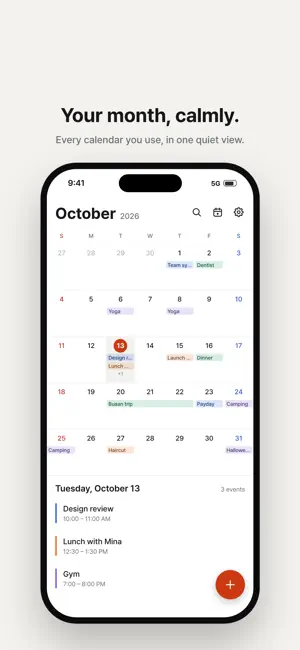
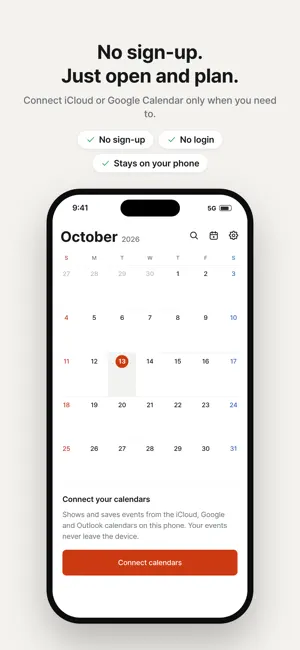
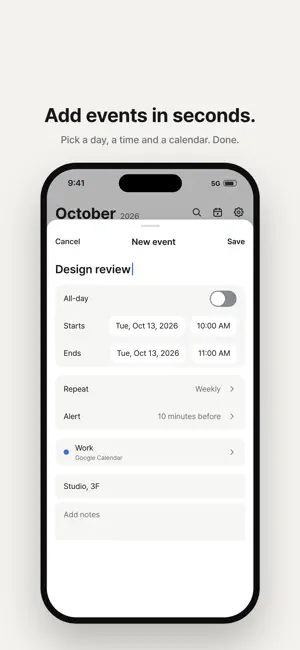
A calendar for a well-run day: Calenday. Calendar, time grid, tasks, notes, D-days and widgets. Use them the way you like. ■ Calendar • Switch between month, week and day views with one button in the header. • Long-press and drag an event to move it to another date, or drag its edges to change its length. ■ A timetable to design your day • 10-minute grid: split each hour into six blocks and plan your day in detail. • Long-press an empty slot and drag to create an event of exactly that length. • Pick the layout you like: 7-day or 3-day week, day time grid or list. ■ Widgets you see without opening the app • 11 home screen widgets, including Today, This Week, This Month, Tasks, 10-minute grid and D-day. • Lock screen widgets show your next event and tasks at a glance. • Check off tasks right from the widget. ■ Tasks and notes in one place • View tasks by Today, Upcoming and Unscheduled, and organize them with repeating tasks and category colors. • Add a title and photos to notes. Notes with a date also appear in your calendar. ■ Special days, in photos • Decorate D-days with photos, frames, fonts and patterns, and put them on a widget. • Get reminders for milestones like 100 days or a first anniversary. ■ The calendars you already use • Brings in the iCloud and Google calendars already added to your iPhone. • No sign-up, no login, nothing to move. Events are saved to their original calendar. • You can also create calendars that stay only in this app, without syncing. ■ Make it yours • 12 theme colors, 12 app icons, a variety of fonts and dark mode. Calenday works without an account or server. Your events and tasks stay on your device and in your own calendar accounts.
What’s new
Version 1.0.6 · Updated November 17, 2026
• New wide Pro widget combines today's events and tasks with a 10-minute timetable. • More flexible D-day customization: one free photo per item, with more photo styles in Pro. • Improved widget fonts and layouts. • Duplicate calendar events and timetable records, then edit the copy right away. • Set timetable records to repeat daily, weekly, monthly, or yearly.
App privacy
The developer, Haruder, reported these privacy practices to Apple.
Data Used to Track You
The following data may be used to track you across apps and websites owned by other companies:
- Location: Coarse Location
- Identifiers: Device ID
- Usage Data: Advertising Data
Data Linked to You
The following data, which may be collected and linked to your identity, may be used for the following purposes:
- Location: Coarse Location
- Identifiers: Device ID
- Usage Data: Advertising Data
Used for: Third-Party Advertising
Alternatives to Calenday: Calendar & Planner
Looking for apps like Calenday: Calendar & Planner? Here are 6 similar apps on the App Store.
-
 Yomify: Habit Tracker Calendar
-
 CalStack
-
 Branfam: Family Wall Display
-
 PliNotes
-
 DayNote: Diary, Calendar Notes
-
 Otto: AI Email & Calendar
| App | Rating | Price | Last updated | Compare |
|---|---|---|---|---|
| Calenday: Calendar & Planner | – | Free | November 17, 2026 | |
| Yomify: Habit Tracker Calendar | – | Free | Nov 8, 2026 | Compare |
| CalStack | – | 9.99 USD | Nov 7, 2026 | Compare |
| Branfam: Family Wall Display | – | Free | Nov 2, 2026 | Compare |
| PliNotes | – | Free | Nov 16, 2026 | Compare |
| DayNote: Diary, Calendar Notes | – | Free | Oct 31, 2026 | Compare |
| Otto: AI Email & Calendar | – | Free | Nov 9, 2026 | Compare |