

CalStack
Pick Two Productions Inc Productivity iPhoneiPadiPod touchMacApple Watch
CalStack is a paid Productivity app for iPhone and iPad by Pick Two Productions Inc. Requires iOS 18.0. Updated October 9, 2026.
- Price
- 9.99 USD
- on the App Store
- Size
- 20 MB
- Age 4+
- Updated
- Oct 9
- 2026 · v1.2.2
Screenshots
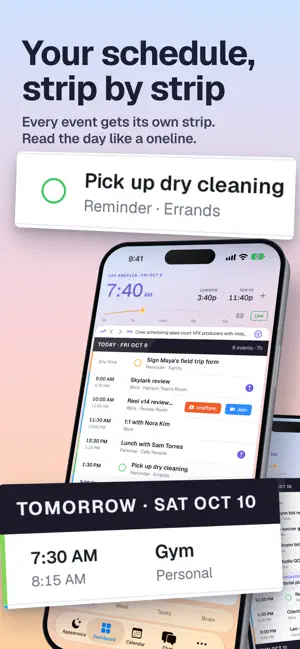


About CalStack
CalStack is a personal command center for your calendar, email, tasks, notes, contacts, and AI assistant. Built for people who live across meetings, travel, family schedules, projects, and inboxes, CalStack brings the day into one focused view instead of scattering it across apps. See your day, upcoming week, pinned events, meetings, reminders, and time zones in a single dashboard. Use Start Day, Check In, and Wind Down rituals to turn your calendar, email, tasks, and notes into practical daily context. CalStack also includes an AI chatbot that can work with your local app context, including calendar events, synced notes, processed email, contacts, and saved preferences. You can connect supported AI providers or local model servers depending on your setup. Key features: • Unified calendar dashboard • Day, week, month, quarter, year, and list calendar views • Pinned and starred calendar events • Time zone dashboard with time scrubber • AI-assisted Start Day, Check In, and Wind Down workflows • Email sync and searchable email context • Brain notes and memory layer • Contact tracking • Meeting and video link support • Local model support for privacy-focused workflows • iCloud sync for supported app data • Native iPhone, iPad, and Mac layouts CalStack is designed to help you understand what matters today, prepare for what is coming next, and keep useful context close without turning your day into another inbox.
What’s new
Version 1.2.2 · Updated October 9, 2026
Your reminders now live in your day. • Ready for iPhone Duo. CalStack fills the inner display and splits its pages at the fold, open flat, as a book or standing up. • Dated reminders from every list show in the day strips at their time, with a circle to tick them done. • A new filter in the corner of Today. Choose which calendars show, see only pinned events, or hide reminders. • Ask CalStack to pin or star an event and it's done. • Apple Watch: the Strips page scrolls through the week, and the Days page shows your dated reminders. • All-day events stay on their day. Events made in chat, from suggestions or in the editor no longer gain an extra day. • Email drafts have a cleaner editor, and Discard asks before deleting. • You can start a draft without a recipient, and sent mail lands in your account's Sent mailbox. • Each task and event in an email thread is suggested once. • Events made from an email keep its link. • Restating a Brain Note a moment later updates it instead of adding a second.
App privacy
The developer, Pick Two Productions Inc, reported these privacy practices to Apple.
Data Not Collected
The developer does not collect any data from this app.
Alternatives to CalStack
Looking for apps like CalStack? Here are 6 similar apps on the App Store. The highest rated is Tida Tasks (5.0/5), and all 6 are free to download.
-
 Senko - AI Computer
-
 Loft Calendar
-
 Tida Tasks
5.0
Tida Tasks
5.0
-
 Pacpost.live
5.0
Pacpost.live
5.0
-
 Signiant
5.0
Signiant
5.0
-
 Flow Production Tracking
1.5
Flow Production Tracking
1.5
| App | Rating | Price | Last updated | Compare |
|---|---|---|---|---|
| CalStack | – | 9.99 USD | October 9, 2026 | |
| Senko - AI Computer | – | Free | Oct 9, 2026 | Compare |
| Loft Calendar | – | Free | Sep 8, 2026 | Compare |
| Tida Tasks | 5.0 / 5 (4) | Free | Sep 30, 2026 | Compare |
| Pacpost.live | 5.0 / 5 (4) | Free | Sep 28, 2026 | Compare |
| Signiant | 5.0 / 5 (2) | Free | Dec 3, 2025 | Compare |
| Flow Production Tracking | 1.5 / 5 (16) | Free | Mar 26, 2024 | Compare |
Compare CalStack with the top alternatives: ratings, updates, ASO score and keyword gaps →