

Loft Calendar
BLUEPRINT TECH LIMITED Productivity iPhoneiPadiPod touch
Loft Calendar is a free Productivity app for iPhone and iPad by BLUEPRINT TECH LIMITED. Requires iOS 17.0. Updated September 8, 2026.
- Price
- Free
- on the App Store
- Size
- 10 MB
- Age 4+
- Updated
- Sep 8
- 2026 · v1.0.1
Screenshots



About Loft Calendar
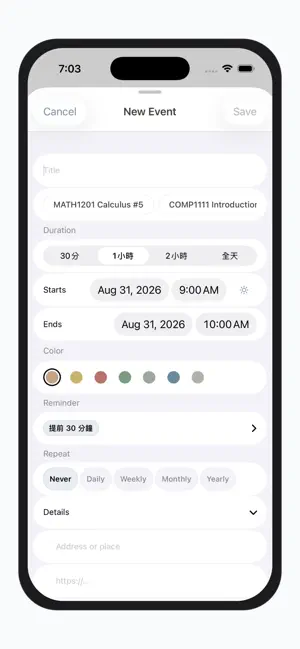
For those who cherish life’s small details and quiet routines — like organizing a drawer, pack your schedules neatly away, leaving peaceful white space to see the whole year, this month, and today. Washi-paper-inspired shades, a tiny card to flip, a few journal lines, and pouring a glass of water for yourself; with your schedule tucked in order, take the rest slow, and hold space for small daily blessings. Today’s Gift · Fortune, Lucky Color, & Lucky Number In the morning or during a quiet break, flip open a little card — today's fortune, lucky color, and lucky number. Like a tiny note left by your desk, it won't disturb your calendar's tranquility. Skip it if you don't need it; whenever you crave a sweet daily ritual, just gently reveal it. Organize Like a Drawer, Effortlessly Integrated Bring your scattered subscription links and old schedules gradually into Loft. Paste your calendar subscription URL or sync directly with your phone calendar — keep everything in one place, while deciding what stays visible. Just like tidying up a drawer, once everything has its spot, your mind clears up too. Year, Month, and Day at a Minimal Glance Gaze at the year’s overall outline, feel your monthly rhythm, and focus solely on what needs doing today. Three levels of view, framed in the same spacious canvas. Multinational Holiday Templates, Easily Added Public holiday templates for 11 regions — Hong Kong, Taiwan, Japan, Singapore, Malaysia, US, UK, Australia, Canada, South Korea, and New Zealand. Add whichever you need. Import full-year or single holidays seamlessly into your calendar, saving you an extra search when planning leaves or getaways. Japanese Nature · Washi Paper Themes Low-saturation, washi-inspired tones — River Sand, Moss, Cloud Paper... layered onto your calendar like picking a mood for the day. Choose your favorite light and dark themes; subtle and muted, quietly accompanying you through your planning. Create Single, Multiple, or Themed Schedules in a Few Taps Tap from your daily view or monthly grid, select a suggestion, and quickly fill in a few details. Create single items, multiple events (such as class or shift schedules), or a bundle of themed schedules — no tedious forms to face, leaving more time for the little things in life. Mindful Wellness · Hydrate, Stretch, and Rest Your Eyes Optional gentle reminders: drink a glass of water, stand up to stretch, or look out into the distance to rest your eyes. Soft notifications that won't clutter your calendar grid — like a quiet whisper to yourself. Journal & Diary Beyond plans, save a few lines for today: a mood, a thought, or a tiny detail you noticed. Your schedule rests quietly alongside, leaving a cozy, unfilled corner like an open journal page. Loft Calendar Premium — One-time purchase of $9.99 for full lifetime access, ad-free. Today’s Gift is for entertainment purposes only; official public holiday announcements shall prevail.
What’s new
Version 1.0.1 · Updated September 8, 2026
• Backup & restore your Loft data to Files / iCloud Drive • Optional weekly backup reminder
App privacy
The developer, BLUEPRINT TECH LIMITED, reported these privacy practices to Apple.
Data Not Collected
The developer does not collect any data from this app.
Alternatives to Loft Calendar
Looking for apps like Loft Calendar? Here are 6 similar apps on the App Store. The highest rated is Stash: Save Links for Later (5.0/5), and all 6 are free to download.
-
 Jotla
-
 Read Later! - Save Articles
-
 Shift It - Shift Work Calendar
-
 easyDays: Calendar & Weather
-
 Pencil Calendar: CalendarPad
4.2
-
 Stash: Save Links for Later
5.0
| App | Rating | Price | Last updated | Compare |
|---|---|---|---|---|
| Loft Calendar | – | Free | September 8, 2026 | |
| Jotla | – | Free | Jul 18, 2026 | Compare |
| Read Later! - Save Articles | – | Free | Sep 29, 2026 | Compare |
| Shift It - Shift Work Calendar | – | Free | May 30, 2026 | Compare |
| easyDays: Calendar & Weather | – | Free | Oct 18, 2026 | Compare |
| Pencil Calendar: CalendarPad | 4.2 / 5 (84) | Free | Oct 1, 2026 | Compare |
| Stash: Save Links for Later | 5.0 / 5 (1) | Free | Oct 17, 2026 | Compare |
Compare Loft Calendar with the top alternatives: ratings, updates, ASO score and keyword gaps →