

DayPlan: To Do List & Calendar
星富 何 Productivity iPhoneiPadiPod touchApple Watch
DayPlan: To Do List & Calendar is a free Productivity app for iPhone and iPad by 星富 何. Requires iOS 17. Updated October 23, 2026.
- Price
- Free
- on the App Store
- Size
- 11 MB
- Age 4+
- Updated
- Oct 23
- 2026 · v1.0.3
Screenshots


About DayPlan: To Do List & Calendar
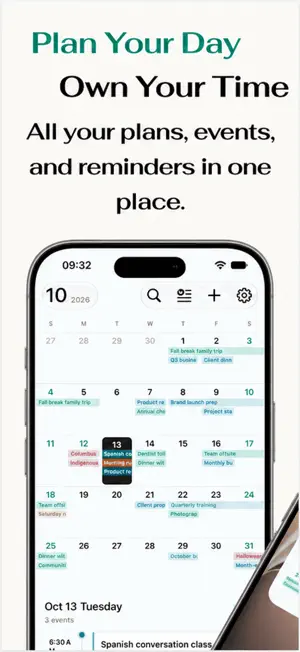
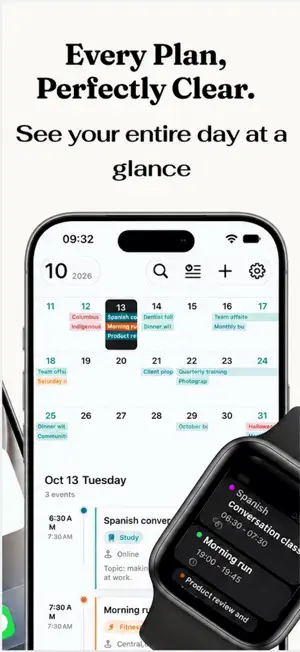
Plan your time. Know what matters next. DayPlan(schedule) brings your calendar and to-dos together, so you can keep track of your plans and decide what deserves your attention. From work meetings to everyday errands, give your day a little more structure. SEE YOUR SCHEDULE Switch between month, week, and two-week views. Add reminders, locations, and notes, or set up all-day and repeating events without entering the same details again. FOCUS ON WHAT MATTERS Organize to-dos by importance and urgency. Use the four-quadrant view to see your priorities, or switch to a list to focus on individual tasks. Break bigger jobs into subtasks, track your progress, and spot overdue items. CAPTURE PLANS FASTER Type a plan in everyday language, use voice input, or pull event details from a screenshot. Review and edit the recognized details before saving. KEEP YOUR PLANS IN SIGHT Add Home Screen widgets for your calendar, upcoming events, to-do lists, or priority grid. Lock Screen widgets give you a quick look at upcoming events and your top to-dos. CHECK IN FROM YOUR WRIST See events, browse to-dos, and explore your priority grid on Apple Watch. Check off tasks and subtasks right from your wrist. BACK UP AND STAY ORGANIZED Connect to Apple Calendar, including available iCloud calendars. Back up to-dos through iCloud Drive, or import and export backup files for your events and tasks. MAKE IT YOURS Choose a color theme, create custom categories, and see how your scheduled time is distributed. To-do backups require an Apple ID, iCloud Drive, and iCloud access for DayPlan. Calendar access, voice input, and other features require the relevant permissions. Apple Watch features require a paired, compatible device. Your Apple ID is charged when you confirm. Auto-renews unless you cancel 24 hours early; that renewal bills then. Manage it in Apple ID settings. Terms of Use (EULA): https://www.apple.com/legal/internet-services/itunes/dev/stdeula/ Privacy Policy: https://zhuanlan.zhihu.com/p/2093370776271451572
What’s new
Version 1.0.3 · Updated October 23, 2026
1. Major Update: Introducing a four-quadrant to-do list! Features a minimalist, fast, and user-friendly interface. Supports sub-tasks. 2. Optimized schedule creation: Now supports "Shortcuts" and voice recognition for quick, automated entry of events. 3. Performance improvements; optimized for iPhone Duo. 4. Bug fixes.
App privacy
The developer, 星富 何, reported these privacy practices to Apple.
Data Not Linked to You
The following data, which may be collected but is not linked to your identity, may be used for the following purposes:
- Location: Coarse Location
- User Content: Photos or Videos, Audio Data
Used for: App Functionality
Alternatives to DayPlan: To Do List & Calendar
Looking for apps like DayPlan: To Do List & Calendar? Here are 6 similar apps on the App Store. The highest rated is BeanDo: To-Do&Reminder Planner (5.0/5), and all 6 are free to download.
-
 Screenshot Inbox: Read & Act
-
 CollectHub-智慧收藏整理
-
 Aline: Daily Life, Made Easier
-
 Zoe - AI life coach
-
 Meow Planner: Pomodoro Timer
-
 BeanDo: To-Do&Reminder Planner
5.0
BeanDo: To-Do&Reminder Planner
5.0
| App | Rating | Price | Last updated | Compare |
|---|---|---|---|---|
| DayPlan: To Do List & Calendar | – | Free | October 23, 2026 | |
| Screenshot Inbox: Read & Act | – | Free | Sep 30, 2026 | Compare |
| CollectHub-智慧收藏整理 | – | Free | Oct 22, 2026 | Compare |
| Aline: Daily Life, Made Easier | – | Free | Aug 3, 2026 | Compare |
| Zoe - AI life coach | – | Free | Dec 4, 2025 | Compare |
| Meow Planner: Pomodoro Timer | – | Free | Oct 21, 2026 | Compare |
| BeanDo: To-Do&Reminder Planner | 5.0 / 5 (2) | Free | Oct 15, 2026 | Compare |