

LoopPDF
Murani Consultancy BV Productivity iPhoneiPadiPod touchMac
LoopPDF is a free Productivity app for iPhone and iPad by Murani Consultancy BV. Requires iOS 18.0. Updated October 30, 2026.
- Price
- Free
- on the App Store
- Size
- 8 MB
- Age 4+
- Updated
- Oct 30
- 2026 · v1.2
Screenshots
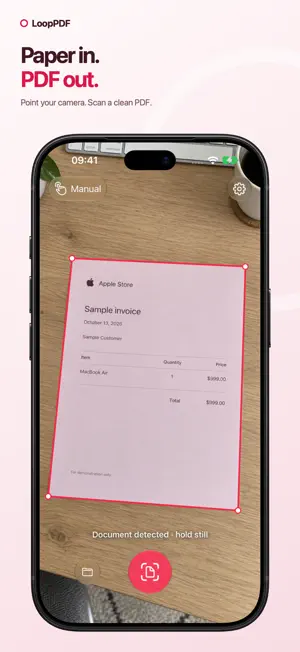


About LoopPDF
Turn paper into clean PDFs and copy text with OCR using LoopPDF, the free document scanner for iPhone, iPad and Mac. POINT, SCAN, SAVE Open the camera and bring all four corners into view. LoopPDF detects the page, counts down and captures it automatically. Tap the scan button whenever you want to capture immediately. Perspective correction straightens pages photographed at an angle. COPY TEXT WITH OCR Recognise text in new scans and saved PDFs with Apple Vision. Select and copy text from one page or copy all pages in order. Recognition runs on your device whenever you open Text, so your saved scans can benefit from improvements to Apple's text recognition. MULTIPLE PAGES, ONE PDF Scan another page, review the result and drag the thumbnails into the right order. Crop, rotate and adjust the colour treatment before saving. Add more pages to an existing PDF whenever you need to. YOUR FILES, ORGANISED Name your PDF and choose a folder inside LoopPDF. Browse subfolders, search by filename and open scans in the built-in PDF viewer. See page counts, file sizes, dates and sync status at a glance. READY ON YOUR OTHER DEVICES Save PDFs to your LoopPDF folder in iCloud Drive and continue on your iPhone, iPad or Mac using the same Apple Account. If iCloud is unavailable, your scans stay on the device and move to iCloud when it becomes available. PRESERVE THE DETAILS Save scans at their original resolution without additional lossy image compression. Keep small details in your documents, with larger files that use more storage. SAVE AND SHARE Send a PDF through Mail, AirDrop or the system share sheet directly after scanning or from the PDF viewer. PRIVATE BY DESIGN Document detection, image processing and OCR happen on your device. We do not receive your scans or add watermarks, logos or other branding. No ads, no subscription, no tracking and no separate LoopPDF account. MAKE IT YOURS Choose an automatic capture delay from 0.5 to 4 seconds. On Mac, use the built-in camera, an external webcam or an available Continuity Camera. Camera access is required for scanning. Syncing requires iCloud Drive and the same Apple Account on your devices. Apple's iCloud storage limits apply. Support: https://murani.nl/apps/looppdf/#support Privacy: https://murani.nl/apps/looppdf/#privacy
What’s new
Version 1.2 · Updated October 30, 2026
OCR support OCR recognises the words in your scans and turns them into text you can copy. After scanning or opening a saved PDF, tap the text-lines icon at the top. Choose "Copy page" for one page or "Copy all" for the entire document.
App privacy
The developer, Murani Consultancy BV, reported these privacy practices to Apple.
Data Not Collected
The developer does not collect any data from this app.
Alternatives to LoopPDF
Looking for apps like LoopPDF? Here are 6 similar apps on the App Store. The highest rated is Contacts + CRM by Dextr (5.0/5), and all 6 are free to download.
-
 Contacts + CRM by Dextr
5.0
-
 Precursor: Screen Time Limit
4.8
-
 Duse - Habit Tracker
4.6
-
 oh my hours
4.0
-
 PNG to PDF
4.8
-
 Notify - Web & Script Notifier
4.9
| App | Rating | Price | Last updated | Compare |
|---|---|---|---|---|
| LoopPDF | – | Free | October 30, 2026 | |
| Contacts + CRM by Dextr | 5.0 / 5 (47) | Free | Oct 29, 2026 | Compare |
| Precursor: Screen Time Limit | 4.8 / 5 (13) | Free | Oct 29, 2026 | Compare |
| Duse - Habit Tracker | 4.6 / 5 (18) | Free | Oct 11, 2026 | Compare |
| oh my hours | 4.0 / 5 (3) | Free | Sep 15, 2026 | Compare |
| PNG to PDF | 4.8 / 5 (31) | Free | Oct 31, 2024 | Compare |
| Notify - Web & Script Notifier | 4.9 / 5 (40) | Free | Oct 24, 2026 | Compare |
Compare LoopPDF with the top alternatives: ratings, updates, ASO score and keyword gaps →