

oh my hours
Yaroslav Neznaradko Productivity iPhoneiPadiPod touch
oh my hours is a free Productivity app for iPhone and iPad by Yaroslav Neznaradko. Rated 4.0/5 from 3 ratings. Requires iOS 26.2. Updated September 15, 2026.
- Rating
- 4.0
- 3 ratings
- Price
- Free
- on the App Store
- Size
- 14 MB
- Age 4+
- Updated
- Sep 15
- 2026 · v1.1
Screenshots


About oh my hours
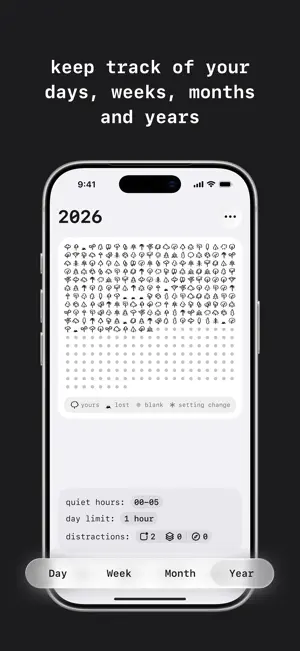
How many hours of your day are truly yours? oh my hours draws each hour of your day as a single mark: yours if you stayed off the apps you chose as distractions, lost if you didn't. Your whole year fits on one screen, one mark per day. It's not a screen time report. It asks a different question: how many hours stayed distraction free today? How it works 1. Pick the apps and categories that distract you. 2. Go about your day. A single second in one of them puts that hour on the line. 3. Checkpoint appears. Keep the hour by closing the app, or continue and lose it. 4. Choose your day limit. Too many lost hours and the day is lost too. Four views of your time • Day. 24 hours, one glance. • Week. Seven days, side by side. • Month. Four weeks in one look. • Year. Your whole year, on one screen. Widgets for where you actually look Home screen and lock screen widgets, in every size, for every view. Put your grid in front of yourself, not behind another tap. Share what you see A single tap turns any view into a clean image. Post it, save it, or send it to a friend. Private by design Everything stays on your device. No account. No server. No analytics. Export your full history to CSV, anytime, free. Not a blocker oh my hours won't lock you out or shame you into stopping. At your hour limit, checkpoint shows up with two options: keep the hour by closing the app, or continue and lose it. Continuing is always allowed. You can switch checkpoint off Free and Full Free, forever: day and week views, basic widgets, the default icon set, full data export. Full Version unlocks month and year views, their widgets, and more icon sets. One yearly payment or a one-time purchase. About the name It's what you'll say the first time you look at the grid. Terms, Privacy And Conditions Read on https://mindfulbun.studio/oh-my-hours/terms/ & https://mindfulbun.studio/oh-my-hours/privacy/ & https://www.apple.com/legal/internet-services/itunes/dev/stdeula/
What’s new
Version 1.1 · Updated September 15, 2026
Introducing "checkpoint" At your hour limit a full screen appears and asks if you want to continue. Close the app and the hour stays yours, or continue and lose it
App privacy
The developer, Yaroslav Neznaradko, reported these privacy practices to Apple.
Data Not Collected
The developer does not collect any data from this app.
Alternatives to oh my hours
Looking for apps like oh my hours? Here are 6 similar apps on the App Store. The highest rated is Things take time — Logbook (5.0/5), and all 6 are free to download.
-
 Futureland – Goal Tracker
4.8
Futureland – Goal Tracker
4.8
-
 LockScreenNotes
4.8
LockScreenNotes
4.8
-
 Lock Screen Notes: NoteWall
4.4
Lock Screen Notes: NoteWall
4.4
-
 Due or Die: To-Do App Blocker
3.6
Due or Die: To-Do App Blocker
3.6
-
 yeknegah
4.3
yeknegah
4.3
-
 Things take time — Logbook
5.0
Things take time — Logbook
5.0
| App | Rating | Price | Last updated | Compare |
|---|---|---|---|---|
| oh my hours | 4.0 / 5 (3 ratings) | Free | September 15, 2026 | |
| Futureland – Goal Tracker | 4.8 / 5 (104) | Free | Sep 14, 2025 | Compare |
| LockScreenNotes | 4.8 / 5 (1,619) | Free | Sep 25, 2026 | Compare |
| Lock Screen Notes: NoteWall | 4.4 / 5 (109) | Free | Oct 6, 2026 | Compare |
| Due or Die: To-Do App Blocker | 3.6 / 5 (5) | Free | Sep 14, 2026 | Compare |
| yeknegah | 4.3 / 5 (10) | Free | Oct 6, 2026 | Compare |
| Things take time — Logbook | 5.0 / 5 (8) | Free | Oct 12, 2026 | Compare |
Compare oh my hours with the top alternatives: ratings, updates, ASO score and keyword gaps →