

Due or Die: To-Do App Blocker
MARCUS STEPHEN TAYLOR Productivity iPhoneiPadiPod touch
Due or Die: To-Do App Blocker is a free Productivity app for iPhone and iPad by MARCUS STEPHEN TAYLOR. Rated 3.6/5 from 5 ratings. Requires iOS 26.0.
- Rating
- 3.6
- 5 ratings
- Price
- Free
- on the App Store
- Size
- 50 MB
- Age 9+
- Updated
- Sep 14
- 2026 · v1.2.1
Screenshots



About Due or Die: To-Do App Blocker
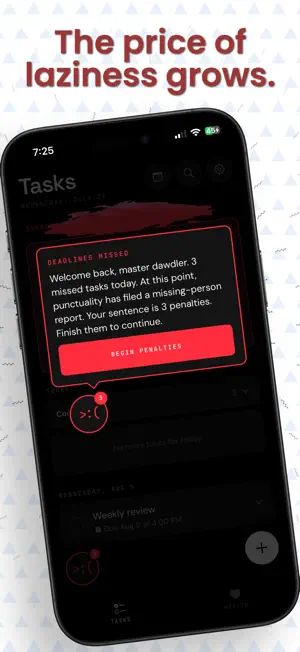
Research suggests that negative reinforcement for missing deadlines can be up to 29% more effective than positive reinforcement. Due or Die is the to-do app and app blocker for planners who need a little tough love to help get tasks done. Create tasks. Set real deadlines. Select interventions to keep you focused. Due or Die can block selected distracting apps with Screen Time until the work is finished. Miss a deadline and the consequences escalate: complete your overdue task, clear a penalty, and earn your apps back. Helpful? Yes. Polite about your procrastination? Absolutely not. A PLANNER THAT BITES BACK • Add tasks quickly with due dates and exact times • Interventions to lockout your distractions, show detailed countdowns, set aside time for working, or create routines • Use iPhone system alarms that can sound during Silent Mode or Focus • Follow live countdowns on the Lock Screen and Dynamic Island • Start app blocking at custom times to define when app lockouts begin. • Choose the apps, categories, and websites that steal your attention • Keep selected distractions locked until the task is complete • Face escalating consequences when deadlines are missed • Create daily, weekly, biweekly, monthly, yearly, and custom recurring tasks • Custom deadline countdowns in-app, on your home screen, and in your notification center • "Personality". Due or Die acts like a drill sergeant to turn “I’ll do it later” into “fine, I’m doing it now.” Missed deadlines triggers a penalty before apps unlock after task completion on top of short, randomized challenges from math, games, captchas, or just taking a good hard look at yourself. The more deadlines you miss in a day, the longer your post-completion lock can last. You remain in control: automatic punishment is optional, Screen Time access can be changed in iOS Settings, and optional selfie challenge images stay on-device and are deleted immediately. REMINDERS WITH A SPINE Get personalized task reminders, morning planning nudges, evening check-ins, app-lock alerts, and a weekly accountability report showing missed tasks and time spent locked out. Helpful? Yes. Polite about your procrastination? Absolutely not. PRIVATE BY DESIGN Your tasks, display name, Screen Time selections, and challenge photos stay on your iPhone. No account is required. App blocking uses Apple’s Screen Time frameworks, and camera access is optional. PRICING: Subscription required for app access and all app features. - 7 day free trial - $0.99 / week (or other currency equivalent) - $2.99 / month (or other currency equivalent) - $29.99 / year (or other currency equivalent) - $39.99 ONE TIME (or other currency equivalent) For people who know better and still need a push. Download Due or Die. Finish the task. Get your apps back. Privacy Policy: https://tehbandit.github.io/due-or-die-privacy/ Terms of Use (EULA): https://www.apple.com/legal/internet-services/itunes/dev/stdeula/
Ratings & reviews
3.6
5 ratings
What’s new
Version 1.2.1 · Updated September 14, 2026
This is a big one! - Added customizable interventions: default reminders, focus-lock suggestions, routine detection, and “tomorrow has no plan” nudges. - Added scheduled work locks with custom days and times, advance warnings, and a “Skip Today” option. - Added configurable Lock Screen and Dynamic Island countdowns with “Complete” and “Lock Now” actions. - Rebuilt onboarding with personalized recommendations, clearer permission setup, a lock demonstration, and a guided first task. - Improved completed-task history with collapsible groups, exact completion times, and early/late results. - Health receipts now show which reminders, focus locks, work locks, and countdowns helped you finish. - Added more varied, personalized roasts and camera-shutter feedback for selfie punishments. - Improved membership management, alarm and Screen Time reliability, and layout polish across iPhone sizes. - Improved membership management with a clearer, more reliable subscription flow. - Added an optional cancellation feedback experience. - Fixed subscription status refresh issues and made general reliability improvements.
App privacy
The developer, MARCUS STEPHEN TAYLOR, reported these privacy practices to Apple.
Data Not Linked to You
The following data, which may be collected but is not linked to your identity, may be used for the following purposes:
- Usage Data: Product Interaction
Used for: Analytics, App Functionality
Alternatives to Due or Die: To-Do App Blocker
Looking for apps like Due or Die: To-Do App Blocker? Here are 6 similar apps on the App Store. The highest rated is Breakin': Shift Work Planner (5.0/5), and all 6 are free to download.
-
 Breakin': Shift Work Planner
5.0
-
 Intenty: Intention Journal
4.6
-
 Lunbi: Habit Tracker
-
 ReadySet: Visual Routine Timer
4.8
-
 Ago: Last Time Tracker
5.0
-
 Swish: To Do Reminder Widget
5.0
| App | Rating | Price | Last updated | Compare |
|---|---|---|---|---|
| Due or Die: To-Do App Blocker | 3.6 / 5 (5 ratings) | Free | September 14, 2026 | |
| Breakin': Shift Work Planner | 5.0 / 5 (1) | Free | Sep 24, 2026 | Compare |
| Intenty: Intention Journal | 4.6 / 5 (9) | Free | Aug 2, 2026 | Compare |
| Lunbi: Habit Tracker | – | Free | Oct 12, 2026 | Compare |
| ReadySet: Visual Routine Timer | 4.8 / 5 (9) | Free | Sep 22, 2026 | Compare |
| Ago: Last Time Tracker | 5.0 / 5 (19) | Free | Sep 29, 2026 | Compare |
| Swish: To Do Reminder Widget | 5.0 / 5 (8) | Free | Oct 12, 2026 | Compare |