

TypeShot - Text & Photo Editor
Takao Sunagawa Photo & Video iPhoneiPadiPod touch
TypeShot - Text & Photo Editor is a free Photo & Video app for iPhone and iPad by Takao Sunagawa. Requires iOS 17.0. Updated November 8, 2026.
- Price
- Free
- on the App Store
- Size
- 197 MB
- Age 4+
- Updated
- Nov 8
- 2026 · v1.1.1
Screenshots
Save to Pinterest
About TypeShot - Text & Photo Editor
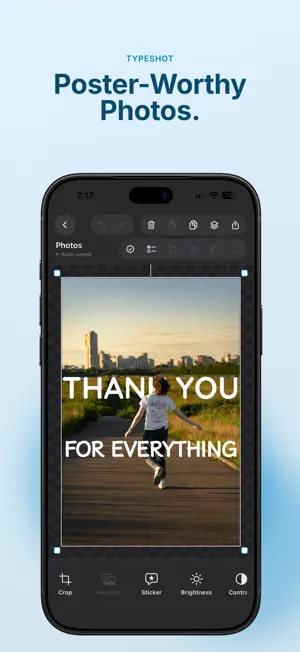
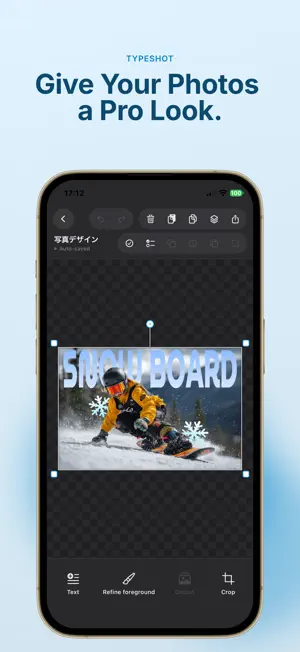
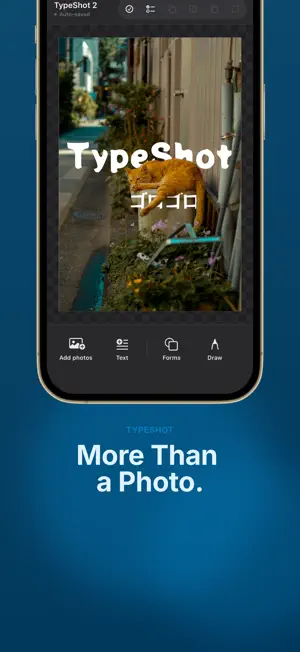
Put text behind your subject. Turn everyday photos into designs that feel like you. TypeShot is a photo design app for cutout collages, typography, and creative layering. Cut out people or pets and combine them with text, or bring multiple photos together in a collage. Customize fonts and layers to create images for social posts and thumbnails. Start with a photo or choose your canvas size first. Explore the possibilities of photos and text on iPhone and iPad. ■ Put text behind your subject Keep the original photo as your background and place a cutout of your subject in front. Arrange your photo, text, and subject to create depth, with lettering tucked behind a person or pet. • Keep the original photo and its foreground cutout aligned when moving or resizing • Move text behind or in front of your subject • Refine cutout edges with erase and restore brushes Cutout results may vary depending on the subject and background. ■ Create photo collages Add multiple photos and freely adjust their size, position, and stacking order. Combine cutouts with text, stickers, and shapes for designs that are minimal, playful, or full of personality. • Add up to six photos at once • Cut out, crop, and replace individual photos • Add white outlines and shadows to cutouts • Reorder, group, and duplicate layers • Undo and redo your edits ■ Make typography part of your photo Choose from a wide range of fonts to match your image and message. Go bold with oversized lettering, make room for whitespace, or layer text over your photos. • Adjust text size, color, letter spacing, and line spacing • Use vertical text, shadows, and outlines • Control how text overlaps with photos ■ Sizes for social posts and thumbnails Start with your photo’s aspect ratio, or choose an Instagram, thumbnail, or custom canvas size. • Square posts: 1:1 • Portrait posts: 4:5 • Stories: 9:16 • Custom dimensions for your needs Change the aspect ratio while editing, scaling your photos and text together. ■ Learn with your own photo An interactive, 12-step tour guides you through adding a photo, editing text, creating a cutout, and placing text behind your subject. A usage guide and FAQ are also available in Settings. ■ Save and keep creating Your projects save automatically, so you can reopen them and continue editing. Organize your work with search, folders, and favorites. Project backup and restore are also supported. ■ Start for free Export designs using free fonts as standard-size PNG or JPG images with a background. Free fonts and free shapes do not require watching ads. ■ TypeShot Pro Get more freedom to design with photos and text: • Access all fonts and Pro shapes • Export projects containing Pro fonts • Export transparent PNG, PDF, and SVG • Export at sizes above the standard resolution • Create unlimited saved projects without rewarded ads Choose a monthly subscription, yearly subscription, or lifetime purchase. ■ Photo editing happens on your device Photo editing and subject cutouts are processed on your device. Photos you edit are not uploaded to our servers. Terms of Use (EULA): https://www.apple.com/legal/internet-services/itunes/dev/stdeula/ Privacy Policy: https://typeshot-website.sunager.workers.dev/en/privacy
What’s new
Version 1.1.1 · Updated November 8, 2026
Meet the black cat on the Home screen. Tap it to help it relax. You can now show or hide the black cat in Settings. Added Chinese, Korean, and Thai fonts.
App privacy
The developer, Takao Sunagawa, reported these privacy practices to Apple.
Data Used to Track You
The following data may be used to track you across apps and websites owned by other companies:
- Identifiers: Device ID
Data Linked to You
The following data, which may be collected and linked to your identity, may be used for the following purposes:
- Location: Coarse Location
- Identifiers: Device ID
- Usage Data: Product Interaction, Advertising Data
Used for: Third-Party Advertising, Developer’s Advertising or Marketing, Analytics, App Functionality
Data Not Linked to You
The following data, which may be collected but is not linked to your identity, may be used for the following purposes:
- Diagnostics: Performance Data, Other Diagnostic Data, Crash Data
- Purchases: Purchase History
Used for: Third-Party Advertising, Developer’s Advertising or Marketing, Analytics, App Functionality
Alternatives to TypeShot - Text & Photo Editor
Looking for apps like TypeShot - Text & Photo Editor? Here are 6 similar apps on the App Store. The highest rated is Timestamp Camera: Site Photos (5.0/5), and all 6 are free to download.
-
 Picoday
-
 ピピっと露出計
-
 RANDOM MEMORIES
-
 Clarity: AI Photo Editor
-
 Timestamp Camera: Site Photos
5.0
-
 Add Text to Video - TEXT+IMAGE
5.0
| App | Rating | Price | Last updated | Compare |
|---|---|---|---|---|
| TypeShot - Text & Photo Editor | – | Free | November 8, 2026 | |
| Picoday | – | Free | Mar 31, 2026 | Compare |
| ピピっと露出計 | – | Free | Jun 28, 2026 | Compare |
| RANDOM MEMORIES | – | Free | Nov 14, 2026 | Compare |
| Clarity: AI Photo Editor | – | Free | Nov 3, 2026 | Compare |
| Timestamp Camera: Site Photos | 5.0 / 5 (1) | Free | Nov 16, 2026 | Compare |
| Add Text to Video - TEXT+IMAGE | 5.0 / 5 (1) | Free | Jan 16, 2026 | Compare |