

Timestamp Camera: Site Photos
KUREHO Photo & Video iPhoneiPadiPod touch
Timestamp Camera: Site Photos is a free Photo & Video app for iPhone and iPad by KUREHO. Requires iOS 17.0. Updated October 21, 2026.
- Price
- Free
- on the App Store
- Size
- 6 MB
- Age 4+
- Updated
- Oct 21
- 2026 · v1.5.2
Screenshots


About Timestamp Camera: Site Photos
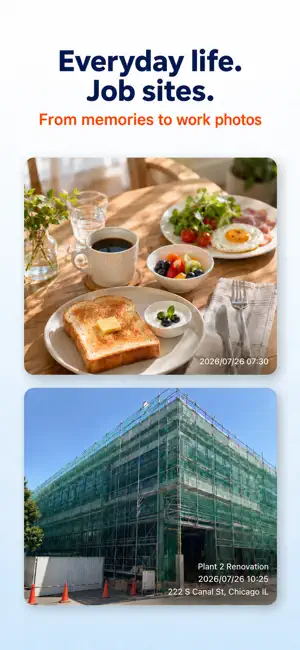
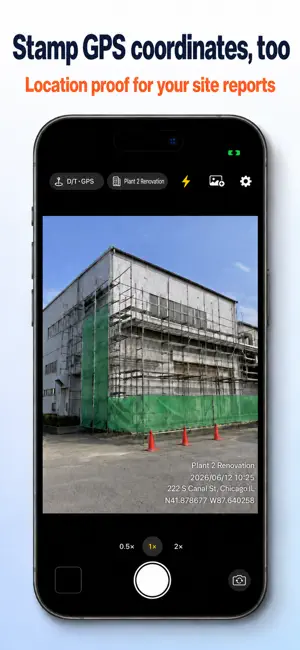
The moment you press the shutter, the date, time and address are stamped onto your photo. Made for work where you need to show when and where a photo was taken: construction, equipment inspections, facility management, deliveries. Drop your photos straight into reports, daily logs and job records. WHO IT'S FOR • Contractors and crews in construction, remodeling, electrical and plumbing who take job site photos every day • Inspectors and facility managers documenting site visits • Real estate agents and property managers recording property condition at move-in and move-out • Delivery drivers and movers who need photo proof of a finished job • Anyone keeping date-stamped records of family, travel or daily life KEY FEATURES Stamped as you shoot The date, time and address are added to the photo the instant you shoot. A live preview on the camera screen shows how the stamp will look, so there's no editing afterward. Dates use a fixed YYYY/MM/DD HH:mm (24-hour) format. Site presets Save the sites you visit often and switch between them with one tap—no retyping at every location. The selected site name is added to the stamp automatically. Landscape or portrait Hold the phone either way and the stamp stays upright with the photo. Handy for wide shots of a whole site. Three quality levels, two coordinate formats Choose Light, Standard or High. High is the default and uses your device's full resolution with no downscaling; Light shrinks the long edge to 2048 px for email and reports. Coordinates can be shown in decimal degrees or degrees, minutes, seconds (DMS). The capture date and time—and GPS location, when location access is on—are also kept in the photo's EXIF data. Add a stamp to photos you've already taken (Plus) Stamp photos already in your library. The original is left untouched and the stamped copy is saved as a new photo. The date comes from the photo's own capture data; if a photo has none, the date and time are left off instead of using today's date. Customize the stamp (Plus) Move the stamp to any corner, choose from 3 sizes and white, black or yellow text, and add a line of your own text. FREE VS. PLUS Free: date & time stamp, date, time & address stamp (unlimited shots), landscape support, 1 site preset, choice of quality and coordinate format. Photos taken with the free version include a small app-name watermark in one corner. Banner ads appear on the Settings screen and below the post-capture preview, and a full-screen ad appears after every 5 photos. Plus (one-time purchase, no subscription; see the app for pricing): removes the app-name watermark and all ads, and adds the date, time, address & GPS coordinates stamp, unlimited site presets, stamp position, size and color, one custom text line, and stamping of photos you've already taken. Restore your purchase on a new device with the same Apple Account. NOTES • Location access is optional. Without it you can still shoot with a date & time stamp—missing location never blocks the shutter. • Location accuracy depends on your device and surroundings. If the address can't be found (for example indoors or with no signal), the stamp shows GPS coordinates when available, or just the date and time. • To save photos, the app only asks for permission to add them to your library. It never changes or deletes photos already in your library.
What’s new
Version 1.5.2 · Updated October 21, 2026
- Fixed an issue where the screen opened from a link could be hidden behind a screen that was already open - Minor improvements
App privacy
The developer, KUREHO, reported these privacy practices to Apple.
Data Used to Track You
The following data may be used to track you across apps and websites owned by other companies:
- Identifiers: Device ID
- Usage Data: Product Interaction, Advertising Data
Data Not Linked to You
The following data, which may be collected but is not linked to your identity, may be used for the following purposes:
- Identifiers: Device ID
- Usage Data: Product Interaction, Advertising Data
- Diagnostics: Crash Data, Performance Data, Other Diagnostic Data
Used for: Third-Party Advertising, Analytics, App Functionality
Alternatives to Timestamp Camera: Site Photos
Looking for apps like Timestamp Camera: Site Photos? Here are 6 similar apps on the App Store.
-
 StampFrame - 日付入り写真・動画
-
 思い出カメラ -タイムスタンプカメラ
-
 Timestamp Camera: Photo Stamp
-
 かんたんタイムスタンプ - 日付や時刻・住所入りの現場写真
-
 申請カメラくん
-
 Photo Date Stamp
| App | Rating | Price | Last updated | Compare |
|---|---|---|---|---|
| Timestamp Camera: Site Photos | – | Free | October 21, 2026 | |
| StampFrame - 日付入り写真・動画 | – | Free | Jun 8, 2026 | Compare |
| 思い出カメラ -タイムスタンプカメラ | – | Free | Aug 1, 2026 | Compare |
| Timestamp Camera: Photo Stamp | – | Free | Aug 26, 2026 | Compare |
| かんたんタイムスタンプ - 日付や時刻・住所入りの現場写真 | – | Free | Sep 23, 2026 | Compare |
| 申請カメラくん | – | Free | Jul 18, 2026 | Compare |
| Photo Date Stamp | – | Free | Feb 26, 2026 | Compare |