

Vaiya: Product Demos
Abdullah Alkhatib Photo & Video iPhoneiPadiPod touchMac
Vaiya: Product Demos is a free Photo & Video app for iPhone and iPad by Abdullah Alkhatib. Requires iOS 17.0. Updated November 23, 2026.
- Price
- Free
- on the App Store
- Size
- 20 MB
- Age 4+
- Updated
- Nov 23
- 2026 · v1.1.1
Screenshots
Save to Pinterest


About Vaiya: Product Demos
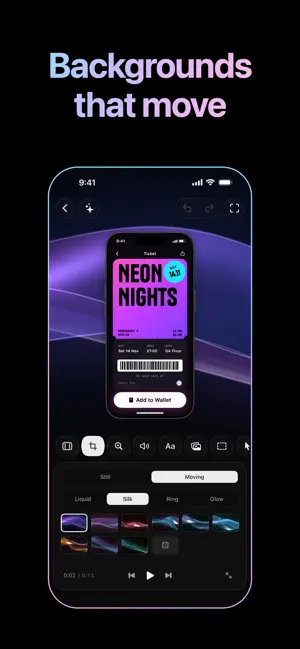
Show your product at its best. Record your app on the iPhone or the Mac, and Vaiya turns it into a polished demo. Ready for a launch video, a product tour, a landing page, a sales demo or your help docs. ZOOM IN WHERE IT MATTERS Add a zoom anywhere with a tap. Mac recordings zoom themselves: every click, drag and notification gets its own zoom. Tap a pin to switch one off, or choose where a zoom looks: follow the cursor, hold where it lands, or one spot. A POINTER YOU CAN FOLLOW In Mac recordings the pointer is drawn again, smooth and big enough to see. Arrow, Outline or Dot, at any size. BACKGROUNDS Gradients, colors, your own images, or one that moves. Round corners and a soft shadow come with it. Roll the die for a new one. DEVICES Show your app in an iPhone, an iPad, a MacBook or a browser. YOU, IN A BUBBLE Record your camera on the Mac and talk people through it from one of nine places. Remove or blur the room behind you. WORDS AND SOUNDS Titles come up word by word, over the video or on a card of their own. Place one of fifteen sounds by hand, and Mac recordings get their clicks and chimes back. BLUR AND SPOTLIGHT Hide customer data, or point at the button that matters. CUT AND SPEED Trim the ends, cut the mistakes, and speed through the slow parts. EXPORT MP4 or GIF, up to 4K, for your site, your launch or your docs. MAC, iPHONE AND iPAD On the iPhone or iPad, record any app, even with Vaiya closed, and turn it on its side as you go: the video turns too. Or bring in a video from Photos. On an iPad on its side or an opened iPhone Duo, the editor spreads out like the Mac's. On the Mac, record a display, a window or part of the screen, or an iPhone or iPad plugged in by cable. Your library is in your own iCloud, so a recording made on one shows up on the other. IN YOUR LANGUAGE English, Japanese, Spanish, French, Russian, Simplified and Traditional Chinese, and Arabic. PRIVATE BY DESIGN No account and no tracking. Vaiya never listens to the keyboard. Your recording is never changed, so every edit can be undone.
What’s new
Version 1.1.1 · Updated November 23, 2026
Answers in the app: write to us from Settings › Feedback, and our answer comes back right there, with a notification. No email address needed. NEW IN 1.1 Vaiya speaks Japanese, Spanish, French, Russian, Simplified and Traditional Chinese, and Arabic. It spreads out on an iPad on its side and an opened iPhone Duo, turns with your phone while you record, and lets you choose where each zoom looks.
App privacy
The developer, Abdullah Alkhatib, reported these privacy practices to Apple.
Data Not Collected
The developer does not collect any data from this app.
Alternatives to Vaiya: Product Demos
Looking for apps like Vaiya: Product Demos? Here are 6 similar apps on the App Store. The highest rated is Edit Text on Photos: Glyphswap (5.0/5), and 5 of the 6 are free to download.
-
 Lab Channels
-
 Edit Text on Photos: Glyphswap
5.0
-
 EchoSense-AI
-
 Clipstack: Video Editor
5.0
-
 Fluxify AI Art Generator
-
 iCPainter: Photo to Painting
3.4
| App | Rating | Price | Last updated | Compare |
|---|---|---|---|---|
| Vaiya: Product Demos | – | Free | November 23, 2026 | |
| Lab Channels | – | 0.99 USD | Sep 2, 2026 | Compare |
| Edit Text on Photos: Glyphswap | 5.0 / 5 (1) | Free | Nov 24, 2026 | Compare |
| EchoSense-AI | – | Free | Oct 1, 2026 | Compare |
| Clipstack: Video Editor | 5.0 / 5 (4) | Free | Nov 16, 2026 | Compare |
| Fluxify AI Art Generator | – | Free | Jul 9, 2026 | Compare |
| iCPainter: Photo to Painting | 3.4 / 5 (15) | Free | Nov 22, 2026 | Compare |