

Hangul Moment
Jinwoo Park Utilities iPhoneiPadiPod touch
Hangul Moment is a free Utilities app for iPhone and iPad by Jinwoo Park. Requires iOS 17.0. Updated November 4, 2026.
- Price
- Free
- on the App Store
- Size
- 24 MB
- Age 4+
- Updated
- Nov 4
- 2026 · v1.3.1
Screenshots

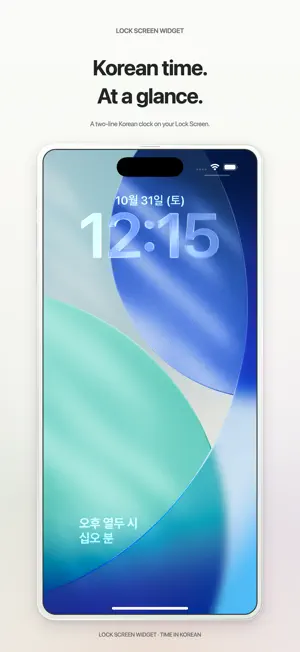


About Hangul Moment
A little Korean word clock for your desk. Hangul Moment displays the time in Hangul with a retro flip clock. Read Korean time on your Lock Screen, or add a clock and daily calendar side by side in StandBy. • Three app themes: Cream, Mono, and Retro Green • A two-line Korean word clock for your Lock Screen • A Korean word clock and daily calendar for StandBy • Four widget looks: Cream, Mono, Retro Green Electronic, and Retro Green Dot • Adjust date, seconds, text size, dimming, flip animation, and sound • Portrait, landscape, and keep-awake while using the app The clock follows your iPhone's local time. Time and dates appear in Korean; menus and guides support English, Korean, and Japanese. All clock features work offline, with no in-app ads or account required. StandBy requires iOS 17 or later. Add the widgets yourself; iOS manages their update timing. “Share Usage Information” is off by default. Only when enabled, Firebase analyzes active clock time, five-active-minute milestones, themes, display settings, widget setup observed by the app, widget guide opens, and app opens through the widget URL. It is separate from advertising tracking and can be turned off at any time. Only if you allow tracking, Meta and TikTok receive data to measure advertising performance. Declining leaves all clock features available. Privacy policy: https://gring2.github.io/retro-korean-clock/en/#privacy Support: [email protected] With usage sharing enabled, open the updated app once on your iPhone. Home Screen and StandBy clock/calendar widgets and the Lock Screen clock can then send activity signals through Supabase to Firebase during refreshes while the app is closed. The aim is one signal per app instance, UTC day, and widget type. These signals do not measure impressions, viewing time, or exact active user counts. You can turn sharing off at any time in settings.
What’s new
Version 1.3.1 · Updated November 4, 2026
Improved optional widget usage sharing and clarified the privacy information. If you enable usage sharing, widgets—including the Lock Screen clock—can share activity information when they refresh while the app is closed. Sharing stays off by default, and all clock and widget features remain available when sharing is off.
App privacy
The developer, Jinwoo Park, reported these privacy practices to Apple.
Data Used to Track You
The following data may be used to track you across apps and websites owned by other companies:
- Location: Coarse Location
- Identifiers: Device ID
- Usage Data: Product Interaction
- Other Data: Other Data Types
Data Linked to You
The following data, which may be collected and linked to your identity, may be used for the following purposes:
- Location: Coarse Location
- Identifiers: Device ID
- Usage Data: Product Interaction, Other Usage Data
- Other Data: Other Data Types
- Diagnostics: Performance Data, Other Diagnostic Data
Used for: Third-Party Advertising, Developer’s Advertising or Marketing, Analytics, App Functionality
Alternatives to Hangul Moment
Looking for apps like Hangul Moment? Here are 6 similar apps on the App Store. The highest rated is PicTossr (5.0/5), and all 6 are free to download.


| App | Rating | Price | Last updated | Compare |
|---|---|---|---|---|
| Hangul Moment | – | Free | November 4, 2026 | |
| PicTossr | 5.0 / 5 (2) | Free | Jul 27, 2026 | Compare |
| Donut timer | – | Free | Oct 31, 2026 | Compare |
| 대충시계 - 한글에 시간을 녹이다 | – | Free | Feb 18, 2026 | Compare |
| 第78回鯱光祭 | – | Free | Sep 22, 2026 | Compare |
| 第77回鯱光祭 | – | Free | Sep 28, 2025 | Compare |
| Magnetic Sensor | – | Free | Sep 15, 2026 | Compare |
Compare Hangul Moment with the top alternatives: ratings, updates, ASO score and keyword gaps →