

Donut timer
Hiroyuki Kako Utilities iPhoneiPadiPod touch
Donut timer is a free Utilities app for iPhone and iPad by Hiroyuki Kako. Requires iOS 16.6. Updated August 27, 2026.
- Price
- Free
- on the App Store
- Size
- 4 MB
- Age 4+
- Updated
- Aug 27
- 2026 · v1.7
Screenshots


About Donut timer
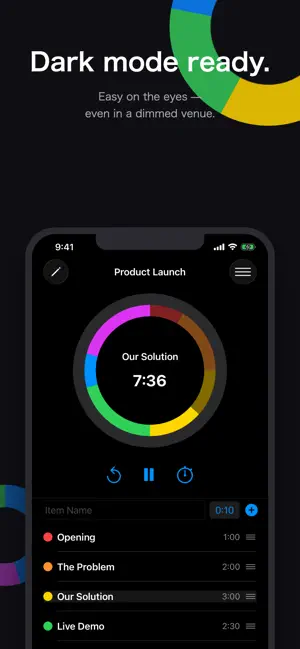
Donut Presentation Timer An intuitive timer app designed for smart time management in presentations, speeches, seminars, classes, cooking, cleaning, and more. With a beautiful donut-shaped visual, you can see your time allocation for each section at a glance. Key Features ■ Intuitive Donut-Shaped Timer Visualize your entire schedule with a color-coded donut chart. See which section you are currently in and how much time remains—instantly and clearly. ■ Flexible Section-Based Timing Create multiple sections to match the flow of your presentation. Assign a name, duration, and color to each section for precise control. ■ Lap Time Tracking Record actual presentation times with the built-in lap time feature. Compare planned time and actual progress in real time to stay on track. ■ Save Timer Presets Save frequently used timer setups with custom names. Quickly reuse the same configuration for recurring presentations or meetings. ■ Customizable Design Choose from over 10 color themes. Customize the look of your timer to match your style or the occasion. ■ Completion Notifications Get notified with sound and vibration when a section ends or the timer finishes. Stay aware of time even when you’re not looking at the screen. Perfect For Presenters and public speakers Teachers and instructors running classes or seminars Meeting and workshop facilitators Students and anyone who wants better time awareness People who want to time cleaning sessions efficiently Anyone who keeps burning their stew Anyone giving presentations with multiple sections Even if time management isn’t your strong suit, this app helps you stay focused and confident. Upgrade your presentations with a functional and elegant donut-shaped timer—and deliver like a professional.
What’s new
Version 1.7 · Updated August 27, 2026
• Added notifications for new features. • Enabled sending feature requests directly from the app. • Improved stability. The app now handles sleep mode correctly, and it is less likely to enter sleep mode while the timer is running. • You can now switch the language and theme (Light/Dark) in Settings.
App privacy
The developer, Hiroyuki Kako, reported these privacy practices to Apple.
Data Used to Track You
The following data may be used to track you across apps and websites owned by other companies:
- Location: Coarse Location
- Identifiers: Device ID
- Usage Data: Product Interaction, Advertising Data
- Diagnostics: Crash Data, Performance Data
Data Linked to You
The following data, which may be collected and linked to your identity, may be used for the following purposes:
- Location: Coarse Location
- Identifiers: Device ID
- Usage Data: Product Interaction, Advertising Data
- Diagnostics: Performance Data
Used for: Third-Party Advertising
Data Not Linked to You
The following data, which may be collected but is not linked to your identity, may be used for the following purposes:
- Diagnostics: Crash Data
Used for: Third-Party Advertising
Alternatives to Donut timer
Looking for apps like Donut timer? Here are 6 similar apps on the App Store.
-
 words2time - Time Your Speech
-
 Hz Lab: Frequency Generator
-
 LiveActivityTimer
-
 Pitch Timer
-
 UWB Locator
-
 M-1 Timer
| App | Rating | Price | Last updated | Compare |
|---|---|---|---|---|
| Donut timer | – | Free | August 27, 2026 | |
| words2time - Time Your Speech | – | Free | Aug 29, 2025 | Compare |
| Hz Lab: Frequency Generator | – | Free | Sep 11, 2026 | Compare |
| LiveActivityTimer | – | Free | Jun 10, 2025 | Compare |
| Pitch Timer | – | Free | Jan 21, 2024 | Compare |
| UWB Locator | – | Free | Aug 12, 2026 | Compare |
| M-1 Timer | – | Free | Dec 19, 2023 | Compare |
Compare Donut timer with the top alternatives: ratings, updates, ASO score and keyword gaps →