

Seamline: Tile Layout Planner
Serhii Khymenko Lifestyle iPhoneiPadiPod touch
Seamline: Tile Layout Planner is a free Lifestyle app for iPhone and iPad by Serhii Khymenko. Requires iOS 17.0. Updated November 17, 2026.
- Price
- Free
- on the App Store
- Size
- 28 MB
- Age 4+
- Updated
- Nov 17
- 2026 · v0.1.19
Screenshots
Save to Pinterest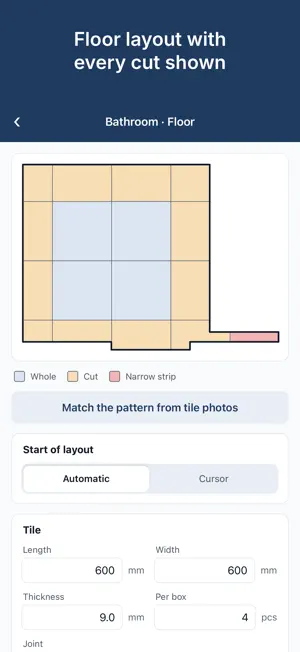
About Seamline: Tile Layout Planner
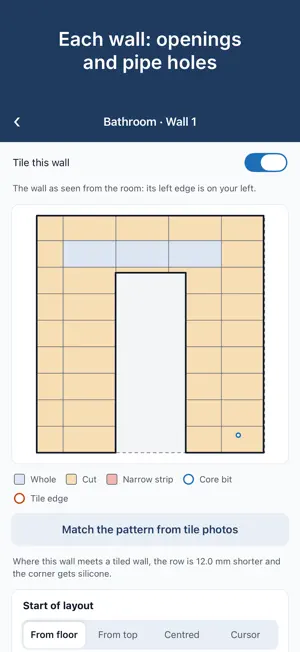
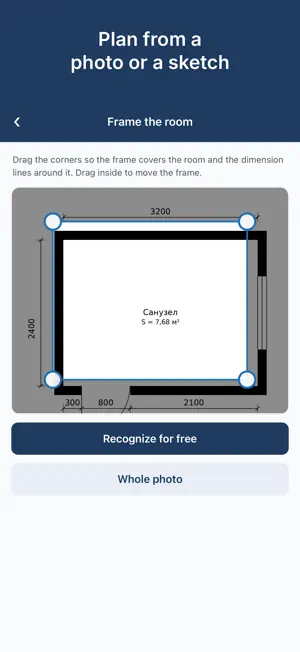
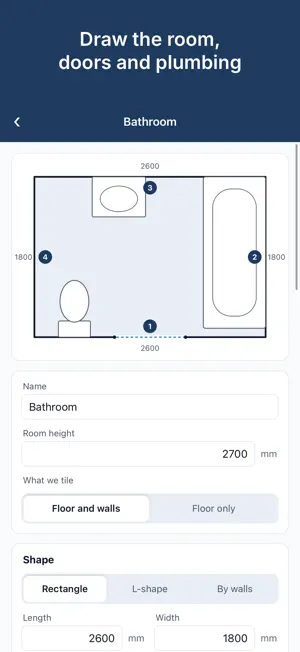
Seamline lays out tiles from your room plan — on the floor and on every wall — and works out how many tiles, how much adhesive, grout and silicone to buy, how many cuts you will make and where to drill. A PLAN FROM A PHOTO Take a photo of a drawing, a plan from your documents or a hand sketch with dimensions. Seamline finds the rooms, walls, doors and windows — you just check the sizes. Recognise one room or a whole floor and pick the rooms you need. Plan sizes are converted to plastered walls (15 mm layer, adjustable). Your first room is free. OR BY HAND IN A MINUTE Rectangle, L-shape or wall by wall: a length and a turn for each wall. A diagonal or curved wall follows from its neighbours. Place doors, windows and fixtures — bath, shower cabin, washbasin, toilet, wall-hung toilet with frame, bidet — and slide them along the wall with your finger. A bath and a shower snap into the corners. FLOOR LAYOUT Straight, brick bond with a 1/2 or 1/3 offset, or diagonal. The app picks a starting point that leaves no thin slivers at the walls — or set it with a crosshair that snaps to corners, the centre and the walls. Floor tiles run into the doorway up to the door leaf; the floor under a bath or shower is left out. EVERY WALL ON ITS OWN Start from the floor, the top or the centre; above a bath, a full row starts at the rim. Openings, boxed-in pipes, mixers, sockets, a toilet frame in the wall or in a projecting box. Pipe holes are shown on the drawing: inside a tile — drill with a core bit; across a joint — cut at the edge. CORNERS DONE RIGHT In an inside corner the next wall's tiles butt against the first wall's tiles, so that row is shorter by the tile and adhesive thickness. The corner joint takes silicone only, counted in metres and cartridges. Outside corners — in metres of trim or with 45° mitre cuts. THE RESULT Whole tiles and cut pieces by type of cut, number of cut lines, narrow strips. Tiles with and without reusing offcuts, reserve, boxes. Adhesive, grout, silicone. Holes by diameter. PROJECTS AND REPORTS A project keeps the plan and all its rooms. The layout and every calculation on the screens are free. The PDF report — drawings, cuts, holes and materials for the plan, the floor and each wall — and the project file come with buying that project once, or with Seamline Pro: a yearly subscription with reports for any number of projects and a backup of all projects. Save to Files or iCloud Drive, or send to a client or a shop. Recognition credits come in packs of 1, 5, 15 and 50: a room costs 1 credit, a whole floor 3. Credits never expire. No sign-up. Your plans are kept on your device; a plan photo is sent only to recognise it and is not stored. Eight languages, light and dark theme. Made by Nearfolk. KNOWN LIMITATIONS Hole positions for fixtures are typical — move them to your pipes. Offcuts are reused within one wall, so any error is on the side of a spare tile. Cladding thickness in inside corners is taken as 12 mm. Recognition can misread a blurred or skewed photo — always check the wall lengths before laying out tiles. Questions and ideas: [email protected] Seamline Pro is a yearly auto-renewable subscription. Payment is charged to your Apple ID when you confirm the purchase. The subscription renews automatically unless cancelled at least 24 hours before the end of the current period. Manage or cancel it in your Apple ID settings. Terms of Use: https://www.apple.com/legal/internet-services/itunes/dev/stdeula/ Privacy Policy: https://nearfolk.io/seamline/privacy-ios.html
What’s new
Version 0.1.19 · Updated November 17, 2026
The recognition screen now shows what to photograph: a drawing, a plan or a hand sketch with dimensions works, a photo of the room or its ceiling does not.
App privacy
The developer, Serhii Khymenko, reported these privacy practices to Apple.
Data Not Linked to You
The following data, which may be collected but is not linked to your identity, may be used for the following purposes:
- Usage Data: Product Interaction
- Purchases: Purchase History
- User Content: Photos or Videos, Other User Content
- Identifiers: Device ID
Used for: Developer’s Advertising or Marketing, Analytics, App Functionality
Alternatives to Seamline: Tile Layout Planner
Looking for apps like Seamline: Tile Layout Planner? Here are 6 similar apps on the App Store. The highest rated is Doma: Home Renovation Tracker (5.0/5), and all 6 are free to download.
-
 AI Bathroom Designer Studio
-
 Doma: Home Renovation Tracker
5.0
-
 УК Парковые Аллеи
-
 LayoutVO: 3D Room Planner
-
 A100
1.0
-
 Hintik
| App | Rating | Price | Last updated | Compare |
|---|---|---|---|---|
| Seamline: Tile Layout Planner | – | Free | November 17, 2026 | |
| AI Bathroom Designer Studio | – | Free | Jul 21, 2026 | Compare |
| Doma: Home Renovation Tracker | 5.0 / 5 (1) | Free | Oct 30, 2026 | Compare |
| УК Парковые Аллеи | – | Free | Mar 16, 2026 | Compare |
| LayoutVO: 3D Room Planner | – | Free | Nov 20, 2026 | Compare |
| A100 | 1.0 / 5 (1) | Free | Dec 2, 2025 | Compare |
| Hintik | – | Free | Nov 22, 2026 | Compare |