

Doma: Home Renovation Tracker
Dina Kazakova Lifestyle iPhoneiPadiPod touch
Doma: Home Renovation Tracker is a free Lifestyle app for iPhone and iPad by Dina Kazakova. Rated 5.0/5 from 1 ratings. Requires iOS 16.4.
- Rating
- 5.0
- 1 ratings
- Price
- Free
- on the App Store
- Size
- 66 MB
- Age 4+
- Updated
- Oct 22
- 2026 · v1.5.0
Screenshots


About Doma: Home Renovation Tracker
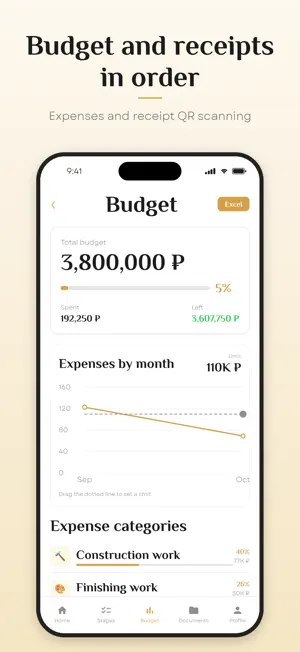
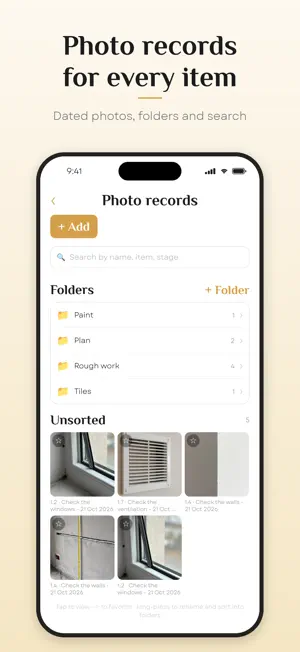
Doma is a renovation app for an apartment, house or office: a route of stages from handover to move-in, budget and receipts, photos for every item, documents and a property passport. The owner, the designer and the contractor run the property together: the contractor checks off finished work, the owner or designer reviews and accepts it. Stages, photos, expenses and decisions stay with the property instead of getting lost in your camera roll. WHAT'S INSIDE • Renovation route. Answer a short questionnaire and the app builds stages and items for your goal: major renovation, cosmetic refresh, furnishing or just record keeping. Change your answers at any time; add, remove, rename and reorder stages and items. • New-build apartment handover. The first stage of the route has 17 items, from checking the door, windows and walls to the certificate and the keys. Photograph the defects and keep the certificate in the property's documents. • Work and its acceptance. The contractor checks off what's done, the owner or designer reviews it and accepts it or sends it back with comments. • Photo records for every item. Photos with clear names, folders and search; hidden work is photographed before it's covered. The capture date and photo order are kept so that backdating is noticeable, and photos from the gallery are marked. • Budget and receipts. Budget by category, expenses by month, export to Excel. Point the camera at the QR code of a Russian cash receipt and the amount and date fill in automatically. • Documents and property passport. Contracts, certificates and warranties next to the work. Photograph a label, a paint can or a nameplate and the app reads the brand, paint code, SKU and serial number and builds the property passport. Export to PDF and Excel. • Property team. Invite a designer, foreman or contractor with a code or a link. Each role has its own access: for example, the budget is hidden from those who don't need it. • Comments on items, a property feed and tasks, all in one place. Report a post or a member and block them right in the app. • Master Kistya, an AI renovation assistant. Answers questions about building norms and materials, knows how work on your properties is going (overspending, overdue items, what's waiting for review) and shows where things are in the app. Answers are generated automatically and may contain mistakes: check anything important with a professional. • Inspiration. An idea board for the property, with photos and links in folders. • Notifications about approvals, comments and accepted work. • Several properties. When the renovation is over, the property moves into use: documents, warranties, receipts and the passport stay at hand, and the stages remain as history. • Works offline. Data is stored on your phone and syncs when you're back online. • English, Russian and Armenian interface. WHO IT'S FOR Owners who want to keep their renovation, deadlines and money under control, and designers and foremen who run their clients' properties. SIGN-IN AND DATA You can start without an account. Sign in with a one-time code, no password. User data is stored on servers in Russia. Delete your account in the app: Profile → Delete account. Privacy policy and terms of use (in Russian): https://digitaldoma.ru/legal Support: [email protected] The app is also available in Armenian.
What’s new
Version 1.5.0 · Updated October 22, 2026
Change the stage questionnaire at any time: change an answer and confirm, and removed stages and items come back. The one-minute Undo is gone. The Stages screen is calmer, without long counters under the title. You can now also report a photo, a file or an idea. If your phone's language is neither Russian nor Armenian, the app opens in English. Signing in from abroad with an email from any provider no longer depends on your phone's language. A deleted property stays in the Trash for 32 days: whoever deleted it or the owner can restore it in Archive → Trash.
App privacy
The developer, Dina Kazakova, reported these privacy practices to Apple.
Data Linked to You
The following data, which may be collected and linked to your identity, may be used for the following purposes:
- Identifiers: Device ID, User ID
- Contact Info: Physical Address, Email Address, Phone Number
- User Content: Photos or Videos, Other User Content
- Diagnostics: Crash Data, Other Diagnostic Data
- Financial Info: Other Financial Info
Used for: Analytics, App Functionality, Other Purposes
Data Not Linked to You
The following data, which may be collected but is not linked to your identity, may be used for the following purposes:
- Contact Info: Name
Used for: App Functionality
Alternatives to Doma: Home Renovation Tracker
Looking for apps like Doma: Home Renovation Tracker? Here are 6 similar apps on the App Store. The highest rated is Home, Bills & Meters (5.0/5), and all 6 are free to download.
-
 QarzhyAi
-
 Home, Bills & Meters
5.0
Home, Bills & Meters
5.0
-
 Week-List - Планировщик недели
5.0
Week-List - Планировщик недели
5.0
-
 Sati - Путь к Пробуждению
1.8
Sati - Путь к Пробуждению
1.8
-
 УК «Зелёный квартал»
5.0
УК «Зелёный квартал»
5.0
-
 LERAN SMART
| App | Rating | Price | Last updated | Compare |
|---|---|---|---|---|
| Doma: Home Renovation Tracker | 5.0 / 5 (1 rating) | Free | October 22, 2026 | |
| QarzhyAi | – | Free | Aug 12, 2026 | Compare |
| Home, Bills & Meters | 5.0 / 5 (2) | Free | Oct 28, 2026 | Compare |
| Week-List - Планировщик недели | 5.0 / 5 (3) | Free | Oct 20, 2026 | Compare |
| Sati - Путь к Пробуждению | 1.8 / 5 (6) | Free | Oct 23, 2025 | Compare |
| УК «Зелёный квартал» | 5.0 / 5 (1) | Free | Jul 21, 2026 | Compare |
| LERAN SMART | – | Free | Apr 23, 2024 | Compare |