

Lock Schedule
Christian Guss Productivity iPhoneiPadiPod touch
Lock Schedule is a free Productivity app for iPhone and iPad by Christian Guss. Requires iOS 26.0. Updated November 5, 2026.
- Price
- Free
- on the App Store
- Size
- 18 MB
- Age 4+
- Updated
- Nov 5
- 2026 · v1.0
Screenshots
Save to Pinterest


About Lock Schedule
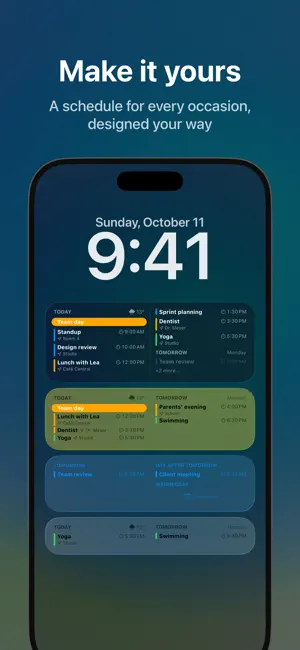
Your calendar, right on the Lock Screen. Lock Schedule turns your calendars into a Live Activity: a clean agenda for today and tomorrow that stays on your Lock Screen and in the Dynamic Island. Glance at your phone, see what's next. No unlocking, no app to open. CREATE YOUR OWN SCHEDULES • Make as many schedules as you like, for example "Work", "Family" or "Gym" • Pick which calendars each schedule shows • Choose the range: today only, today and tomorrow, or further ahead • Filter by keywords, hide all-day or cancelled events MAKE IT LOOK RIGHT • Clear or solid glass, light or dark, or tinted with a calendar's color • Adjustable font size, one or two columns, compact rows • Locations, time icons and dividers on or off • Weather per day, past events faded or hidden • Countdown to your next event START IT YOUR WAY • Start a schedule with one tap • Automate it with the Shortcuts app: at a time, at a place, when an event begins • Tap a day on the Lock Screen to open it in Calendar PRIVATE BY DESIGN Your calendar data stays on your device. No account, no tracking. Weather uses only your approximate location. LOCK SCHEDULE PREMIUM The basics are free. Premium unlocks the full set of appearance options and removes the footer line on the card. Terms of Use: https://apps.neonish.com/legal/ Privacy Policy: https://apps.neonish.com/privacy/
App privacy
The developer, Christian Guss, reported these privacy practices to Apple.
Data Linked to You
The following data, which may be collected and linked to your identity, may be used for the following purposes:
- Purchases: Purchase History
- Identifiers: User ID
Used for: Analytics, App Functionality
Data Not Linked to You
The following data, which may be collected but is not linked to your identity, may be used for the following purposes:
- Identifiers: Device ID
- Usage Data: Product Interaction, Other Usage Data
- Location: Coarse Location
Used for: Analytics, App Functionality
Alternatives to Lock Schedule
Looking for apps like Lock Schedule? Here are 6 similar apps on the App Store. The highest rated is Hone Week: Weekly Planner (5.0/5), and all 6 are free to download.
-
 Daypane - ルーティン壁紙・ロック画面
-
 Hone Week: Weekly Planner
5.0
-
 Nicecal – Calendar & Widget
-
 What Now - Live Calendar
4.0
-
 Callendar: Meeting Call Alerts
-
 Lock Screen Memo: Note Widget
| App | Rating | Price | Last updated | Compare |
|---|---|---|---|---|
| Lock Schedule | – | Free | November 5, 2026 | |
| Daypane - ルーティン壁紙・ロック画面 | – | Free | Oct 15, 2026 | Compare |
| Hone Week: Weekly Planner | 5.0 / 5 (1) | Free | Nov 17, 2026 | Compare |
| Nicecal – Calendar & Widget | – | Free | Nov 26, 2026 | Compare |
| What Now - Live Calendar | 4.0 / 5 (4) | Free | Nov 18, 2026 | Compare |
| Callendar: Meeting Call Alerts | – | Free | Oct 24, 2026 | Compare |
| Lock Screen Memo: Note Widget | – | Free | Nov 20, 2026 | Compare |
Compare Lock Schedule with the top alternatives: ratings, updates, ASO score and keyword gaps →