

Hone Week: Weekly Planner
Mubasher Ali Productivity iPhoneiPadiPod touch
Hone Week: Weekly Planner is a free Productivity app for iPhone and iPad by Mubasher Ali. Rated 5.0/5 from 1 ratings. Requires iOS 18.0.
- Rating
- 5.0
- 1 ratings
- Price
- Free
- on the App Store
- Size
- 13 MB
- Age 12+
- Updated
- Nov 17
- 2026 · v1.1.1
Screenshots
Save to Pinterest

About Hone Week: Weekly Planner
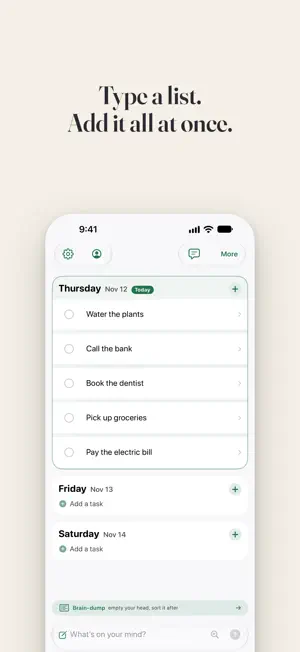
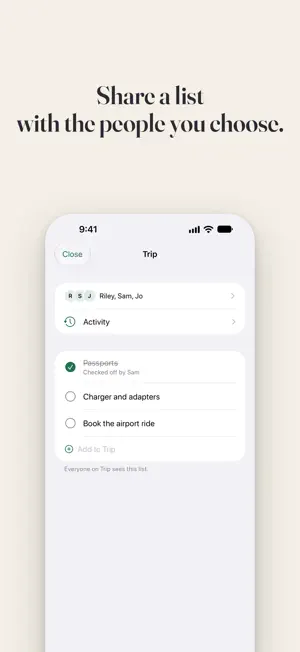
A blank to-do list can make you freeze. A long one can make you feel behind before you start. Hone Week is a weekly planner for your appointments, errands and everything else, and each day it picks one thing for you to start with. I built it for myself, because I felt the same way. Write your week in plain words, and Hone Week puts each task on the day you name. It's free, with no subscription and no in-app purchases. WRITING IT DOWN Type "dentist thu 2:30pm" and it lands on Thursday at 2:30 PM. Add #errands to tag it, or ! to mark it important. • Type a whole list, one task per line, and add it all in one tap. One Undo takes it all back. • Paste a plan from a text or an email, and check it line by line. • Pick a photo of a plan. Hone Week reads the words right there on your phone, then turns them into tasks for you to check. The photo isn't sent to us. WHEN YOU DON'T KNOW WHERE TO START • Ask for a first step on any big task. On iPhones with Apple Intelligence (iOS 26 or later), the step is written for that task, on your phone. Other iPhones get a simple two-minute starter. • Start from a ready-made routine. Rename or leave out any task, then add it. • When your energy is low, ask for something lighter that fits right now. • Go through a messy list one task at a time and decide what to keep, move or let go. • Hear your day read out loud: your one thing first, then what has a time, then what can wait. WHEN THE DAY GETS AWAY FROM YOU There's no overdue pile and no streak to lose. • In the evening, move what's left to tomorrow in one tap. You can undo it. • When a day looks heavy, Hone Week can suggest changes to your week, one at a time. Nothing moves until you say yes. • Bring back a task you let go, any time within 30 days. SHARED LISTS • Start a list for a trip, a house or a team, and invite people with a link or a code. • You can report or block someone if you need to. • You need an account. Where your Apple Account has an age range set, shared lists show only if it allows them. ALSO IN THE APP • Your Apple Calendar events and reminders in your week, if you turn them on. See your whole day in one picture, with your events beside your tasks. • Today, Week and Month views, plus a Someday section for tasks without a day • Reminders at the time or up to an hour before. Snooze or move to tomorrow right from the alert. • Widgets that show your day on your Home Screen and Lock Screen • Send someone your free times without showing what you're doing • Light and dark mode with seven accent colors • English, Spanish, French, Arabic, Simplified Chinese and Urdu. PRIVACY • No account needed. Without one, your tasks are kept on your phone and are not sent to us. • Sign in with your email to see your week on your other devices and on honeweek.com, or to share a list. People on a shared list see its tasks and the name you chose. • A list you mark private is not uploaded from this phone and cannot be shared. It stays out of widgets, Siri and Spotlight, and its reminders do not show what the task is. • No ads, no tracking, no analytics. • Face ID lock, off until you turn it on. • Delete your account in Settings anytime.
What’s new
Version 1.1.1 · Updated November 17, 2026
Smoother week, fewer surprises: - Type "Mon-Fri standup" or "Trip Mon-Wed" and it lands on every day you meant. - Screens stay put while they load. - See something on a shared list you want to do? Add it to your own week. - Hiding names on the Today widget? It now shows how full your day looks and what's next. - Changing language now goes through iPhone Settings, so the whole app switches at once. - Delete account is more thorough. - Plus clearer permission messages and small fixes.
App privacy
The developer, Mubasher Ali, reported these privacy practices to Apple.
Data Linked to You
The following data, which may be collected and linked to your identity, may be used for the following purposes:
- Contact Info: Email Address, Name
- User Content: Other User Content
- Identifiers: User ID
Used for: App Functionality
Data Not Linked to You
The following data, which may be collected but is not linked to your identity, may be used for the following purposes:
- Other Data: Other Data Types
Used for: App Functionality
Alternatives to Hone Week: Weekly Planner
Looking for apps like Hone Week: Weekly Planner? Here are 6 similar apps on the App Store. The highest rated is PathDay: Personal Productivity (5.0/5), and all 6 are free to download.
-
 Lock Schedule
-
 PathDay: Personal Productivity
5.0
-
 What Now - Live Calendar
4.3
-
 Planner: Routines & Checklists
5.0
-
 Floato: Lock Screen Passes
4.3
-
 Locodo: To-Do List & Planner
| App | Rating | Price | Last updated | Compare |
|---|---|---|---|---|
| Hone Week: Weekly Planner | 5.0 / 5 (1 rating) | Free | November 17, 2026 | |
| Lock Schedule | – | Free | Nov 5, 2026 | Compare |
| PathDay: Personal Productivity | 5.0 / 5 (1) | Free | Oct 19, 2026 | Compare |
| What Now - Live Calendar | 4.3 / 5 (3) | Free | Nov 18, 2026 | Compare |
| Planner: Routines & Checklists | 5.0 / 5 (4) | Free | Nov 6, 2026 | Compare |
| Floato: Lock Screen Passes | 4.3 / 5 (6) | Free | Nov 25, 2026 | Compare |
| Locodo: To-Do List & Planner | – | Free | Sep 9, 2026 | Compare |