

Local Transcribe: Note Taker
Armen Ter-Oganezov Productivity iPhoneiPadiPod touchApple Watch
Local Transcribe: Note Taker is a free Productivity app for iPhone and iPad by Armen Ter-Oganezov. Rated 5.0/5 from 1 ratings. Requires iOS 26.0.
- Rating
- 5.0
- 1 ratings
- Price
- Free
- on the App Store
- Size
- 11 MB
- Age 4+
- Updated
- Nov 22
- 2026 · v1.4
Screenshots
Save to Pinterest


About Local Transcribe: Note Taker
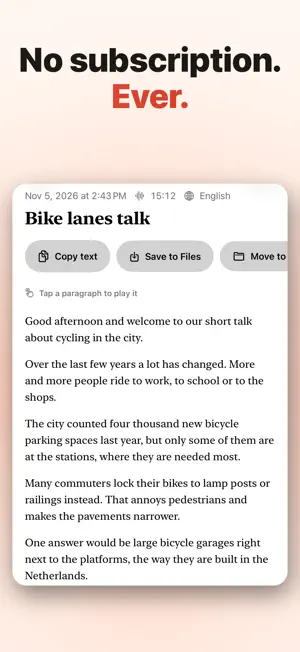
Local Transcribe turns what you say into text, right on your iPhone, iPad and Apple Watch. Record, dictate or share a video and read it. The tasks you mention become a checklist. No account, no cloud, no subscription. RECORD WITHOUT WORRY • One tap starts a recording: in the app, from the Lock Screen widget or with the Action button. • Audio is saved while you speak. A long lecture or interview is not lost if the app is closed unexpectedly. • See your words appear under the waveform as you speak. RECORD ON APPLE WATCH • One tap on the watch, from a complication or from the Smart Stack starts a recording. On Apple Watch Ultra, the Action button does it too. • It works without your iPhone. The audio is saved on the watch in short pieces, so nothing is lost if the battery runs out. • When your iPhone is near, the recording goes over by itself and is transcribed there. TASKS FROM WHAT YOU SAY • Tap Task and say what needs doing, with a short pause between tasks: each one lands on your list. • In any recording, say "to do: buy bread, call the doctor" and the note gets a checklist. Tap a task to hear where you said it. • Every open task from every note in one Tasks list, and in a widget where you tick them off on the Home Screen. • Need a date or an alert? One tap hands a task to Apple's Reminders. WIDGETS AND THE DYNAMIC ISLAND • Record or say tasks from a Home Screen widget without opening the app. The time runs on the widget, in the Dynamic Island and on the Lock Screen; Stop opens the note. • Small, medium and large widgets, a Lock Screen button, and Record and Task in Control Center. FOLDERS AND SUMMARIES • Sort notes into folders with a colour and a symbol, and filter the list in one tap. • With Apple Intelligence, Apple's on-device model writes a title and a short summary, finds the tasks and suggests a folder. Nothing moves without your yes. Without Apple Intelligence, tasks are found by keywords. DICTATE ANYWHERE • Press the button in Control Center or the Action button and Local Transcribe opens already listening. Speak, pause, and the text is on your clipboard, ready to paste into any message. • Punctuation your way: automatic, only what you say ("period", "new line"), or none. Capitals on or off. • Save a dictation as a note with one tap, or have every dictation saved. The last 50 stay in a history. • Dictation is free, up to two minutes at a time. VIDEOS, VOICE MESSAGES AND SUBTITLES • Share a video (mov, mp4, m4v), a voice message or an audio file (m4a, mp3, wav, opus, ogg) and read it. Only the sound is kept. • Or pick files right in the app, from Files or Photos. • Save subtitles as an .srt file next to the text and the audio, timed to the speech. READ, FIX AND FIND • Transcription on your device in German, English, French, Spanish, Italian, Portuguese, Japanese, Korean, Chinese, Hindi and more. • Notes read like a document: a title, clear paragraphs. Tap a paragraph to hear exactly that part. • Correct a misheard word or name once, in one note or in all of them, and future recordings get it right. • Search all notes. A result opens the note and plays from that sentence. • Translate a note into another language with Apple's translator on your device. YOUR NOTES ARE YOURS • Copy the text or save text, subtitles and audio to Files at any time. • Your recordings and transcripts never leave your device. No account and no ads. • The app sends anonymous usage statistics and crash reports to fix errors. Turn this off in Settings; in Europe the app asks first. FAIR PRICING • Your first four transcriptions are free, at any length, and one more every week. • After that, one purchase unlocks unlimited transcription. Pay once. No subscription. • Recording, dictation, playback and saving your audio stay free. Requires iOS 26 or later, and watchOS 26 or later for Apple Watch. Apple's speech and translation models are downloaded once by the system; after that, everything works offline.
What’s new
Version 1.4 · Updated November 22, 2026
• Import audio and video right in the app, from Files or Photos. • See your words under the waveform while you record. • Widgets follow your recording after Stop: Transcribing, then the first line of your note. • The privacy policy now says in detail what the anonymous statistics include. Your recordings and their text still never leave your device.
App privacy
The developer, Armen Ter-Oganezov, reported these privacy practices to Apple.
Data Not Linked to You
The following data, which may be collected but is not linked to your identity, may be used for the following purposes:
- Identifiers: Device ID
- Usage Data: Product Interaction
- Diagnostics: Crash Data
Used for: Analytics, App Functionality
Alternatives to Local Transcribe: Note Taker
Looking for apps like Local Transcribe: Note Taker? Here are 6 similar apps on the App Store.
-
 Turnote: AI Note Taker
-
 ThoughtRecorder
-
 Transcriber Voices
-
 Awaazly: AI Voice to Text
-
 Shiftat - Plan Your Shifts
-
 VoiceAPP Transcriber
| App | Rating | Price | Last updated | Compare |
|---|---|---|---|---|
| Local Transcribe: Note Taker | 5.0 / 5 (1 rating) | Free | November 22, 2026 | |
| Turnote: AI Note Taker | – | Free | Oct 15, 2026 | Compare |
| ThoughtRecorder | – | Free | Nov 24, 2026 | Compare |
| Transcriber Voices | – | Free | Nov 20, 2026 | Compare |
| Awaazly: AI Voice to Text | – | Free | Sep 1, 2026 | Compare |
| Shiftat - Plan Your Shifts | – | Free | Oct 26, 2026 | Compare |
| VoiceAPP Transcriber | – | Free | Sep 18, 2026 | Compare |