

VoiceAPP Transcriber
Can KALECIK Productivity iPhoneiPadiPod touch
VoiceAPP Transcriber is a free Productivity app for iPhone and iPad by Can KALECIK. Requires iOS 17.0. Updated September 18, 2026.
- Price
- Free
- on the App Store
- Size
- 23 MB
- Age 4+
- Updated
- Sep 18
- 2026 · v1.3.1
Screenshots


About VoiceAPP Transcriber
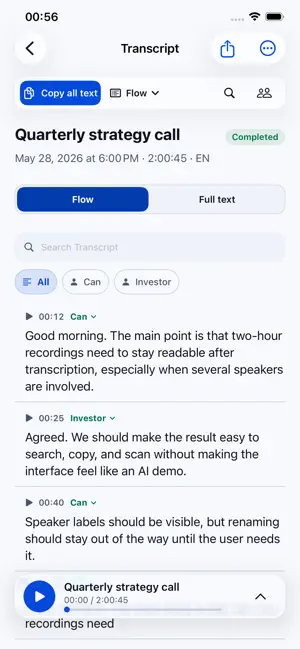
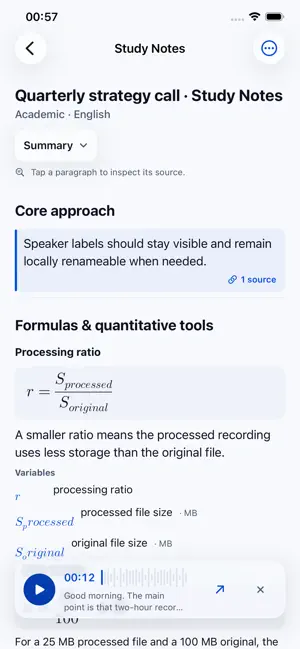
VoiceAPP turns recordings and imported audio or video into clean, searchable transcripts and evidence-linked notes. Record in the app or import from Files, choose one or multiple speakers before starting, then follow every step from upload to a ready transcript. Review the result with synchronized playback, search, speaker filters, editing, and export tools. TRANSCRIBE AND REVIEW - In-app recording and MP3, M4A, WAV, MP4, or MOV import - Long recording support for meetings, lectures, interviews, and personal notes - Clear one-speaker or multiple-speaker setup, remembered for next time - Transcript-linked playback with seeking, follow mode, and speed controls - Always-visible Copy all text, full-text search, and speaker filters - Local speaker renaming and transcript correction - Export or share TXT, PDF, SRT, VTT, and original media - Completion notifications and recoverable background processing STUDY NOTES - Create a Summary or Deep Summary only when you ask - Tap a paragraph to inspect its supporting transcript timestamps - Play or jump to the exact source segment, then return to your reading position - Evidence-linked outputs for courses, meetings, interviews, and research ORGANIZE - Save recordings into Courses, Projects, Interview Series, Personal, or custom Collections - Keep one recording in multiple Collections without duplicating the original PRIVACY AND AI PROCESSING VoiceAPP asks before sending recorded or imported audio for transcription. Audio, transcription settings, and job metadata pass through the VoiceAPP backend hosted on Cloudflare to AssemblyAI, a third-party transcription provider. Generative notes require separate consent and an explicit create or regenerate action. Corrected transcript text, speaker labels, timestamps, output type, and language pass through the VoiceAPP backend to the configured generative-AI provider with non-persistent processing requested. Audio is not sent to the generative-AI provider for note generation. Controls and account deletion are available in Settings. Privacy Policy: https://voiceapp-api.cnklck.workers.dev/privacy Terms of Use: https://voiceapp-api.cnklck.workers.dev/terms
What’s new
Version 1.3.1 · Updated September 18, 2026
This update improves recording and transcription reliability. - Clearer guidance when a recording needs more transcription minutes, with direct options to add minutes and retry. - A recording waiting for minutes no longer blocks other recordings in the upload queue. - More reliable automatic recording limits, including when the recording screen is minimized. - Improved recovery of existing uploads without uploading the same audio again.
App privacy
The developer, Can KALECIK, reported these privacy practices to Apple.
Data Linked to You
The following data, which may be collected and linked to your identity, may be used for the following purposes:
- Purchases: Purchase History
- User Content: Audio Data, Other User Content
- Identifiers: User ID
Used for: App Functionality
Alternatives to VoiceAPP Transcriber
Looking for apps like VoiceAPP Transcriber? Here are 6 similar apps on the App Store.
-
 Ask the Elect
-
 Vispark - Summarize Video
-
 MemRa: Save & Find Videos
-
 Listen AI Pro
-
 AudioQuill Transcriber
-
 Truebar - Transcription
| App | Rating | Price | Last updated | Compare |
|---|---|---|---|---|
| VoiceAPP Transcriber | – | Free | September 18, 2026 | |
| Ask the Elect | – | Free | Aug 16, 2026 | Compare |
| Vispark - Summarize Video | – | Free | Jun 21, 2026 | Compare |
| MemRa: Save & Find Videos | – | Free | Oct 18, 2026 | Compare |
| Listen AI Pro | – | Free | Jul 29, 2026 | Compare |
| AudioQuill Transcriber | – | Free | Jun 2, 2026 | Compare |
| Truebar - Transcription | – | Free | Sep 22, 2026 | Compare |