

SpitePDF: PDF Editor & Markup
JASON RANDALL DORFMAN Productivity iPhoneiPadiPod touchMac
SpitePDF: PDF Editor & Markup is a free Productivity app for iPhone and iPad by JASON RANDALL DORFMAN. Requires iOS 18.0. Updated October 24, 2026.
- Price
- Free
- on the App Store
- Size
- 206 MB
- Age 4+
- Updated
- Oct 24
- 2026 · v1.3
Screenshots


About SpitePDF: PDF Editor & Markup
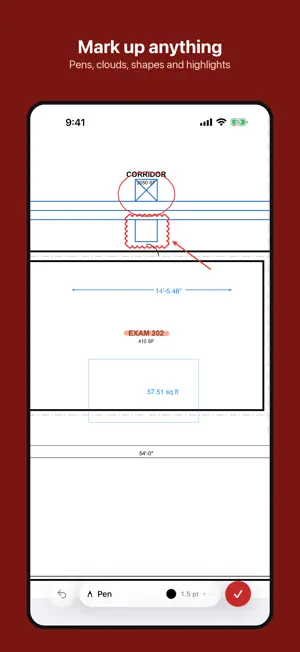
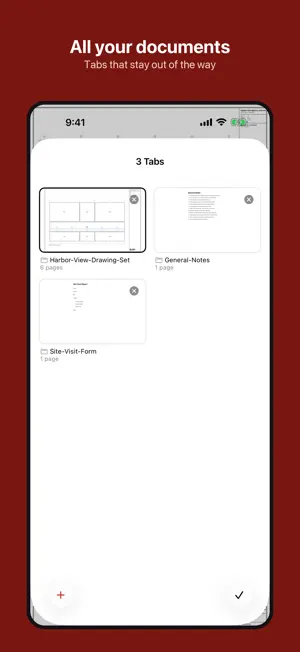
SpitePDF is a complete PDF workshop for iPhone and iPad, with a ribbon of tools that is easy to find your way around and a look that fits iOS and iPadOS. READ - Fast, smooth viewing of long documents and large drawing sets, with continuous, single-page, two-page and cover layouts - Thumbnails, outline, search with results list, bookmarks and Reading Mode - Tabs and split view to work in two documents side by side MARK UP - Highlight, underline, strike through and squiggly text markup - Notes, text boxes, callouts, shapes, lines, arrows, clouds and freehand ink with pressure - Stamps, image stamps and voice notes - Annotation list, replies, and comment summary EDIT - Edit text and images directly on the page - Redact permanently, by selection, search or pattern, with the hidden content really removed - Recognise text in scans with OCR, then review and correct the words ORGANISE - Insert, delete, rotate, reorder, split, merge and extract pages - Headers, footers, page numbers, Bates numbers, watermarks and backgrounds - Crop, resize and clear margins FORMS AND SIGNATURES - Fill forms, calculate fields and run form scripts - Sign with a certificate, verify signatures, and add Fill and Sign images - Submit forms when you choose to CONVERT AND SHARE - Export pages as images, text, Word, HTML or flattened PDF; make a PDF from images - Password protection and permissions, Reduce File Size, Sanitize and Print PRIVATE BY DESIGN - Everything runs on your iPhone and iPad. No account, no tracking, no analytics - The network is used only when you submit a form or request a signature timestamp Try every feature free for 14 days, then unlock SpitePDF on iPhone, iPad and Mac with a single one-time purchase. No subscription.
What’s new
Version 1.3 · Updated October 24, 2026
• A new look: a fresh SpitePDF icon, with dark and tinted versions for your Home Screen. • Reduce File Size on iPhone and iPad: High, Medium or Low, a page range, or "smaller than N MB". Pictures are shrunk on your device; text, forms, comments and links are kept. • Pro pack tools now carry a small PRO mark. A lock means the pack isn't unlocked yet; tap it to start that pack's free 14-day trial or buy it. • Quick actions: press and hold the SpitePDF icon to scan a document, start a blank note, combine files or reopen your last document. • New Shortcuts actions for Siri, Spotlight and the Shortcuts app: merge, rotate, split, compress, add a password, turn pictures into a PDF and open in SpitePDF. • Search now fills the screen, remembers your recent searches and shows results in a clear list. • Hover over a page thumbnail on iPad with a trackpad or mouse to rotate, extract or delete it. • When a document is signed, the "edit anyway?" question now always appears, even over an open sheet, and "Edit Anyway" finishes what you asked for. • Fixed: Undo and Redo after Recognize Text or Sheet Index could stop responding. • If a document can't be saved, SpitePDF now tells you. • Many fixes and performance improvements.
App privacy
The developer, JASON RANDALL DORFMAN, reported these privacy practices to Apple.
Data Not Collected
The developer does not collect any data from this app.
Alternatives to SpitePDF: PDF Editor & Markup
Looking for apps like SpitePDF: PDF Editor & Markup? Here are 6 similar apps on the App Store. The highest rated is PDF Editor: Merge & Sign PDF (5.0/5), and all 6 are free to download.
-
 PDF Editor: Merge & Sign PDF
5.0
-
 MRS: PDF Editor, Scanner & OCR
5.0
-
 LLM: Answering Machine
4.3
-
 PocketGPT: Private AI
4.4
-
 Personal AI
4.3
-
 PDFix: Edit, Sign, Convert PDF
5.0
| App | Rating | Price | Last updated | Compare |
|---|---|---|---|---|
| SpitePDF: PDF Editor & Markup | – | Free | October 24, 2026 | |
| PDF Editor: Merge & Sign PDF | 5.0 / 5 (1) | Free | Sep 15, 2026 | Compare |
| MRS: PDF Editor, Scanner & OCR | 5.0 / 5 (2) | Free | Sep 30, 2026 | Compare |
| LLM: Answering Machine | 4.3 / 5 (6) | Free | Jun 18, 2026 | Compare |
| PocketGPT: Private AI | 4.4 / 5 (19) | Free | Apr 1, 2024 | Compare |
| Personal AI | 4.3 / 5 (46) | Free | Aug 5, 2025 | Compare |
| PDFix: Edit, Sign, Convert PDF | 5.0 / 5 (3) | Free | Oct 19, 2026 | Compare |