

Bookcraft: Book Formatter
David Peterson Productivity iPhoneiPadiPod touchMac
Bookcraft: Book Formatter is a free Productivity app for iPhone and iPad by David Peterson. Requires iOS 17.0. Updated November 19, 2026.
- Price
- Free
- on the App Store
- Size
- 16 MB
- Age 4+
- Updated
- Nov 19
- 2026 · v1.3
Screenshots
Save to Pinterest


About Bookcraft: Book Formatter
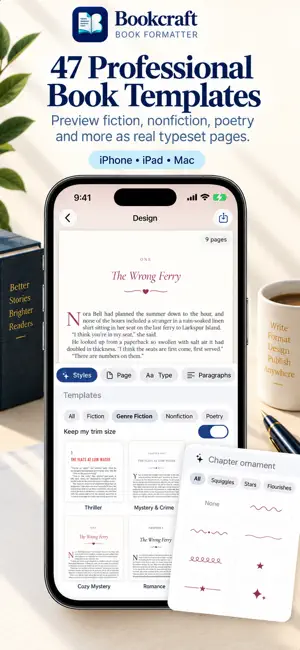
Turn your manuscript into a real, professionally typeset book — right on your iPhone, iPad or Mac. Import a Word document, PDF or text file — or drop one onto the window on Mac — and Bookcraft finds your chapters, sets every page like a published book, and exports a print-ready PDF, an EPUB ebook and a Word file. No account, no upload: your writing never leaves your device. TYPESET LIKE A PUBLISHER • Running heads and page numbers in the right places • Chapters that open on right-hand pages, with drop caps or small-caps first lines • Widow and orphan control, so no lonely lines at the top of a page • Title page, copyright page and table of contents generated for you • Margins that grow with your page count, as print-on-demand printers require 47 TEMPLATES, THEN MAKE IT YOURS Browse templates as real typeset pages — classic and literary fiction, thriller, mystery, romance, fantasy, sci-fi, horror, nonfiction, business, self-help, cookbook, poetry, children's, workbooks, journals, large print and more — then change anything: • Fonts for body text, headings and titles, from a curated library of book typefaces or your own .ttf/.otf • Size, line spacing, letter spacing, justification and hyphenation • Indented or spaced paragraphs, chapter number styles, alignment and sink depth • 40 decorative ornaments — squiggles, stars, flourishes, laurels, rules — above or below chapter titles or as scene breaks • Running head and page number styles, text and accent colors • Custom CSS for complete control • Save any look as your own style and reuse it on every book EVERY STANDARD TRIM SIZE From pocket and mass-market sizes to 6" × 9" trade, square, landscape, workbook and UK, European and Japanese metric formats — or enter any custom size. Bleed, paper color and printer margin rules are checked as you go. IMAGES, YOUR WAY Drag and drop photos straight into your chapters, move them, size them full or half width, and add captions. Add a front cover for your ebook and an illustration above every chapter title. Bookcraft warns you if an image is too low-resolution to print sharply. PROOF IT LIKE A PRINTED BOOK Turn real two-page spreads with a swipe. Proofreader's marks flag widows, orphans, stranded short words and loose lines, and each one comes with a fix. READY FOR PRINT One check tells you whether your book will pass Amazon KDP or IngramSpark: page count, trim size, margins, fonts, image resolution, bleed and ink. Most problems fix themselves with one tap, and you get the exact settings and spine width to enter on the printer's site. DESIGN YOUR COVER Make a typographic front cover for your ebook and a print-ready wraparound cover — back, spine and front — sized to your book's real spine width, with layouts, colours, fonts, ornaments, your own photo and a back-cover blurb. EDIT WITH CONFIDENCE Edit any paragraph, find and replace across the book, and clean up quotes, dashes and spacing in one tap. Word footnotes come through as footnotes or endnotes. Update the manuscript from a revised file and keep your design. Bookcraft saves a copy before every big change, so you can go back to any earlier version. YOUR WHOLE SHELF Keep every book on one shelf, give a series one shared look, and fill “Also by” pages automatically. Optional iCloud sync keeps your books on iPhone, iPad and Mac. EXPORT • Print PDF at your exact trim size, fonts embedded, ready for print-on-demand upload • EPUB ebook with a proper table of contents and your cover • Word document at your trim size, to keep editing PRICING Bookcraft is free to download and try with every feature. Free PDF exports carry a “Bookcraft Preview” watermark. A one-time purchase unlocks clean PDFs plus EPUB and Word export for every book you make — no subscription. Privacy: Bookcraft collects no data. Your manuscripts, books and fonts stay on your device, and in your own iCloud if you turn on sync. Terms of Use: https://www.apple.com/legal/internet-services/itunes/dev/stdeula/
What’s new
Version 1.3 · Updated November 19, 2026
Bookcraft 1.3 puts your photos where you want them, and reads your PDFs better. • Arrange Photos: see the real typeset pages and work on the photos right there. Drag a photo to a new place in the text, its caption with it. Drag a corner to resize it. Make its caption larger or smaller. Drop new photos onto the page, or add them from your library. • Photo sizes carry into every export: the print PDF, the EPUB and the Word file. • A portrait photo is never taller than the page, and a chapter that opens with one no longer leaves a blank first page. • Find Chapters Again: re-read a book's chapters with the improved detection, merge chapters, and turn lines into subheadings. The source file is kept with the book. • PDF import keeps the pictures and their captions, mends paragraphs split across lines, and keeps bibliographies as entries. • Very large PDFs import without running out of memory. • The typesetter recovers on its own if the Mac suspends it. • Layout fixes: the copyright page backs the title page, long contents entries wrap, and gaps before figures close. • Bookcraft Lifetime now includes the pro tools: your own fonts, custom CSS, series looks with “Also by” pages, and the wraparound print cover. The free shelf holds two books; any purchase opens it.
App privacy
The developer, David Peterson, reported these privacy practices to Apple.
Data Not Collected
The developer does not collect any data from this app.
Alternatives to Bookcraft: Book Formatter
Looking for apps like Bookcraft: Book Formatter? Here are 6 similar apps on the App Store.
-
 MondoWrite: Write a Novel
-
 Zhibi: Novel Writing Studio
-
 OneWriter: Inspiration Place
-
 Ink & Page: Book Writer
-
 Almost Fiction
-
 FantasyRat Novel Studio
| App | Rating | Price | Last updated | Compare |
|---|---|---|---|---|
| Bookcraft: Book Formatter | – | Free | November 19, 2026 | |
| MondoWrite: Write a Novel | – | Free | Nov 23, 2026 | Compare |
| Zhibi: Novel Writing Studio | – | Free | Nov 17, 2026 | Compare |
| OneWriter: Inspiration Place | – | Free | Oct 15, 2026 | Compare |
| Ink & Page: Book Writer | – | Free | Nov 14, 2026 | Compare |
| Almost Fiction | – | Free | Nov 9, 2026 | Compare |
| FantasyRat Novel Studio | – | Free | Nov 17, 2026 | Compare |